
Online Order Process: UML Modeling with VPasCode and Visual Paradigm
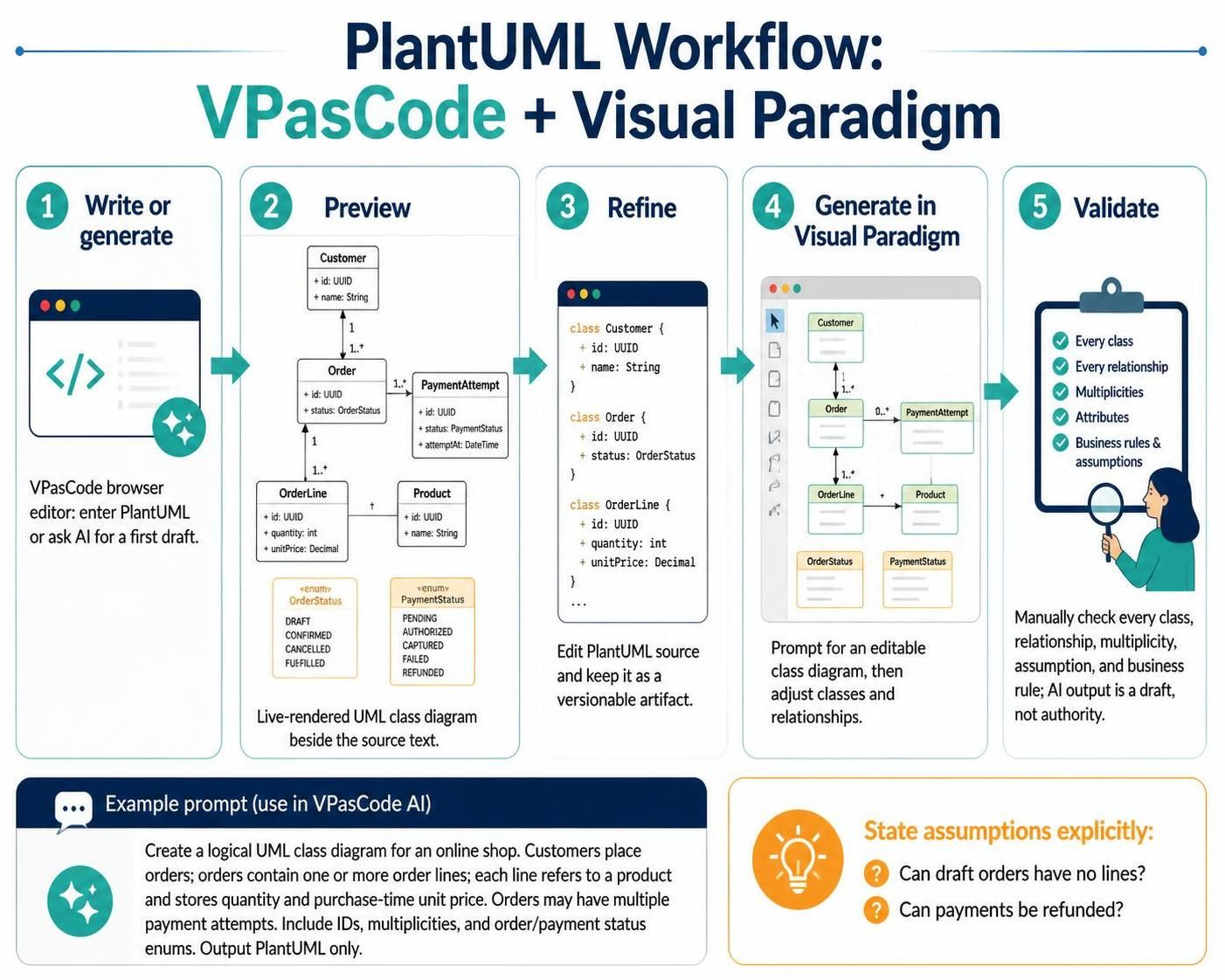
In modern software architecture, the bridge between abstract business requirements and concrete technical implementation is often a UML Class Diagram. However, traditional diagramming tools can sometimes be slow or rigid. This tutorial explores a streamlined workflow using VPasCode (Visual Paradigm’s browser-based editor) combined with Visual Paradigm‘s desktop capabilities to model complex systems like an Online Shop.
This approach leverages a “Text-First” methodology. By treating the diagram code (PlantUML) as the primary versionable artifact, you ensure that your system architecture remains consistent, diffable, and easily auditable, while still enjoying the visual benefits of a live-rendered diagram.
The 5-Step VPasCode Workflow
The workflow presented in the diagram outlines a robust iterative process for generating high-fidelity diagrams. It moves from raw text to a validated, editable model.
1. Write or Generate
The process begins in the VPasCode browser editor. This tool is designed for speed and flexibility. You have two primary options here:
- Manual Entry: Write the PlantUML syntax directly. This is ideal for experienced architects who know the exact structure required.
- AI Generation: Use the integrated AI assistant to draft a first pass based on a natural language prompt. This is useful for rapidly scaffolding complex structures.
2. Preview
One of the most powerful features of VPasCode is the Live Preview. As you type or generate code, the diagram renders instantly on the right side of the screen. This immediate feedback loop allows you to spot structural errors—such as incorrect arrows or missing classes—before you even leave the editor.
3. Refine
Once the initial draft is visualized, the text source remains your control center. You can iterate on the PlantUML source to refine attributes, add data types, or adjust relationships. Crucially, this step emphasizes keeping the text as the versionable artifact. Unlike a binary image file, a text file can be stored in Git, allowing you to track changes in your system design over time.
4. Generate in Visual Paradigm
Once the diagram is satisfactory in VPasCode, you can import it into the full Visual Paradigm suite. Here, the diagram becomes fully editable. You can adjust the layout, add styling, and further refine the model. The workflow suggests using prompts to generate editable diagrams, but the source code remains the foundation.
5. Validate
The final step is a rigorous manual check. AI tools are powerful, but they are probabilistic; they predict the most likely structure based on your prompt, not the absolute truth. You must verify:
- Every Class: Are all necessary entities present?
- Every Relationship: Do the associations match the business rules?
- Multiplicities: Is the 1-to-Many or Many-to-Many logic correct?
- Business Rules: Do the enums and statuses (like “Draft” or “Refunded”) align with the system requirements?
Example Scenario: The Online Shop Model
To illustrate this workflow, let’s walk through the specific example of an Online Shop system. The goal is to model how Customers place Orders, how those Orders contain OrderLines, and how Payments are handled.
The Requirements:
- Customers place orders.
- Each order contains one or more order lines.
- Each order line refers to one product and stores quantity and the unit price at purchase time.
- Orders can have multiple payment attempts.
- Include identifiers, multiplicities, and status enums.
The Prompt Strategy:
When using the AI assistant in VPasCode, precision is key. You must explicitly state your assumptions to avoid ambiguity. For instance, you might need to specify if an order can exist without lines (a draft) or if payments can be refunded.
The PlantUML Source Code
Below is the resulting PlantUML code generated for this scenario. You can copy this directly into VPasCode to see the live diagram.
@startuml

' Define Enums for Status
enum OrderStatus {
    DRAFT
    CONFIRMED
    CANCELLED
    FULFILLED
}

enum PaymentStatus {
    PENDING
    AUTHORIZED
    CAPTURED
    FAILED
    REFUNDED
}

' Define Classes
class Customer {
    +id: UUID
    +name: String
}

class Order {
    +id: UUID
    +status: OrderStatus
}

class OrderLine {
    +id: UUID
    +quantity: int
    +unitPrice: Decimal
}

class Product {
    +id: UUID
    +name: String
}

class PaymentAttempt {
    +id: UUID
    +status: PaymentStatus
    +attemptAt: DateTime
}

' Define Relationships
Customer "1" --> "1..*" Order : places
Order "1" --> "1..*" OrderLine : contains
OrderLine "+" --> "1" Product : refers to
Order "1" --> "0..*" PaymentAttempt : has attempts

@enduml
Best Practices for AI-Assisted Modeling
When utilizing AI tools like those in Visual Paradigm, it is vital to remember that the output is a draft, not the final authority. The model may infer incorrect ownership or missing constraints.
By following this workflow, you ensure that your system architecture is not just a pretty picture, but a robust, documented, and validated blueprint for your development team.