
Unify System Context & Architecture Decisions with Visual Paradigm OpenDocs
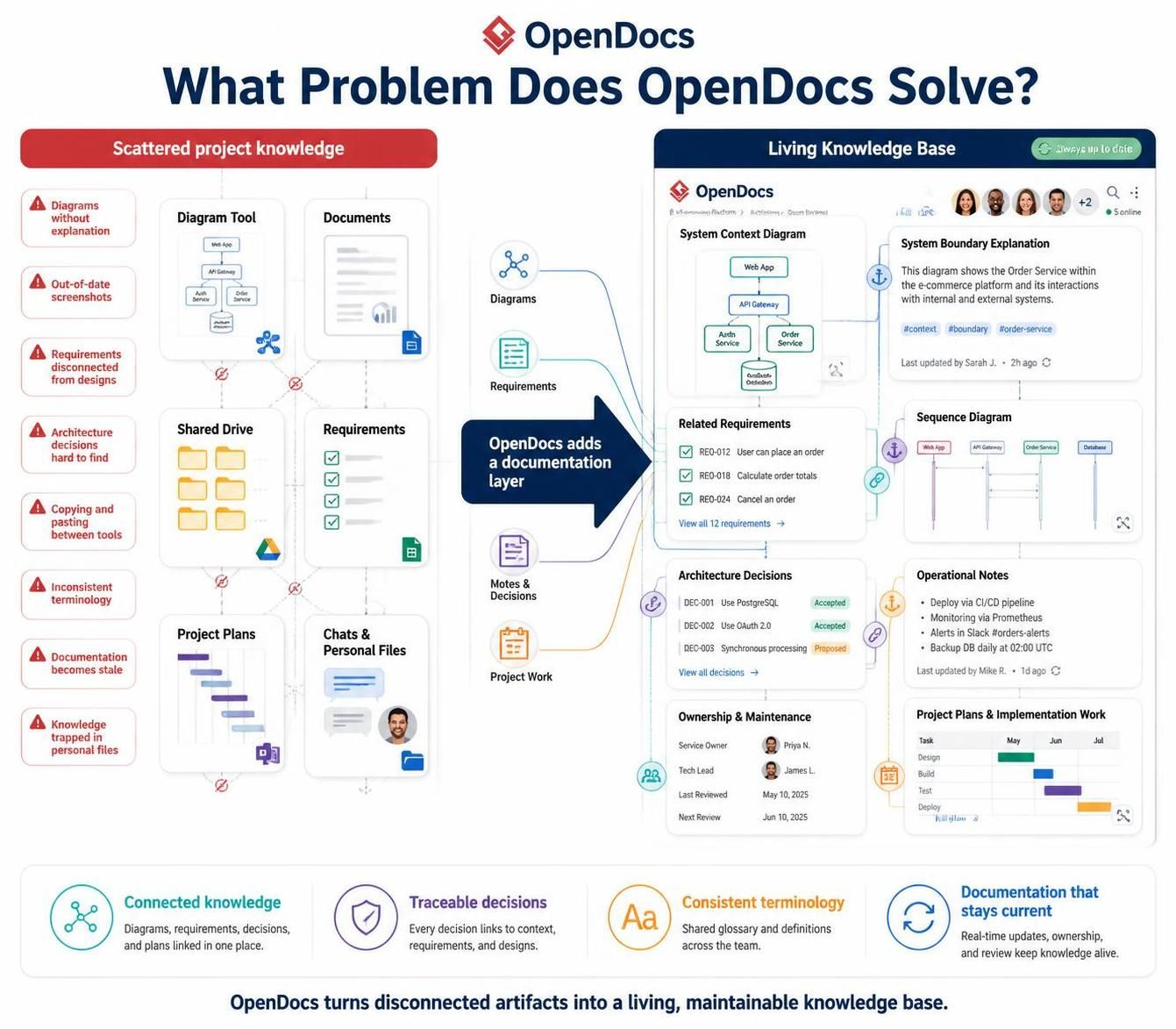
In modern software architecture, the greatest challenge is often not creating the diagrams themselves, but keeping them synchronized with the textual requirements, decisions, and operational notes that surround them. Visual Paradigm OpenDocs addresses this by creating a “Living Knowledge Base” that acts as a documentation layer around your visual and analytical artifacts.
This tutorial explores how to structure a high-quality OpenDocs page, specifically focusing on the integration of a System Context Diagram with its necessary textual explanations, related requirements, and architectural decisions.
The Challenge: Scattered Project Knowledge
Traditionally, system architecture documentation is fragmented across multiple tools. A system architect might design a context diagram in a modeling tool, write the business requirements in a Word document, store the final report on a shared drive, and discuss implementation details in chat applications like Slack or Teams.
This fragmentation leads to several critical issues:
- Disconnected Context: Diagrams are often published without sufficient explanation, leaving readers guessing about system boundaries.
- Stale Documentation: When a diagram is updated in the modeling tool, the static screenshot in the document remains unchanged.
- Hard-to-Find Decisions: Architecture decisions (e.g., why a specific database was chosen) are often buried in meeting minutes rather than linked to the design artifact.
- Inconsistent Terminology: Without a centralized glossary, different team members may use different terms for the same concepts.
The Solution: The Living Knowledge Base
OpenDocs solves these problems by aggregating these disparate pieces of information into a single, interactive page. Instead of a static PDF or a disconnected set of files, an OpenDocs page functions as a central hub where context, design, requirements, and decisions are tightly coupled.
Key Components of an OpenDocs Page
A typical, well-structured OpenDocs page for a system context should include the following distinct sections:
- System Context Diagram: The primary visual artifact showing the system’s boundary and its interactions with external entities.
- System Boundary Explanation: A dedicated text section that defines what is included in the system and what is outside of it.
- Related Requirements: A list of specific requirements (e.g., “User can place an order”) that the diagram fulfills.
- Architecture Decisions: A record of high-level choices, such as technology stack selections (e.g., “Use PostgreSQL”).
- Operational Notes: Information regarding how the system is deployed, monitored, and maintained.
- Ownership & Maintenance: Clear assignment of responsibility (e.g., Service Owner, Tech Lead) to ensure accountability.
Step-by-Step: Structuring Your System Context
To create a comprehensive OpenDocs page, follow this architectural pattern:
1. Define the Visual Boundary
Start by generating a System Context Diagram. This diagram acts as the anchor for your documentation. It should clearly distinguish between the system you are building and the external actors (users, third-party services, databases) it interacts with.
2. Add Explanatory Context
Do not rely solely on the visual. Add a text block titled System Boundary Explanation. This text should explicitly state the scope. For example: “This diagram shows the Order Service within the e-commerce platform and its interactions with internal and external systems.”
3. Link Requirements
Traceability is crucial. Link the diagram to specific requirements. In the OpenDocs interface, you can embed a list of active requirements. This allows stakeholders to see exactly which functional requirements (e.g., REQ-012: User can place an order) are supported by the current design.
4. Document Decisions and Operations
Finally, ensure that the “Why” and “How” are documented. Add a section for Architecture Decisions to explain the rationale behind technology choices. Additionally, include Operational Notes that cover deployment pipelines, monitoring strategies, and backup schedules.
Technical Implementation in Visual Paradigm
Visual Paradigm provides the engine to link these elements. While the visual interface allows for drag-and-drop assembly of these blocks, the underlying logic relies on the concept of Linked Artifacts. When you update a diagram in the modeling tool, OpenDocs automatically reflects these changes, ensuring the documentation stays current.
For example, if you modify the API Gateway in your diagram, the system context updates immediately. The associated requirements and decision logs remain attached to that specific diagram version, preserving the history of the system’s evolution.
Conclusion
By transitioning from scattered files to a Living Knowledge Base, teams can ensure that their system context diagrams are never out of date, their requirements are always traceable, and their architectural decisions are permanently recorded. OpenDocs transforms documentation from a passive obligation into an active, searchable, and maintainable asset.