

Strategic planning is the backbone of any successful business, yet the process of moving from abstract goals to actionable initiatives is often fraught with complexity. The Ansoff Matrix Strategy Builder aims to solve this disconnect. By combining the classic strategic framework devised by Igor Ansoff with modern Artificial Intelligence, this tool offers a structured, educational, and highly efficient pathway for business leaders to plan their growth. In this review, we explore the features, workflows, and unique value proposition of this interactive tool.
What is the Ansoff Matrix Strategy Builder?
The Ansoff Matrix Strategy Builder is a web-based application designed to guide users through the four quadrants of the Ansoff Matrix: Market Penetration, Market Development, Product Development, and Diversification. Unlike static templates or blank spreadsheets, this tool acts as a dedicated wizard.
It is built for a wide audience ranging from business executives and product managers to students and consultants. Its primary goal is to help users analyze growth opportunities and define detailed implementation plans without the need for complex software installations or user accounts.
Key Features and Capabilities
1. AI-Powered Strategy Generation
The standout feature of this tool is its integration with AI. For many strategists, the hardest part of planning is staring at a blank page. The AI Strategy Generator alleviates this “writer’s block.” By simply entering the business name, industry context, and a brief description of goals, the AI populates all four quadrants with relevant strategic initiatives.
This feature functions like an on-demand consultant. It provides a comprehensive first draft, offering a dozen potential growth ideas tailored to the specific context of the company. While human judgment is still required to refine these ideas, the AI accelerates the brainstorming phase significantly.
2. Step-by-Step Wizard Interface
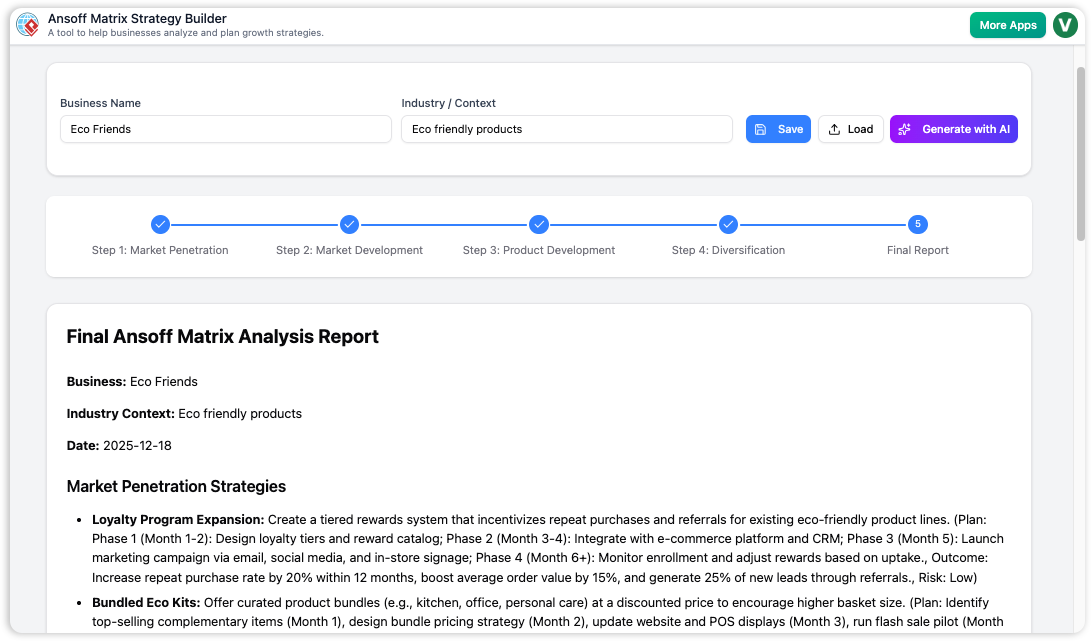
The application structures the planning process into a 5-step wizard. This design choice is critical for focus. Rather than overwhelming the user with a massive grid, the tool isolates each strategic area:
- Step 1: Introduction and Business Context
- Step 2-5: Guided traversal through Penetration, Development, and Diversification
- Final Step: Consolidated Reporting
This logical flow ensures that users thoroughly explore one avenue of growth before moving to the next, preventing the oversight of critical opportunities.
3. Detailed Strategy Definition
Beyond simple brainstorming, the tool demands accountability. For every initiative added—whether generated by AI or manually input—the user is prompted to complete a detailed table. Key fields include:
- Strategy Name & Description: What is the core idea?
- Implementation Plan: How will it be executed?
- Expected Outcome: What are the projected results?
- Risk Level: A dropdown assessment to help balance the portfolio.
This structure turns abstract concepts into actionable plans, ready for presentation to stakeholders.
4. Privacy-Focused Data Management
In an era of cloud dependency, this tool takes a refreshing approach to data privacy. It operates without requiring a user account. Data is saved locally to the user’s machine as a JSON file. This ensures that sensitive strategic plans remain in the user’s control and are not stored on external servers. Users can save their progress and reload the JSON file at any time to continue working.
User Experience and Workflow
Using the Strategy Builder feels intuitive and educational. The interface is clean, with built-in help icons that explain the theory behind each Ansoff quadrant. This makes it an excellent resource for students and academics, as well as seasoned professionals needing a refresher.
The Core Workflow
The typical user journey involves three distinct phases:
- Initialization: The user launches the tool and defines the business context. This is the “prompt” that guides the AI.
- Generation & Refinement: The user triggers the AI generation. Within seconds, the tables are populated. The user then reviews the AI’s suggestions, editing descriptions, adjusting risk levels, and deleting irrelevant entries.
- Finalization: Once the matrix is populated, the user navigates to the “Final Report.” This section consolidates all strategies into a professional layout, which can be printed directly or saved as a PDF for sharing with teams.
Pros and Limitations
Pros
- Accessibility: No login or account creation is required to access advanced features like AI generation.
- Speed: The AI generator drastically reduces the time needed to create a preliminary strategic plan.
- Educational Value: Integrated definitions and guides help users learn the framework as they apply it.
- Data Ownership: Local JSON saving ensures privacy and easy backup.
- Structured Output: The final report is formatted for clarity, making it easy to present to decision-makers.
Limitations
- Internet Dependency: While saving is local, the AI generation features require an active internet connection.
- No Direct Excel Export: The tool focuses on PDF/Print and JSON formats. Users wanting to manipulate data in a spreadsheet must copy-paste or convert the JSON.
- No Cloud Sync: Because data is local, moving between devices requires manually transferring the JSON file.
Conclusion
The Ansoff Matrix Strategy Builder is a robust, user-friendly tool that modernizes a classic business framework. It effectively bridges the gap between theoretical strategy and practical application. By leveraging AI to jumpstart the brainstorming process and providing a rigid structure for implementation planning, it empowers business owners, product managers, and consultants to make informed decisions about where to invest their resources.
For anyone looking to clarify their growth path, accelerate brainstorming, or produce professional strategic reports without the friction of complex enterprise software, this tool is highly recommended.