


The shift toward distributed work is not merely a trend; it is a fundamental transformation in how organizations operate. Managing projects across time zones, cultures, and digital interfaces requires a deliberate shift in strategy. Traditional command-and-control structures often fail when applied to remote environments. Instead, success relies on clarity, trust, and robust asynchronous workflows. This guide outlines the essential frameworks for leading distributed teams effectively without relying on physical presence or specific proprietary tools.
Remote project management demands a higher degree of intentionality. Every interaction must serve a purpose, and every document must act as a single source of truth. As teams expand geographically, the friction of coordination increases. Addressing this requires a structured approach to communication, scheduling, and accountability. Below, we explore the core pillars of maintaining high performance in a virtual setting.
🗣️ Communication Frameworks for Virtual Teams
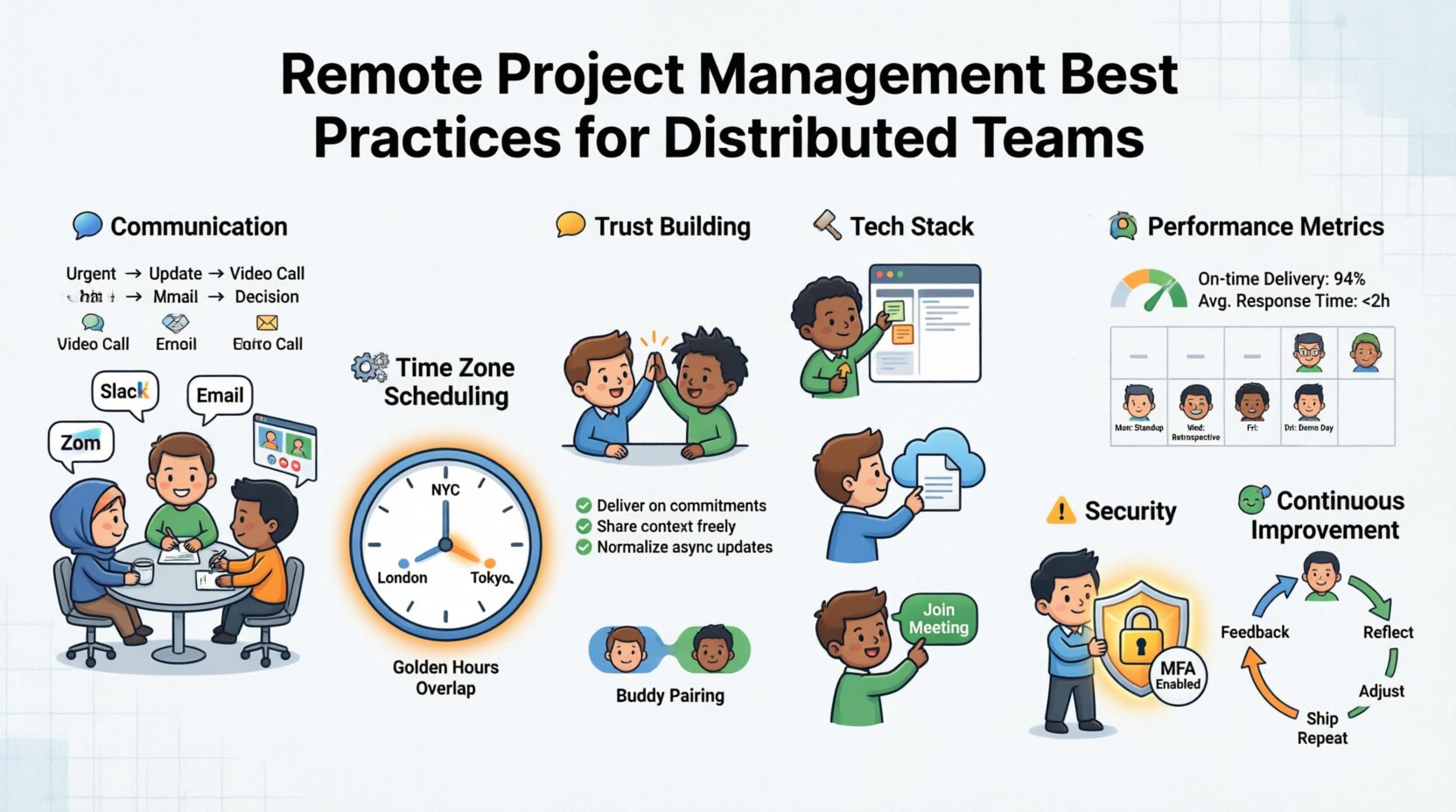
Communication is the lifeblood of any project, but in a remote context, it becomes the primary infrastructure. Misunderstandings that might be resolved with a quick walk to a desk in an office now require deliberate digital threads. The key is balancing synchronous and asynchronous methods to prevent fatigue while ensuring alignment.
1. Asynchronous First
Asynchronous communication allows team members to work at their own pace and during their most productive hours. This is crucial for distributed teams where overlapping work hours may be minimal. When information is documented clearly, individuals can contribute without waiting for immediate responses.
Documentation over Meetings: Record decisions in a central location rather than discussing them verbally. This creates a searchable history.
Written Updates: Encourage status updates via text or video logs rather than daily stand-ups. This reduces meeting fatigue.
Clear Context: Ensure every message contains the necessary context. Avoid vague requests that require clarification loops.
2. Synchronous for Connection
While async is efficient, synchronous communication is necessary for complex problem-solving and team bonding. Video calls allow for non-verbal cues that text lacks. However, these should be scheduled intentionally.
Office Hours: Designate specific times when leaders are available for drop-in questions.
Brainstorming Sessions: Use live sessions for creative work where real-time iteration is needed.
Social Interaction: Dedicate time for non-work chatter to build interpersonal relationships.
Communication Channel Matrix
Selecting the right medium for the right message is critical. Using email for urgent issues or chat for complex strategy leads to inefficiency. The table below outlines best practices for channel selection.
Channel | Best Use Case | Response Expectation | Example |
|---|---|---|---|
Instant Messaging | Quick questions, urgent alerts | Within 1-2 hours | Is the server down? |
Formal announcements, external comms | Within 24 hours | Project milestone update | |
Video Call | Complex decisions, conflict resolution | Scheduled | Q3 Strategy Review |
Project Board | Task status, deadlines, deliverables | Updated before task due | Task moved to Review |
📅 Scheduling Across Time Zones
Time zone differences are the most obvious logistical hurdle in remote project management. A team spanning three continents may have a maximum overlap of only two hours per day. Relying on this window for all collaboration is unsustainable. Instead, teams must adopt a “follow the sun” mentality or prioritize documentation.
1. Rotating Meeting Times
Convenience cannot be the default metric for scheduling. If a meeting is always held at 9:00 AM New York time, it becomes 9:00 PM for the team in Tokyo. To maintain equity, rotate meeting times.
Fair Rotation: Move the meeting time weekly or bi-weekly so the inconvenience is shared.
Recording: Always record meetings for those who cannot attend live.
Agenda Distribution: Send the agenda 24 hours in advance so remote attendees can prepare without the meeting.
2. Overlap Hours
Identify the “golden hours” where the maximum number of team members are online. Reserve these windows for collaborative work, such as sprint planning or critical decision-making. Keep individual work focused during non-overlap times.
🤝 Building Trust Without Physical Presence
In a physical office, trust is often built through observation. You see someone working late or collaborating in a hallway. In a remote environment, visibility is low. Trust must be built through reliability and transparency rather than physical presence.
1. Output Over Hours
Managers must shift focus from monitoring activity to evaluating results. If an employee completes their tasks on time and to a high standard, the number of hours they spend online is irrelevant. This autonomy fosters trust.
Define Outcomes: Clearly state what success looks like for a task, not how to do it.
Trust the Process: Allow team members to choose their working hours within reason.
Focus on Delivery: Celebrate the completion of deliverables rather than the time spent.
2. Intentional Onboarding
Remote onboarding can feel isolating. New hires need a structured path to integration that goes beyond reading documents. They need to understand the culture and meet the team.
Buddy System: Assign a peer to guide the new hire through their first month.
Structured Schedule: Plan meetings for the first two weeks to introduce key stakeholders.
Cultural Immersion: Share norms and values explicitly. Do not assume they are obvious.
🛠️ Technology Stack Essentials
While we avoid naming specific software, the categories of technology required for remote project management are consistent. A distributed team needs a digital workspace that replicates the functionality of a physical office.
1. Task Management
A central system for tracking work is non-negotiable. This system should allow for task assignment, deadline setting, and status tracking. It serves as the single source of truth for what is being worked on.
Visibility: Everyone should see the progress of the project without asking.
Dependencies: The system should link tasks so delays are visible.
History: Changes to tasks should be logged to prevent confusion.
2. File Storage
Files must be accessible from anywhere. Version control is critical to ensure everyone is working on the latest draft. Cloud-based storage ensures that data is not siloed on individual hard drives.
Access Control: Ensure permissions are set correctly to protect sensitive data.
Searchability: Files should be named logically and tagged for easy retrieval.
Redundancy: Ensure backups are in place to prevent data loss.
3. Video Conferencing
Face-to-face interaction is vital for complex discussions. Reliable video tools reduce the sense of distance. Features like screen sharing and recording enhance collaboration.
Stability: Choose tools that handle poor internet connections gracefully.
Capacity: Ensure the tool supports the number of participants needed.
Security: Use encryption and waiting rooms to protect meetings.
📊 Performance Metrics for Distributed Work
Measuring performance remotely requires different metrics than in-office work. Time tracking is often less relevant than output tracking. However, some quantitative data is necessary to ensure workload balance.
1. Key Performance Indicators (KPIs)
Define metrics that align with project goals. These should be measurable and time-bound. Common KPIs for remote projects include:
Delivery Rate: Percentage of tasks completed by the deadline.
Quality Score: Error rate or feedback received on deliverables.
Response Time: Average time taken to acknowledge client or internal queries.
2. Weekly Routine Checklist
Consistency helps maintain momentum. The following routine ensures that communication remains steady and projects stay on track.
Day | Focus | Activity |
|---|---|---|
Monday | Planning | Review weekly goals and assign tasks. |
Wednesday | Check-in | Mid-week status update to catch blockers. |
Friday | Wrap-up | Document progress and plan for next week. |
Bi-Weekly | Review | Deep dive into metrics and team health. |
⚠️ Risk Management and Security
Remote work introduces unique risks regarding data security and operational continuity. A distributed team is more vulnerable to breaches if protocols are not strict. Security must be integrated into the workflow, not treated as an afterthought.
1. Data Protection
Employees working from home environments may not have the same security infrastructure as an office. Policies must address this gap.
Device Management: Ensure company devices are used for work tasks.
Network Security: Advise against using public Wi-Fi for sensitive work.
Authentication: Implement multi-factor authentication for all access points.
2. Operational Continuity
What happens if a team member becomes unavailable? Remote teams must have contingency plans for illness, internet outages, or personal emergencies.
Cross-Training: Ensure multiple people know how to perform critical tasks.
Documentation: Processes should be written down so they are not dependent on one person.
Backup Contacts: Establish clear escalation paths for urgent issues.
🔄 Continuous Improvement
The remote work landscape evolves rapidly. What works today may not work next year. Teams must remain agile in their management practices. Regular retrospectives are essential to identify friction points.
1. Feedback Loops
Create safe channels for team members to voice concerns about the workflow. If a process is too burdensome, it will be ignored. Listen to the team regarding their tools and schedules.
Surveys: Conduct anonymous surveys to gauge satisfaction.
One-on-Ones: Use private meetings to discuss personal blockers.
Actionable Changes: Show the team that their feedback leads to tangible adjustments.
2. Adapting to Change
As the project scales, the management style may need to shift. Early stages require more coordination. Later stages may require more autonomy. Be prepared to pivot strategies based on the project phase.
Scale Communication: As the team grows, move from informal to formal channels.
Refine Tools: Remove tools that are no longer necessary to reduce clutter.
Re-evaluate Goals: Ensure objectives remain aligned with the broader organizational strategy.
🧭 Summary of Best Practices
Leading a distributed team is a complex challenge that requires a blend of empathy, structure, and technology. It is not enough to simply move the office online; the underlying processes must be redesigned for the digital environment. By prioritizing asynchronous communication, respecting time zones, and focusing on output over presence, organizations can build resilient and high-performing remote units.
Success in this domain is not about perfection. It is about continuous adaptation. Teams that embrace flexibility and maintain clear communication channels will navigate the challenges of remote project management effectively. The goal is to create an environment where every team member feels connected, supported, and empowered to deliver their best work, regardless of their location.
Related posts:
 Project Management 101: A Beginner’s Quick Start Guide to Leading Projects with Confidence
 What Project Managers Actually Do: A Real-World Component Breakdown for Aspiring Leaders
 The Project Management Lifecycle Explained: A Comprehensive Walkthrough from Start to Finish
 7 Common Project Management Mistakes That Derail Teams (And How to Avoid Them)