


Enterprise Architecture relies on clarity. Without it, complex systems become black boxes that confuse decision-makers and obscure value. The ArchiMate framework provides a robust language for describing business, information, application, and technology layers. However, a model without context is merely a diagram. It becomes useful only when tailored to specific audiences. This is where Viewpoints come into play. A Viewpoint defines the perspective from which an architecture is described, ensuring the right information reaches the right people at the right time.
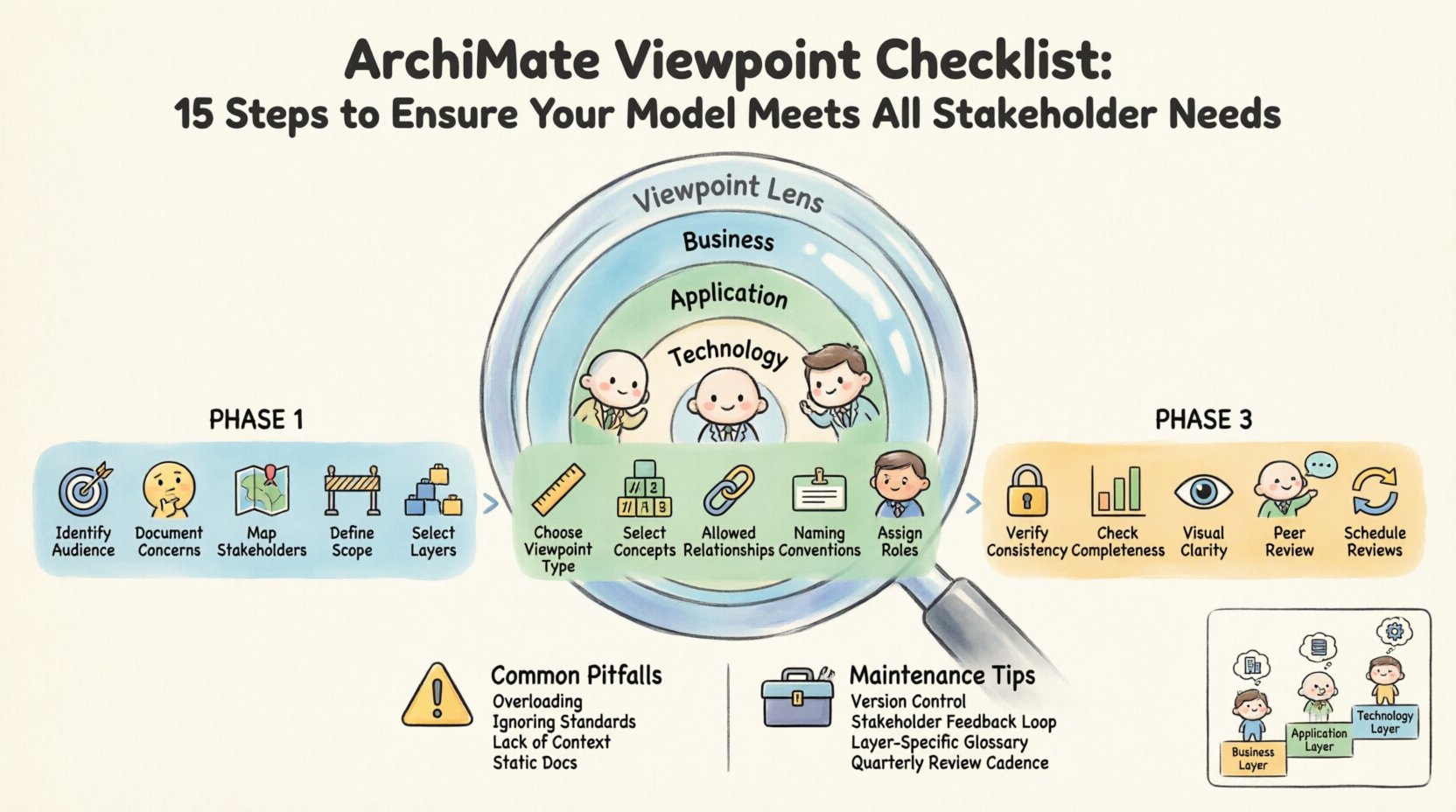
Creating effective Viewpoints requires precision. It involves understanding the concerns of stakeholders, selecting appropriate concepts, and validating the output against architectural standards. This guide presents a comprehensive 15-step checklist to verify that your ArchiMate models align with stakeholder requirements. By following this structured approach, you ensure consistency, reduce ambiguity, and facilitate better communication across the organization.
Understanding the Foundation: What is an ArchiMate Viewpoint? 🧩
Before diving into the checklist, it is essential to define the core concept. In the ArchiMate standard, a Viewpoint is a specification of the conventions used for constructing a View. A View is the result of applying a Viewpoint to an Architecture Model. Simply put, a Viewpoint is the lens, and the View is the image seen through that lens.
Different stakeholders require different lenses. A developer needs to see interfaces and component dependencies. A business leader needs to see value streams and organizational units. A security officer needs to see actors and security mechanisms. If you present a technical diagram to a board member, they will likely disengage. If you present a high-level strategy to an engineer, they will feel overwhelmed. The Viewpoint bridges this gap.
A well-defined Viewpoint includes:
- Stakeholders: Who is the audience?
- Concerns: What questions are they trying to answer?
- Models: Which parts of the enterprise architecture are relevant?
- Notation: Which symbols and relationships are used?
- View: The actual visual representation produced.
Ensuring these elements are aligned is the primary goal of the following checklist.
The 15-Step Viewpoint Validation Checklist ✅
This section details the specific actions required to validate an ArchiMate Viewpoint. The steps are categorized into three phases: Preparation, Definition, and Validation.
Phase 1: Preparation and Stakeholder Alignment
1. Identify the Primary Audience 🎯
Every Viewpoint serves a specific group. Determine exactly who will consume this model. Is it a technical team, a project manager, or an executive sponsor? Avoid creating a “general audience” Viewpoint, as this often leads to diluted information. Clearly list the job titles or roles associated with this artifact.
2. Document Specific Concerns 🤔
Once the audience is identified, record their specific concerns. These are the problems they face or the decisions they need to make. For example, a security concern might be “How is data protected between the application and the database?”. A business concern might be “Which process supports the new revenue stream?”. List these concerns explicitly to ensure the View addresses them directly.
3. Map Stakeholders to Concerns 🗺️
Create a matrix linking stakeholders to their concerns. This ensures no group is overlooked and no concern is ignored. Use a table format to visualize this mapping, as shown below.
| Stakeholder | Primary Concern | Viewpoint Focus |
|---|---|---|
| Business Manager | Process Efficiency | Business Process Layer |
| Application Architect | Service Interfaces | Application Service Layer |
| Infrastructure Lead | Node Connectivity | Technology Infrastructure |
4. Define the Scope Boundaries 🚧
An architecture model can become infinite if not bounded. Define what is in scope and what is out of scope. Explicitly state which business domains, applications, or technology components are excluded from this specific View. This prevents scope creep and keeps the model focused on the immediate concerns.
5. Select the Relevant ArchiMate Layers 🏗️
ArchiMate divides architecture into layers: Business, Application, and Technology, plus Strategy and Implementation. Determine which layers are necessary for the current View. If the concern is purely operational, the Strategy layer may be irrelevant. Avoid cluttering the model with layers that do not contribute to answering the stakeholder concerns.
Phase 2: Viewpoint Definition and Modeling
6. Choose the Appropriate Viewpoint Type 📐
Select from the standard ArchiMate Viewpoint categories (e.g., Business Process, Application Functioning, Technology Infrastructure). Ensure the chosen type matches the concerns identified in Step 2. If you need to show interactions, a Communication Viewpoint might be necessary. If you need to show structure, a Structure Viewpoint is preferred.
7. Select Specific Metamodel Concepts 🔢
Within the chosen layers, pick the specific concepts. Do not use every possible concept. For instance, in the Business Layer, you might only need Process, Function, and Actor. Do not include Role or Collaboration unless they add specific value to the current context. Simplification aids comprehension.
8. Define Allowed Relationships 🔗
Not all relationships are suitable for every View. Some relationships are too complex for a high-level summary. Define which associations (such as Association, Aggregation, Realization, or Flow) are permitted. Restricting relationships prevents the diagram from becoming a tangled web that confuses the reader.
9. Establish Naming Conventions 🏷️
Consistency is key to readability. Define rules for naming elements. Should names be capitalized? Should acronyms be used? Should descriptions be included? Ensure these rules are applied uniformly across the model. Inconsistent naming forces the reader to pause and decode the meaning repeatedly.
10. Assign Clear Roles to Elements 👤
Ensure that every element in the Business Layer has a clear role. Actors should represent people or organizational units, not abstract concepts. Functions should represent specific activities. This clarity prevents ambiguity regarding who does what and how processes are executed.
Phase 3: Validation and Alignment
11. Verify Consistency with the Core Model 🔒
Check if the Viewpoint aligns with the overarching Enterprise Architecture Model. If the View shows a process that the Core Model says does not exist, there is a conflict. Ensure that the data in the Viewpoint is derived from the authoritative source model. Inconsistencies erode trust in the architecture.
12. Check for Completeness of Data 📊
Ensure that all required information for the stakeholder’s concern is present. If a stakeholder needs to know the data flow, ensure Data Objects and Flows are included. If the concern is about security, ensure Security Mechanisms are visible. Completeness ensures the View is actionable.
13. Validate Visual Clarity 👁️
Review the layout. Are lines crossing unnecessarily? Are labels overlapping? Is there enough white space? A cluttered Viewpoint is difficult to read. Use grouping and clustering to organize related elements. Visual hierarchy helps the eye scan the diagram logically.
14. Conduct a Peer Review 🤝
Have another architect review the Viewpoint. They can spot errors you may have missed. Ask them to interpret the diagram and explain what they see. If their interpretation matches your intent, the Viewpoint is effective. If not, adjust the notation or labeling.
15. Schedule Regular Reviews 🔄
Architecture evolves. Stakeholders change. Viewpoints must be maintained. Establish a cycle for reviewing the Viewpoint. Does it still meet the stakeholder needs? Has the scope changed? Update the Viewpoint documentation and the model itself to reflect current realities.
Common Pitfalls in Viewpoint Creation ⚠️
Even with a checklist, errors can occur. Understanding common mistakes helps avoid them.
- Overloading the View: Trying to show everything in one diagram makes it useless. Split complex views into multiple related diagrams.
- Ignoring Notation Standards: Using custom symbols or non-standard colors can confuse readers who expect the standard ArchiMate notation.
- Lack of Context: Presenting a View without a legend or explanation of the scope leads to misinterpretation.
- Static Documentation: Treating the Viewpoint as a one-time artifact rather than a living document.
Maintaining Viewpoint Integrity Over Time 🛠️
Maintaining a Viewpoint is as important as creating it. As the enterprise changes, the Viewpoint must adapt. This involves tracking changes in the underlying model and propagating them to the View. When a new application is introduced, does the Viewpoint reflect it? When a business process is retired, is it removed from the Viewpoint?
Version control is essential. Each change to a Viewpoint should be logged with a date, author, and reason for the change. This history helps auditors and future architects understand the evolution of the architecture. It also ensures accountability.
Furthermore, feedback loops are critical. Stakeholders should be encouraged to provide feedback on the Viewpoints. If a stakeholder says the View does not help them make a decision, investigate why. Was the concern misidentified? Was the level of detail too high? Adjust the Viewpoint based on this feedback.
Final Considerations for Architecture Success 🚀
The value of ArchiMate lies in its ability to communicate complex structures simply. Viewpoints are the mechanism that makes this possible. By adhering to the 15-step checklist, you ensure that your architecture models are not just technical drawings, but tools for decision-making.
Remember that the goal is not perfection in the model, but alignment with the needs of the people using it. A perfect model that no one understands is a failure. A simple model that answers critical questions is a success.
Regularly revisit the checklist. As your organization grows, the complexity of your Viewpoints will grow. The principles remain the same: identify the audience, define the concerns, and validate the output. This disciplined approach builds trust in your architecture practice and drives better business outcomes.
Start applying these steps today. Audit your current Viewpoints against this list. Identify gaps. Implement improvements. Over time, you will see a significant increase in the utility and adoption of your Enterprise Architecture models.
Related posts:
 ArchiMate Viewpoint: A Beginner’s Guide to Choosing the Right Lens for Your Enterprise Model
 Stop Confusing ArchiMate Viewpoints: The Simple Breakdown Business, Application, and Tech Architects Need
 Quick Start ArchiMate Viewpoints: How to Map Your First Business Strategy in Under 30 Minutes
 ArchiMate Viewpoints Explained: From Business Processes to Tech Infrastructure Without the Jargon