


Enterprise architecture demands precision. Without it, models become cluttered and communication breaks down. The ArchiMate specification provides a robust framework, yet the concept of a Viewpoint remains one of the most misunderstood elements among practitioners. Many teams focus heavily on the diagramming tools and the symbols themselves, neglecting the structural discipline required to manage what is shown, to whom, and why.
This guide examines the architecture of viewpoints within the ArchiMate specification. It moves beyond basic definitions to explore the strategic application of views. We will dissect how to align stakeholder concerns with specific architectural representations. By understanding the nuances, you ensure that your enterprise architecture models serve their intended purpose: clarity and decision support.
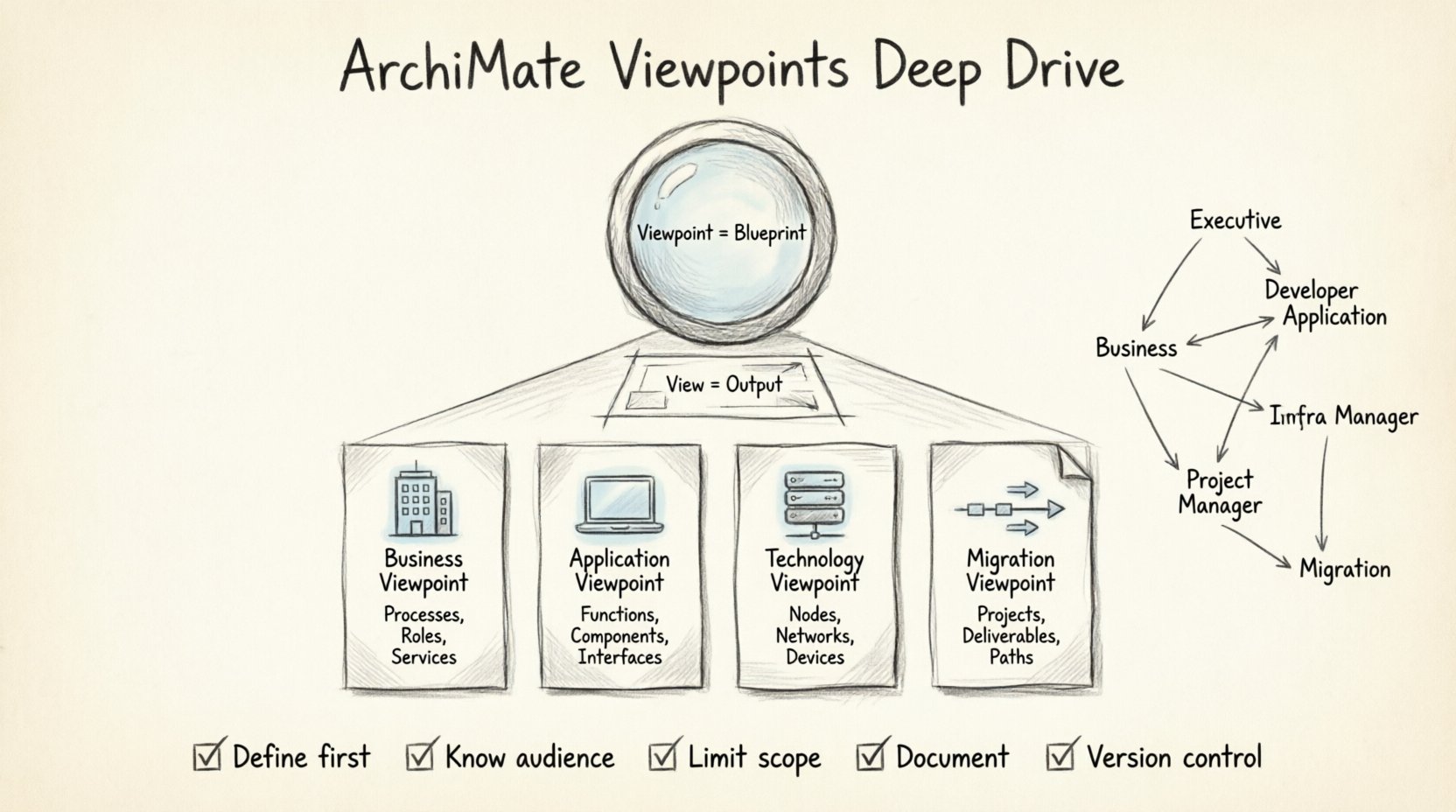
Understanding the Core Distinction: View vs. Viewpoint 👁️
Before diving into the mechanics, one must grasp the fundamental difference between a View and a Viewpoint. This distinction is often blurred in practice, leading to confusion about what constitutes a valid model element.
- Viewpoint: A specification of conventions for constructing and using a view. It defines how to build the view. It includes the meta-model elements, the notation, and the specific concerns it addresses.
- View: A representation of a related set of concerns. It is the actual output or the diagram itself. It is created using a viewpoint.
Think of the Viewpoint as the blueprint for the lens, and the View as the image seen through that lens. A beginner might create a diagram without defining the underlying viewpoint conventions. This leads to inconsistency. If one architect draws a business process using a specific notation, and another draws it differently, the model loses coherence.
Establishing a Viewpoint first ensures that:
- Consistent notation is applied across the enterprise.
- Specific stakeholder concerns are explicitly addressed.
- The scope of the model is clearly defined.
The Standard ArchiMate Viewpoints 📋
The ArchiMate specification defines several standard viewpoints. These serve as the foundational templates for most architectural inquiries. While custom viewpoints are powerful, understanding the standard set is a prerequisite for effective modeling.
1. The Business Viewpoint 🏢
This viewpoint focuses on business services, processes, and roles. It is often the entry point for stakeholders who do not have a technical background. The goal is to visualize how value is delivered.
- Key Elements: Business Processes, Business Roles, Business Services, Business Objects.
- Typical Users: Business Managers, Process Owners, Operations Teams.
- Common Question: “How does the organization deliver value to the customer?”
2. The Application Viewpoint 💻
This viewpoint details the software systems and their interactions. It connects business logic to technical implementation. It is crucial for developers and system architects.
- Key Elements: Application Functions, Application Services, Application Components, Application Interfaces.
- Typical Users: Software Developers, System Architects, DevOps Engineers.
- Common Question: “Which application supports this specific business capability?”
3. The Technology Viewpoint ⚙️
This viewpoint addresses the physical and logical infrastructure. It maps where applications run and how data is stored. It is essential for infrastructure planning.
- Key Elements: Nodes, Devices, System Software, Networks.
- Typical Users: Infrastructure Managers, Security Teams, Hardware Architects.
- Common Question: “What hardware is required to host this service?”
4. The Implementation and Migration Viewpoint 🔄
This viewpoint is unique because it focuses on time. It shows the transition from a current state to a target state. It is vital for project management and roadmap planning.
- Key Elements: Work Packages, Projects, Deliverables, Migration Paths.
- Typical Users: Program Managers, Change Management Teams.
- Common Question: “What steps are needed to move from the current state to the target state?”
Mapping Stakeholders to Viewpoints 🗺️
A common mistake is assuming one viewpoint serves everyone. A C-level executive does not need the same level of detail as a database administrator. Effective architecture requires mapping specific concerns to specific viewpoints.
| Stakeholder Group | Primary Concern | Recommended Viewpoint |
|---|---|---|
| Executive Leadership | Strategic alignment, Value delivery | Business Viewpoint (High Level) |
| Process Owners | Efficiency, Workflow, Handoffs | Business Viewpoint (Detailed) |
| Application Architects | Integration, Data flow, Dependencies | Application Viewpoint |
| Infrastructure Managers | Availability, Performance, Security | Technology Viewpoint |
| Project Managers | Timeline, Deliverables, Transition | Implementation and Migration Viewpoint |
When creating a Viewpoint, start by identifying the stakeholder. Then, define the scope of information they require. Avoid cluttering the view with elements that do not serve the stakeholder’s decision-making process. This discipline prevents information overload.
Custom Viewpoints: When to Create Your Own 🛠️
While standard viewpoints cover many scenarios, enterprise architecture often requires specific contexts. The specification allows for the creation of custom viewpoints. However, this should be done with caution.
Criteria for Custom Viewpoints
Do not create a custom viewpoint unless the standard ones fail to address a specific need. Consider the following factors:
- Specific Industry Regulations: If compliance requires showing specific data flows or security controls not covered by the standard Business Viewpoint.
- Unique Organizational Structures: If your organization has a specific type of governance structure that requires a unique mapping of roles.
- Tool Limitations: If the modeling platform requires specific grouping to function correctly (though this is a tooling issue, not an architectural one).
The Cost of Customization
Every custom viewpoint adds complexity. It requires documentation. It requires training for the team. If the standard Business Viewpoint works for 90% of cases, creating a custom “Finance Business Viewpoint” for the remaining 10% might be justified, but creating a custom viewpoint for every minor variation is unsustainable.
Ensure that any custom viewpoint:
- Reuses existing meta-model elements where possible.
- Is clearly documented in the model repository.
- Follows the same notation rules as the standard viewpoints.
Nuances Beginners Often Overlook 🧐
Many practitioners struggle with the finer details of Viewpoint implementation. These nuances separate a functional model from a robust enterprise architecture. Let us explore the most common pitfalls.
1. Mixing Layers Without Purpose
It is tempting to draw lines between Business and Technology layers to show “who does what.” However, the ArchiMate specification discourages mixing layers indiscriminately. Relationships should be meaningful.
- The Risk: Creating a “spaghetti diagram” where every business process is linked to every server.
- The Fix: Use specific viewpoints to isolate layers. If you need to see the connection, use the Realization relationship carefully, but ensure the Viewpoint definition permits it. Do not mix layers in a Viewpoint unless the concern explicitly requires it.
2. Ignoring the Viewpoint Definition Document
A Viewpoint is not just a diagram; it is a definition. Beginners often create a diagram and forget to define the Viewpoint metadata. This leads to confusion later.
- What to Define: Name, Description, Stakeholders, Concerns, Notation, and Scope.
- Why it Matters: When a new team member joins, they need to know which Viewpoint was used to create a specific diagram. Without this metadata, the model becomes a black box.
3. Over-Modeling the Viewpoint
It is possible to define a Viewpoint that includes too many element types. This reduces clarity.
- The Risk: The stakeholder sees a diagram with 50 different icons and does not know where to look.
- The Fix: Limit the element types allowed in the Viewpoint. If the concern is “Process Efficiency,” exclude Technology Nodes. Focus the Viewpoint on Business Processes and Roles only.
4. Failing to Version Control Viewpoints
Just as you version control the model, you should version control the Viewpoints. If a Viewpoint changes, it might invalidate existing Views created with it.
- Change Management: If you update a Viewpoint to include a new relationship type, ensure all existing diagrams remain valid or are updated accordingly.
- Communication: Notify stakeholders if a Viewpoint changes. A change in notation might confuse the audience who relies on the previous version.
Ensuring Consistency Across Models 🔗
Consistency is the hallmark of a mature architecture practice. When multiple architects work on the same enterprise, how do you ensure the Viewpoints align?
Establishing a Meta-Model
Define a core set of element definitions that all Viewpoints must adhere to. For example, a “Business Process” should be defined the same way in the Business Viewpoint and the Implementation Viewpoint.
- Standardization: Create a library of approved Viewpoints.
- Templates: Use templates to ensure that every new Viewpoint starts with the same baseline structure.
- Review: Conduct regular reviews of the Viewpoints to ensure they are still meeting stakeholder needs.
Maintaining the Architecture Over Time 🕰️
Architecture is not a one-time project; it is a living discipline. Viewpoints must evolve as the enterprise evolves.
Review Cycles
Schedule periodic reviews of your Viewpoints. Ask the following questions:
- Are stakeholders still finding value in this Viewpoint?
- Has the technology landscape changed enough to require a new Viewpoint?
- Are there any deprecated elements that need to be removed?
Feedback Loops
Establish a channel for feedback. If a stakeholder says, “I can’t find the information I need in this View,” take it as a signal to adjust the Viewpoint definition. Perhaps they need a different aggregation of data, or a different level of detail.
Do not ignore feedback. It is the best indicator of whether your architecture practice is serving the business.
Summary of Best Practices 📝
To summarize the key takeaways for implementing ArchiMate Viewpoints effectively:
- Define before you draw: Always establish the Viewpoint before creating the View.
- Know your audience: Map Viewpoints to specific stakeholder concerns.
- Limit scope: Exclude elements that do not serve the specific concern.
- Document metadata: Record the purpose and scope of every Viewpoint.
- Version control: Treat Viewpoint changes as significant architectural events.
- Reuse standards: Leverage standard ArchiMate Viewpoints before creating custom ones.
By adhering to these principles, you move beyond simple diagramming. You create a structured communication framework that enables clear decision-making. The complexity of enterprise architecture is managed not by hiding it, but by organizing it into coherent views.
Remember, the goal is not to create the most complex model. The goal is to create the clearest model. A well-structured Viewpoint achieves this by filtering out noise and highlighting the signal. This approach ensures that your enterprise architecture remains a valuable asset for years to come.
Final Thoughts on Implementation 🚀
Implementing a robust Viewpoint strategy takes time. It requires discipline and a commitment to consistency. However, the return on investment is significant. Teams spend less time asking “What does this mean?” and more time acting on the information provided.
Start small. Define a core set of Viewpoints for your most critical stakeholders. Refine them based on feedback. Gradually expand the library as the organization grows. This iterative approach ensures that the architecture practice remains aligned with the business needs.
With a solid understanding of Viewpoints, you can navigate the complexities of the ArchiMate specification with confidence. You will be able to construct models that are not just visually appealing, but functionally effective. This is the essence of professional enterprise architecture.