
Mastering the Visual Paradigm Pipeline with AI and VP Noteskeep
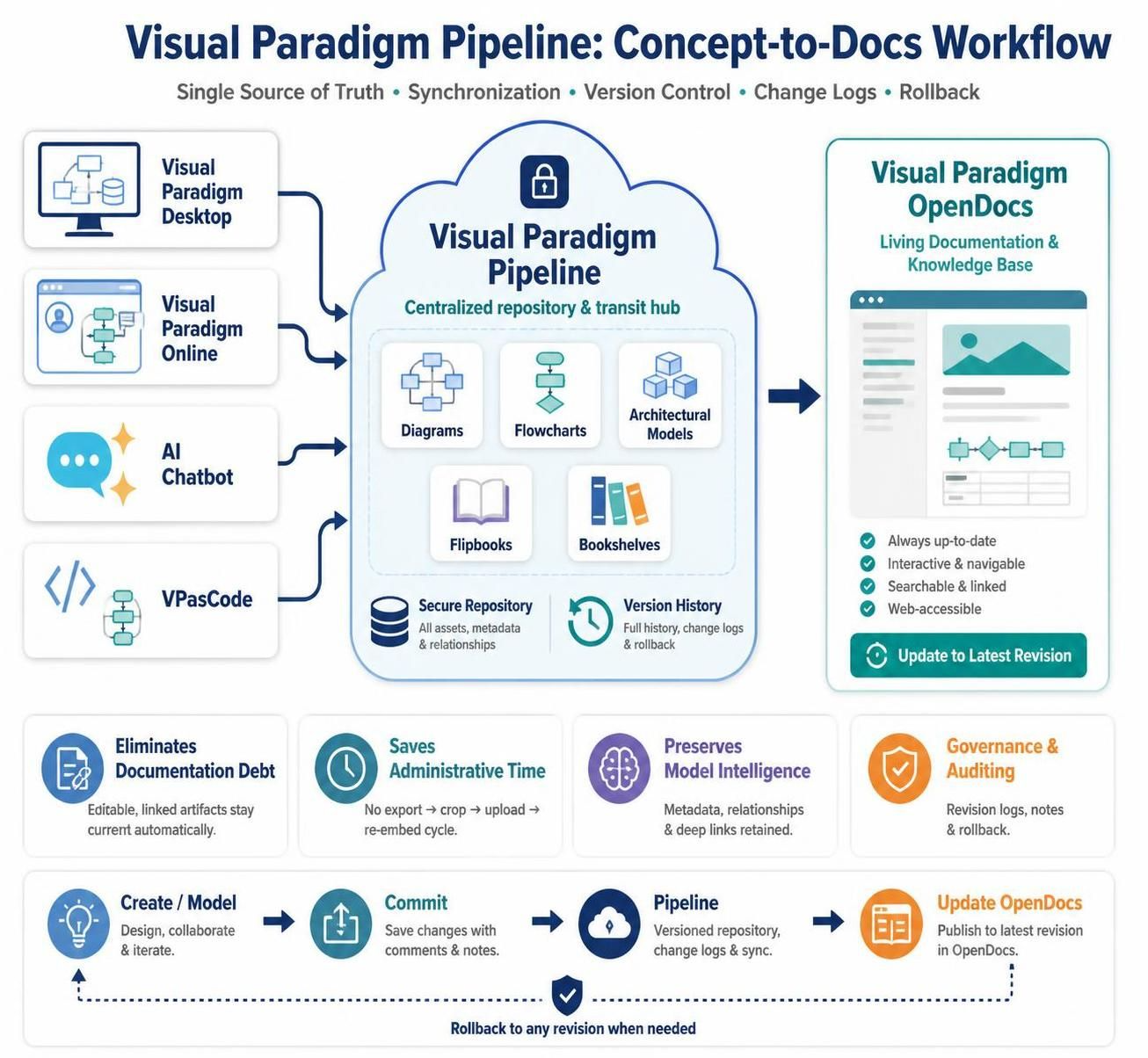
In the modern era of software development and enterprise architecture, the gap between designing a system and documenting it often leads to “documentation debt.” Diagrams become outdated the moment they are exported as static images. The Visual Paradigm Pipeline solves this by creating a centralized, cloud-based connection layer between your modeling tools and your documentation platform, Visual Paradigm OpenDocs.
This tutorial explores the system architecture of the Pipeline, how it functions as a transit hub for visual assets, and how it transforms the traditional “export-then-upload” workflow into a dynamic, synchronized process.
1. The Core Concept: A Three-Layer Ecosystem
To understand the Pipeline, it is best viewed as a three-layer ecosystem designed to maintain a “Single Source of Truth.” This architecture ensures that the visual assets you create are never separated from their source models.
Layer 1: The Generation Layer
This is where the work begins. The Pipeline accepts inputs from a variety of tools, making it platform-agnostic:
- Visual Paradigm Desktop: Used for advanced enterprise modeling, database design, and professional UML/BPMN tasks.
- Visual Paradigm Online: Facilitates browser-based, collaborative diagramming and visual planning.
- AI Diagramming Chatbot: Accelerates creation by converting natural-language descriptions into structured visual models.
- VPasCode: Provides a code-oriented approach for creating diagrams via text-based languages like PlantUML, Mermaid, and Graphviz.
Layer 2: The Pipeline Layer (The Transit Hub)
The Pipeline acts as the central nervous system. It is not merely a file storage folder; it is a managed repository that performs four critical functions:
- Centralized Storage: It stores diagrams (UML, BPMN, ERD), flowcharts, and architectural models in a secure cloud repository.
- Revision Management: It records changes, allowing teams to review newer revisions or restore earlier versions.
- Metadata Preservation: Unlike static images, the Pipeline retains the intelligence, relationships, and metadata of the source model.
- Transit & Connection: It connects the Generation Layer to the Documentation Layer.
Layer 3: The Documentation Layer
The destination for these assets is Visual Paradigm OpenDocs. This platform serves as a living documentation hub, technical manual generator, and knowledge base. Crucially, OpenDocs does not just display images; it embeds them as managed elements. This means the documentation can query the Pipeline to check if a newer revision exists.
2. The Workflow: From Model to Living Documentation
The Pipeline replaces the traditional, error-prone workflow with a streamlined loop. Here is the step-by-step process:
- Create or Generate: A team member designs a model using Desktop, Online, or AI tools.
- Commit to Pipeline: The asset is submitted to the Pipeline. The system assigns it an identifiable reference and tracks the revision.
- Embed in OpenDocs: The diagram is inserted into OpenDocs. It is not a static image but a live link to the asset in the Pipeline.
- Review Changes: If the modeler updates the source diagram, the Pipeline detects the change.
- Update Documentation: OpenDocs identifies that a newer revision is available, allowing the team to sync the documentation to the latest state instantly.
3. Solving the “Static Image” Problem
Traditional documentation relies on a “Create -> Export -> Upload -> Replace” cycle. This creates significant problems:
- Multiple Copies: The same diagram may exist in dozens of versions across different folders.
- Outdated Info: Documentation becomes stale immediately after export.
- Lost Intelligence: Metadata and deep links are lost when converting a model to a PNG or JPG.
- Administrative Overhead: Teams waste time manually updating images across multiple documents.
The Pipeline eliminates these issues by keeping the visual and the source synchronized. The result is a reliable Single Source of Truth.
4. Capabilities and Asset Types
The Pipeline is versatile and supports a wide range of visual assets depending on the source tool. You can manage:
- UML & BPMN: Sequence diagrams, class diagrams, activity flows.
- Database & Architecture: ERDs, ArchiMate models, system architecture diagrams.
- Interactive Elements: Flipbooks and Bookshelves for comprehensive documentation views.
Conclusion
The Visual Paradigm Pipeline is more than just a file transfer tool; it is an ecosystem designed to keep diagrams and documentation synchronized as a project evolves. By treating diagrams as managed cloud artifacts rather than static files, teams can ensure that their technical documentation remains accurate, up-to-date, and a true reflection of their system architecture.