
Mastering the “Write-Code-as-Diagram” Paradigm with VPasCode
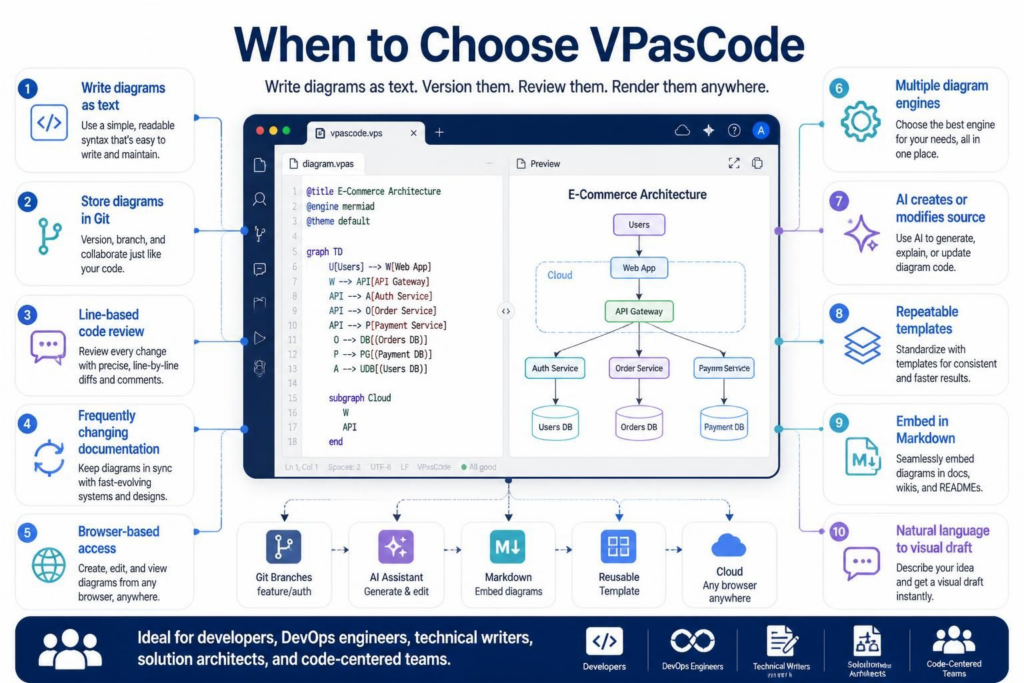
In the world of software architecture, the gap between design and documentation is often where projects fail. Architects draw diagrams in static tools, but the code evolves rapidly, leaving the visuals obsolete. VPasCode (Visual Programming as Code) bridges this gap by allowing you to write diagrams as text, version them in Git, and render them anywhere.
This tutorial explores the core system architecture behind VPasCode, how it integrates with modern DevOps workflows, and how to leverage its powerful modeling concepts to create maintainable, living documentation.
1. The Core Philosophy: Text-Based Modeling
Traditional diagramming tools rely on a WYSIWYG (What You See Is What You Get) interface where you drag and drop boxes. While intuitive, this approach creates “unversionable” files that are difficult to diff or merge. VPasCode flips this paradigm.
Instead of coordinates, you define relationships using simple, readable syntax. This allows the diagram to be treated as source code. The image below illustrates the core “Diagram-as-Text” concept, where the left side of the editor contains the source code and the right side renders the live visualization.
@title E-Commerce Architecture
@engine mermaid
@theme default

graph TD
    U[Users] --> W[Web App]
    W --> API[API Gateway]
    API --> A[Auth Service]
    API --> O[Order Service]
    API --> P[Payment Service]
    O --> DB[Orders DB]
    P --> PG[Payment DB]
    A --> UDB[Users DB]

    subgraph Cloud
        W
        API
    end
Why Text-Based Syntax Matters
- Version Control Friendly: You can commit diagram changes to Git alongside your application code. This enables a single source of truth for both implementation and architecture.
- Line-Based Review: Just like code, you can use pull requests to review architectural changes. Reviewers can see exactly which relationships were added or removed.
- Collaboration: Multiple engineers can edit different parts of the diagram file simultaneously without “conflict” errors, provided the syntax is modular.
2. The VPasCode System Architecture
The architecture shown in the infographic is built around a “Write, Version, Review, Render” loop. This system is designed specifically for teams that need to move quickly from a natural-language idea to a visual draft.
The Workflow Loop
- Browser-Based Access: The editor is accessible from any browser, removing the need for heavy local installations. This supports remote-first teams.
- Multi-Engine Support: VPasCode abstracts the rendering engine. As seen in the example above using
@engine mermaid, you can switch between diagram engines (like Mermaid, PlantUML, or Graphviz) without changing your workflow. - Repeatable Templates: For enterprise environments, you can create reusable templates. This ensures that every diagram follows the same layout rules, styling, and naming conventions.
3. Advanced Concepts: AI and Integration
Modern architecture tools must evolve. VPasCode integrates Artificial Intelligence directly into the modeling workflow.
AI-Assisted Modeling
Instead of writing boilerplate syntax manually, you can use the AI assistant to generate or modify the source code. You might describe a high-level concept—”Create a cloud architecture with an API Gateway and three microservices”—and the AI will generate the corresponding Mermaid or PlantUML code for you.
Embedding in Markdown
Documentation often lives in Markdown files (READMEs, Confluence, Notion). VPasCode allows you to embed diagrams directly into these documents. This ensures that the documentation and the visual representation are always synchronized.
## Architecture Diagram

```mermaid
graph TD
  U[Users] --> W[Web App]
  W --> API[API Gateway]
```
4. Who is VPasCode For?
VPasCode is particularly suitable for:
- Software Development Teams: Who need to keep architecture up-to-date with rapid code iterations.
- DevOps Engineers: Who manage infrastructure as code and need to visualize system topology.
- Technical Writers: Who need to generate accurate diagrams from text descriptions.
- Solution Architects: Who want to iterate on designs quickly before committing to complex modeling tools.
Conclusion
By adopting VPasCode, teams can stop treating diagrams as static art and start treating them as living code. This shift enables faster iteration, better collaboration, and a robust system architecture that evolves alongside the software it describes.