
Architecting AI-Driven Docs: Visual Paradigm NotesKeep’s Chronological Ecosystem
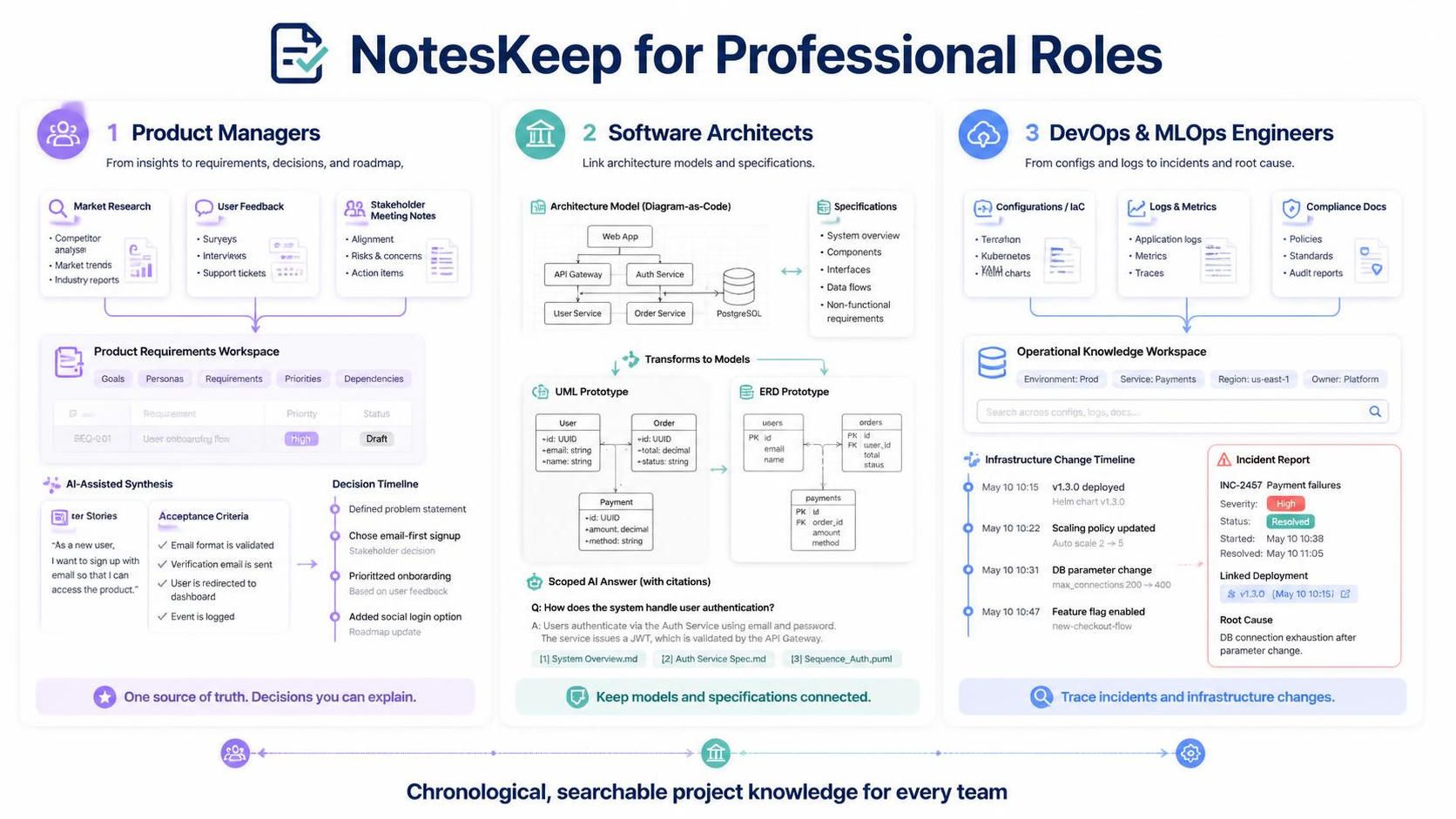
In the modern software development lifecycle, the disconnect between documentation and execution is a critical vulnerability. Static wikis rot the moment they are written, and fragmented tools create silos that slow down decision-making. Visual Paradigm NotesKeep represents a paradigm shift from static repositories to a dynamic, chronological knowledge ecosystem. This tutorial explores the underlying system architecture of NotesKeep, demonstrating how it unifies Product Management, Software Architecture, and DevOps into a single source of truth.
1. The Core Philosophy: Chronological Traceability
Before diving into the specific modules, it is essential to understand the architectural backbone of NotesKeep. Unlike traditional tools where data is stored in isolated buckets, NotesKeep is built on a Chronological Timeline. Every piece of information—whether it is a user story, a database schema change, or a server log entry—is anchored to a specific point in time. This “Time-Travel” capability ensures that:
- Traceability: You can see the history of why a decision was made.
- Context: Decisions are not viewed in isolation but in the context of the project’s evolution.
- Justification: Roadmap changes can be justified by referencing the historical timeline of requirements.
2. The Product Manager Module: Synthesis Engine
The first pillar of the architecture is the Product Requirements Workspace. This module is designed to solve the “Insight-to-Requirement” bottleneck.
Input Ingestion
The system accepts unstructured data from three primary vectors:
- Market Research: Competitor analysis and industry reports.
- User Feedback: Data from surveys, interviews, and support tickets.
- Stakeholder Meetings: Raw notes from syncs.
AI-Assisted Synthesis
Once ingested, the system employs an AI Synthesis Engine to transform these inputs into structured artifacts. The AI does not just summarize; it structures data into:
- User Stories: Formatted as “As a [persona], I want [action] so that [benefit].”
- Acceptance Criteria: Defining the “Definition of Done” for the story.
Decision Timeline
Crucially, this process is linked to a Decision Timeline. Every requirement is linked to the specific stakeholder decision that authorized it, creating an auditable chain of custody for product features.
3. The Software Architect Module: Visual-Textual Sync
The second pillar addresses the notorious gap between design and documentation. Architects often struggle to keep diagrams in sync with text specifications.
Architecture Model (Diagram-as-Code)
NotesKeep supports Diagram-as-Code workflows. Instead of manually dragging and dropping shapes, architects define the system structure using code. The system ingests this code to generate:
- System Overview: High-level component diagrams.
- Component Models: Detailed internal structures.
- Interfaces: API definitions and data flows.
Transforms to Models
The system creates a bi-directional link between text and visuals. When a text specification is updated, the corresponding UML or ERD (Entity Relationship Diagram) can be regenerated or validated automatically.
UML & ERD Prototyping
The architecture includes a UML Prototype section for sequence diagrams and class structures, and an ERD Prototype for database schemas. This allows architects to validate designs before writing a single line of implementation code.
Scoped RAG (Retrieval-Augmented Generation)
To ensure architectural integrity, NotesKeep uses a Scoped RAG system. When an architect queries the AI, the model is restricted to the current project’s architectural specifications and citations, preventing hallucinations and ensuring that answers are backed by the specific project documentation.
4. The DevOps & MLOps Module: Operational Intelligence
The final pillar connects the abstract design to the concrete infrastructure. This module is vital for managing complex environments and debugging incidents.
Knowledge Ingestion
The Operational Knowledge Workspace ingests three critical data types:
- Configurations / IaC: Terraform scripts, Kubernetes manifests, and Helm charts.
- Logs & Metrics: Application logs, system metrics, and trace data.
- Compliance Docs: Security policies and audit reports.
Infrastructure Change Timeline
Similar to the Product module, this section features a timeline of infrastructure changes. It tracks:
- Deployments (e.g., Helm chart version updates).
- Scaling policies (e.g., Auto-scaling thresholds).
- Parameter changes (e.g., Database connection limits).
Incident Reporting & Root Cause Analysis
The system creates a direct link between an Incident Report and the specific infrastructure changes that preceded it. By correlating the incident timestamp with the change timeline, engineers can instantly identify if a recent deployment or configuration change caused the failure.
5. Technical Implementation: The Unified Workspace
At the core of NotesKeep is the Unified Workspace. This is not merely a dashboard; it is a semantic database that indexes all the disparate data types mentioned above.
Search Across Contexts
The search functionality in NotesKeep is context-aware. It does not just search for keywords; it searches across:
- Product requirements
- Architecture diagrams
- Infrastructure code
- Operational logs
This allows a developer to search for a specific error message and immediately find the related user story, the architectural component responsible, and the recent deployment that introduced the bug.
Conclusion
Visual Paradigm NotesKeep is more than a documentation tool; it is an architectural framework for organizational knowledge. By enforcing a chronological, interconnected approach, it ensures that:
- Product Managers have a clear lineage from market insight to roadmap.
- Architects maintain a single source of truth for design and specification.
- DevOps Engineers can trace incidents back to specific code or config changes.
This integration of AI, modeling, and chronological tracking creates a “Living Documentation” system that evolves with your project, reducing risk and accelerating delivery.