
Mastering BPMN Subprocesses: Collapsing Complexity into Clear Visual Logic
In the world of Business Process Model and Notation (BPMN), clarity is king. When modeling complex systems like the “Order to Cash” lifecycle, a single diagram can quickly become a tangled web of logic. This is where the concept of Subprocesses becomes your most powerful tool for managing complexity.
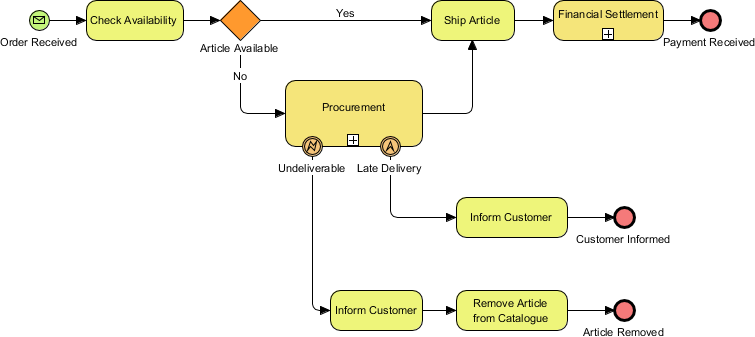
The diagram provided illustrates a sophisticated ordering workflow. It demonstrates how to handle a decision point—checking if an article is available—and how to encapsulate the complex “Procurement” logic into a single, manageable visual unit. Whether you are using Visual Paradigm or another BPMN tool, understanding when to expand and when to collapse these subprocesses is critical for effective communication.
Understanding the Visual Hierarchy
The diagram presents a high-level view of an order fulfillment process. It begins with an Order Received event and moves through several key stages. The most critical element here is the yellow rounded rectangle labeled Procurement. This is not just a simple task; it is a collapsed subprocess.
A collapsed subprocess allows the modeler to hide the intricate details of a specific operation while keeping the main flow readable. In this scenario, the “Procurement” subprocess represents a significant amount of work—likely involving external suppliers, inventory checks, or manufacturing—that would clutter the main diagram if fully expanded.
The Mechanics of the Expanded View
When we look at the logic surrounding the “Procurement” subprocess, we see how it interacts with the rest of the system. The process flow follows a specific path based on availability:
- Check Availability: The process starts here.
- The Gateway Decision: A diamond-shaped gateway asks, “Article Available?”
- The ‘Yes’ Path: If available, the process skips the procurement logic entirely and proceeds to Ship Article.
- The ‘No’ Path: If not available, the flow enters the Procurement subprocess.
Once the “Procurement” subprocess is triggered, the diagram implies that the article will eventually be sourced. Upon completion, the flow returns to the main path to Ship Article. However, the diagram also provides a safety net for failure scenarios.
Navigating Exception Handling
Real-world processes are rarely linear. They are full of exceptions. The diagram excellently demonstrates how to handle negative outcomes from the “Procurement” subprocess using exception events (the red circles at the end of the branches).
Notice the labels attached to the lines exiting the “Procurement” subprocess:
- Undeliverable: If the article cannot be delivered, the subprocess triggers a flow to Inform Customer and ends with the Customer Informed termination event.
- Late Delivery: If the article arrives too late, the flow triggers another Inform Customer task, followed by Remove Article from Catalogue, and ends with the Article Removed termination event.
This structure is vital for stakeholders. It shows that the system doesn’t just “fail”; it has specific logic to handle failures gracefully, informing the customer and updating the catalog accordingly.
Visualizing the “Inside” of Procurement
While the main diagram hides the internal steps, a standard BPMN model would define what happens inside the “Procurement” box. If we were to expand it, the internal logic might look like this:
[Start Event] ->
   [Task: Contact Supplier] ->
   [Task: Negotiate Price] ->
   [Decision: Supplier Accepts?] --(No)--> [Task: Find Alternative Supplier]
   --(Yes)-->
   [Task: Place Order] ->
   [Wait for Delivery] ->
   [End Event]
By keeping this detail collapsed in the parent diagram, the “Order Received” to “Financial Settlement” flow remains clean and easy to read. The audience can focus on the big picture: how an order moves from receipt to payment.
Strategic Modeling: To Collapse or Expand?
As you build your own models, you must decide when to reveal detail and when to hide it. The provided diagram is a perfect example of a “Contextual View.”
Choose a Collapsed View When:
- You are presenting the end-to-end process to an audience that needs the main stages.
- The internal steps of “Procurement” are not relevant to the current discussion.
- Showing every detail would make the parent diagram hard to read.
Choose an Expanded View When:
- You are reviewing the subprocess’s internal logic (e.g., how the supplier is contacted).
- The sequence of tasks, decisions, or exceptions matters to the discussion.
- Stakeholders need to see exactly how the subprocess fits into the parent flow without switching diagrams.
A useful modeling practice is to keep the overview concise and reveal detail selectively. Avoid expanding every subprocess at once, as the parent diagram can become crowded, and layout changes may make relationships harder to follow.
Conclusion
The diagram provided serves as a blueprint for robust process modeling. It combines a high-level flow with detailed exception handling and the strategic use of subprocesses. By mastering these concepts, you can create diagrams that are not just technical drawings, but clear, communicative maps of your organization’s operations.