
Master Information Architecture with Visual Paradigm OpenDocs
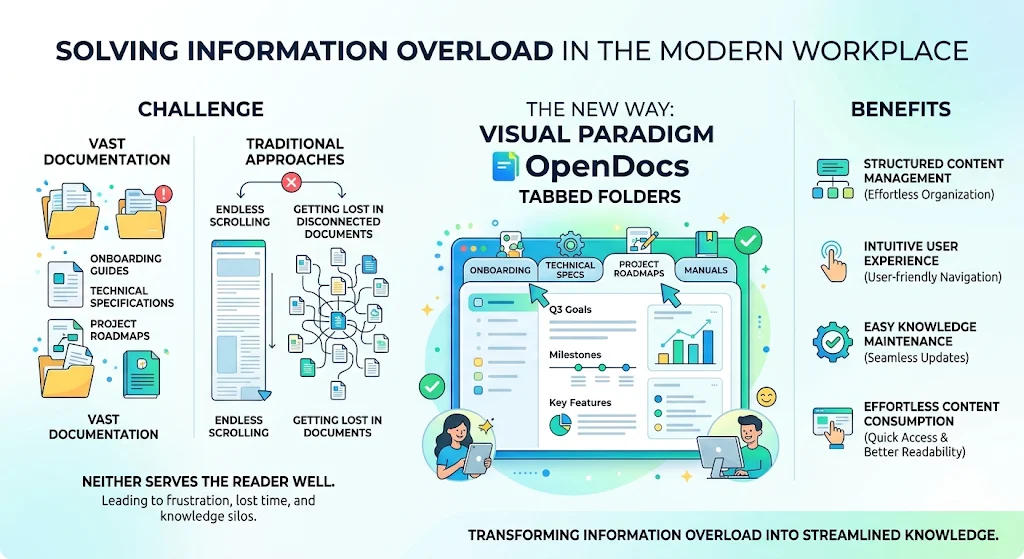
In the modern enterprise, the primary challenge is rarely a lack of information; it is the struggle to navigate it. As teams scale, documentation grows into monolithic files or disconnected silos, leading to “endless scrolling” and lost context. Visual Paradigm OpenDocs addresses this systemic friction with a powerful structural innovation: Tabbed Folders. This feature redefines how technical writers and project managers organize complex knowledge bases, transforming a chaotic list of documents into an intuitive, browser-like interface.
The Problem with Traditional Documentation Structures
Before diving into the solution, it is essential to understand the architectural flaws in traditional documentation strategies. As illustrated in the challenge phase of the OpenDocs model, content is often categorized in two problematic ways:
- Monolithic Pages: Creating a single, massive document for a project (e.g., a “Master Onboarding Guide”). This forces users to scroll endlessly to find specific troubleshooting steps or roadmap details, degrading the user experience.
- Disconnected Documents: Creating hundreds of individual files without a clear hierarchy. Users often get lost in a “labyrinth” of links, where the context of the current document is lost the moment they navigate away.
Neither approach serves the reader well. The result is frustration, wasted time, and the creation of knowledge silos where critical information is effectively hidden.
The Solution: The Tabbed Folder Concept
Visual Paradigm OpenDocs introduces a Tabbed Folder architecture that bridges the gap between structured content management and the intuitive experience of a modern web browser. Instead of a linear list, content is organized into logical groups—such as “Onboarding,” “Technical Specs,” “Project Roadmaps,” and “Manuals”—accessible via interactive tabs.
Core Modeling Concepts
To effectively implement this system, one must shift their mindset from “file management” to “user journey mapping.” The Tabbed Folder acts as a container for related pages, ensuring that context is maintained while keeping the interface uncluttered.
The architectural benefits include:
- Structured Content Management: Content is grouped logically, allowing for effortless organization of vast documentation sets.
- Intuitive User Experience: Navigation becomes user-friendly, reducing the cognitive load required to find specific information.
- Effortless Content Consumption: Users can access knowledge quickly without reloading pages or scrolling through irrelevant text.
Step-by-Step Implementation Guide
Implementing Tabbed Folders in Visual Paradigm OpenDocs is a straightforward process that involves defining a parent structure and mapping child pages to specific tabs. Follow these steps to transform your documentation strategy:
Step 1: Define the Parent Folder
Begin by creating a new folder in your documentation tree. This folder will serve as the container for the entire project or topic area. For example, if you are building a project guide, name the folder “Project Alpha Guide.”
Step 2: Create the Tabbed Structure
Within the parent folder, you will define the tabs. Each tab represents a distinct category of information. You should structure these based on the user’s workflow. For a technical product, the standard flow might look like this:
- Onboarding: For new users to get started quickly.
- Technical Specs: For developers needing deep architectural details.
- Project Roadmaps: For stakeholders tracking milestones and goals.
- Manuals: For end-users requiring troubleshooting and operational guides.
Step 3: Populate the Tabs with Pages
Once the tabs are created, you can drag and drop existing documents or create new pages directly into the specific tab. This action links the content to that specific tab view. When a user opens the folder, they will see the tab bar at the top, and clicking a tab will instantly switch the content view without navigating to a new URL or page load.
Step 4: Configure Navigation and Metadata
Ensure that each page within the tabbed folder has appropriate metadata. This helps with searchability across the entire folder. Additionally, configure the default tab (the one that opens first) to be the most critical entry point for the majority of users.
graph TD
    A[OpenDocs Project Folder] --> B(Tab: Onboarding)
    A --> C(Tab: Technical Specs)
    A --> D(Tab: Project Roadmaps)
    A --> E(Tab: Manuals)

    B --> B1[Welcome Guide]
    B --> B2[Setup Instructions]

    C --> C1[API Documentation]
    C --> C2[System Architecture]

    D --> D1[Q3 Goals]
    D --> D2[Milestones]

    E --> E1[Troubleshooting]
    E --> E2[FAQ]
Best Practices for Knowledge Maintenance
The true power of the Tabbed Folder lies in its ability to facilitate seamless updates. Because content is grouped by topic, a technical writer can update the “Technical Specs” tab without affecting the “Onboarding” flow. This modularity ensures that:
- Version Control is Simplified: Updates are localized to specific tabs.
- Context is Preserved: Users do not lose their place when navigating between different sections of the documentation.
- Scalability is Achieved: As the project grows, new tabs can be added without cluttering the existing view.
By adopting the Tabbed Folder structure, teams can transform information overload into streamlined knowledge, ensuring that critical information is not only easy to maintain but also effortless to consume.