
From Idea to Enterprise-Ready: Mastering the Visual Paradigm AI Chatbot Workflow
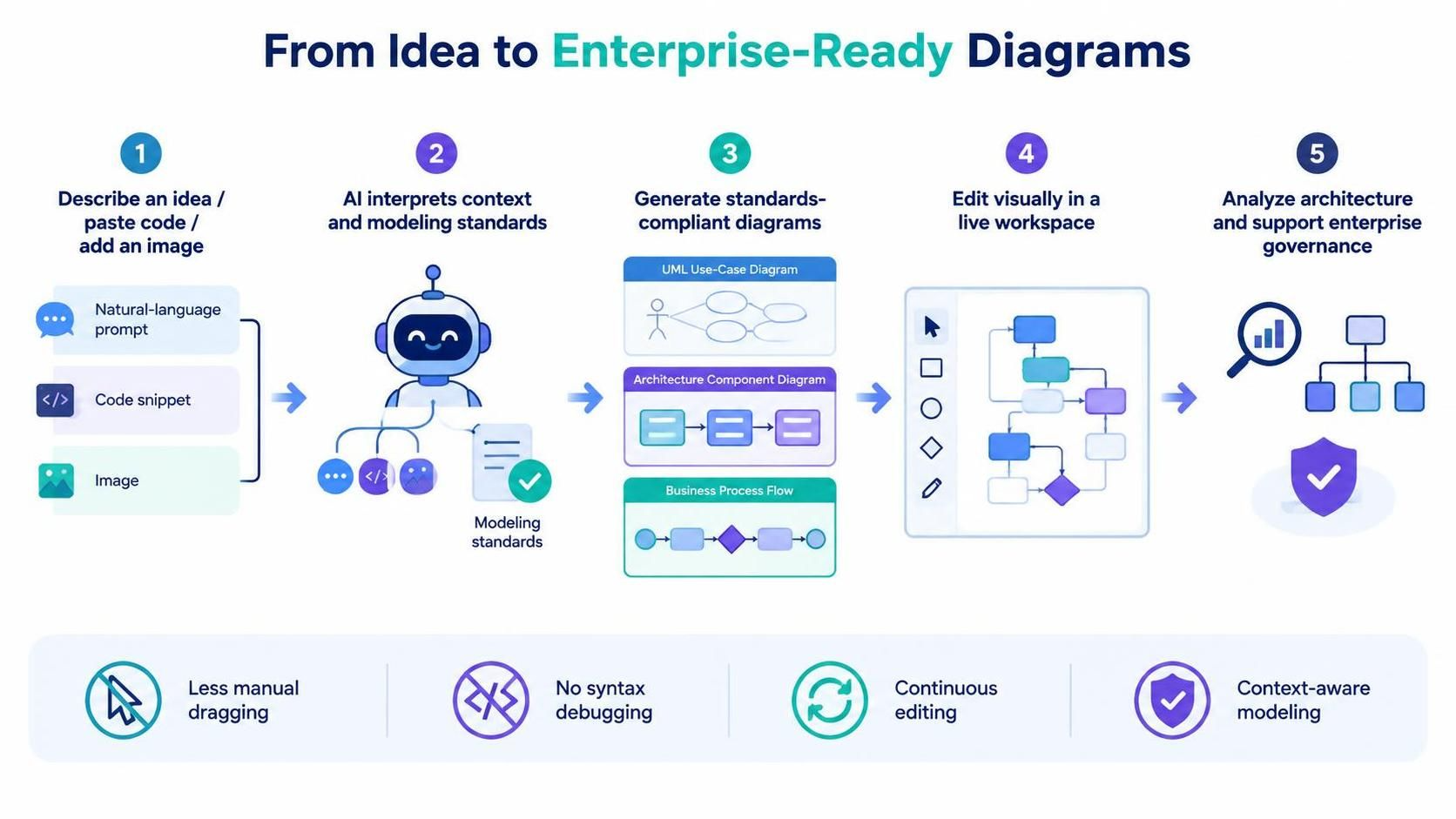
In the modern landscape of software architecture and business process design, the gap between a raw idea and a professional visualization has historically been a significant bottleneck. Traditionally, creating standards-compliant diagrams required deep knowledge of modeling syntax, meticulous manual dragging of shapes, or debugging complex “diagram-as-code” scripts. While general-purpose Large Language Models (LLMs) can generate code snippets, they often lack the contextual awareness and visual editing capabilities required for enterprise-grade work.
Enter the Visual Paradigm AI Chatbot. This specialized conversational modeling assistant transforms plain-language prompts, existing code, and even images into standards-compliant technical diagrams. Unlike generic text generators, it integrates directly into a live visual modeling workspace, enabling continuous editing, architectural analysis, and enterprise governance. This guide explores how this tool bridges the divide between natural language and professional modeling.
The Core Architecture of AI-Assisted Modeling
The Visual Paradigm AI Chatbot represents a shift from static text generation to dynamic, interactive modeling. Its architecture is designed to understand not just the syntax of a diagram, but the semantic meaning of the request within the context of the entire enterprise system.
At its core, the system functions as a bridge between unstructured inputs (like a casual text prompt or a hand-drawn sketch) and structured outputs (like UML or BPMN diagrams). It achieves this by leveraging a specialized engine that understands modeling standards, allowing it to interpret context and generate diagrams that are ready for immediate use.
Step 1: Diverse Input Modalities
The process begins with the input phase, where the AI accepts various forms of data to initiate the modeling process. This flexibility allows architects and product managers to start working from their preferred medium of expression.
- Natural Language Prompts: Users can simply describe a system, a process, or a component interaction in plain text. The AI parses this text to identify actors, use cases, or process steps.
- Code Snippets: For developers, the AI can analyze existing programming code to reverse-engineer architecture diagrams, ensuring the visual model stays in sync with the codebase.
- Images: Users can upload hand-drawn sketches or existing diagram images, and the AI will interpret the visual elements to generate a digital, editable version.
Step 2: Contextual Interpretation & Standards Enforcement
Once the input is received, the AI enters an interpretation phase. Unlike simple text generators, this system applies strict Modeling Standards to the output. It understands the rules governing specific diagram types, such as the correct placement of gateways in a Business Process Model and Notation (BPMN) flow or the correct relationship types in a UML Component Diagram.
The AI ensures that the generated diagram is not just a rough sketch but a valid, standards-compliant artifact that can be used for documentation and analysis.
Step 3: Standards-Compliant Generation
The system then generates the actual diagram. Based on the interpretation, it can produce a variety of diagram types, including:
- UML Use-Case Diagrams: Mapping out system functionality and user interactions.
- Architecture Component Diagrams: Visualizing the high-level structure of the software system.
- Business Process Flows: Defining the sequence of operations and decision points.
Live Workspace Integration: The Power of Continuous Editing
One of the most distinct advantages of the Visual Paradigm AI Chatbot is its integration into a live visual workspace. Once the AI generates a diagram, it is not a static image or a locked file. It is an editable canvas where the user can refine the output.
This workflow eliminates the need for “diagram-as-code” debugging. If the AI misses a detail or if the user wants to add a new step, they can simply interact with the diagram visually. The chatbot remains available to assist with further edits, ensuring that the modeling process remains a continuous, conversational loop rather than a linear, one-off generation task.
Key Benefits of the Live Workflow
The transition from generation to live editing offers several strategic advantages for enterprise teams:
- Less Manual Dragging: The AI handles the heavy lifting of placing shapes and connecting lines, reducing the mechanical time spent on layout.
- No Syntax Debugging: Because the AI understands the underlying modeling rules, users avoid the frustration of syntax errors common in code-based modeling tools.
- Continuous Editing: The diagram evolves alongside the project, allowing for real-time updates as requirements change.
- Context-Aware Modeling: The AI maintains the context of the entire project, ensuring consistency across different diagrams.
Step 5: Analyze and Govern Enterprise Architecture
The final stage of the workflow is analysis and governance. Once the diagram is finalized in the live workspace, it becomes a powerful asset for the organization. The tool allows architects to perform architectural analysis, checking for gaps, redundancies, or inefficiencies in the design.
This capability supports enterprise governance by ensuring that all visualized processes and architectures adhere to company standards and best practices. The diagrams are not just for documentation; they are functional tools for understanding and improving the business.
Conclusion
The Visual Paradigm AI Chatbot represents the future of system design. By combining the speed of natural language processing with the precision of enterprise modeling standards, it empowers architects, product managers, and developers to move seamlessly from idea to execution. It removes the technical barriers to high-quality diagramming, allowing teams to focus on the logic and structure of their systems rather than the mechanics of drawing them.