
Mastering Dynamic Loop Constructs and Event-Based Timing in BPMN
In the realm of Business Process Model and Notation (BPMN), the ability to represent time and repetition is fundamental to creating accurate, executable process maps. Visual Paradigm elevates these standard capabilities by integrating intelligent modeling rules and simulation-ready logic. This tutorial explores how to move beyond static diagrams to create dynamic workflows that handle iterative loops and time-sensitive event triggers, ensuring your models are robust enough for real-world complexity.
The Anatomy of a Process Loop
At the heart of many business processes is the concept of a “loop”—a sequence of activities that must be repeated until a specific condition is met. In Visual Paradigm, this is not merely a drawing exercise; it is a structured modeling capability that defines the lifecycle of a task.
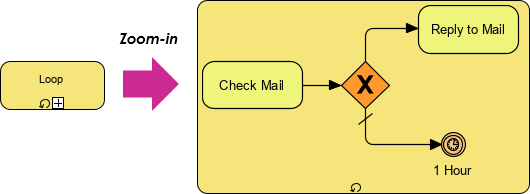
Consider a scenario where an employee must check incoming correspondence. A simple linear flow implies the task happens once. However, business reality often demands that if a specific action (like a reply) is required, the process must cycle back or terminate based on the outcome. This is where the Loop Activity element becomes critical.
- The Container: The loop is encapsulated within a specialized boundary, often represented visually as a rounded rectangle with a distinct icon (a circular arrow). This boundary signals to the reader and the simulation engine that the enclosed activity is not a standalone event but a repeated action.
- The Trigger: The “Loop” is initiated by the entry of the process. The engine enters the loop, executes the contained task, and then evaluates the exit condition.
- The Exit Condition: The loop continues only as long as the condition is true. Once the condition evaluates to false (e.g., “No new emails”), the flow exits the loop and proceeds to the next step in the process.
Event-Based Decision Making
While standard gateways (diamonds) rely on data-driven decisions (e.g., “If amount > $100, go left; else go right”), complex processes often rely on Event-Based Gateways. This is where time and external events dictate the flow of the process.
In the context of our workflow, imagine a scenario where a user has a choice: they can reply to an email immediately, or they can wait for a specific duration. This is modeled using an Event Gateway (often represented as a diamond with a double-lined border).
This gateway creates parallel paths that are triggered by different types of events:
- Message Event: The system waits for an external signal, such as a “Reply to Mail” action. This path is non-deterministic and relies on human interaction or system messaging.
- Timer Event: The system waits for a specific duration (e.g., “1 Hour”). If the timer expires before the message event occurs, the process follows the alternative path.
This structure ensures that the process does not hang indefinitely. It enforces a “timeout” mechanism, which is crucial for automated workflows that must maintain efficiency and prevent bottlenecks.
From Static Diagram to Dynamic Simulation
The true power of Visual Paradigm lies in its ability to validate these complex structures. When you construct a loop containing an event gateway, the tool applies smart connection rules. It checks if the paths are valid, ensuring that every loop has an exit condition and that event gateways are properly synchronized.
Furthermore, the simulation tools allow you to “play” the process. You can observe the execution of the loop in real-time. If the “Reply to Mail” action occurs within 5 minutes, the timer path is cancelled, and the process completes. If the reply does not happen, the “1 Hour” timer triggers, and the process branches to the timeout path. This dynamic insight transforms your diagram from a static map into a predictive model of system behavior.
Best Practices for Complex Process Modeling
To maintain clarity in your models, especially when dealing with nested loops and event gateways, follow these architectural principles:
1. Maintain Clean Master Views
Visual Paradigm supports process drill-down features. If a loop or event gateway becomes too complex, consider collapsing it into a sub-process. This keeps your high-level master view clean while allowing you to expand the details only when necessary for deep dives into nested complexities.
2. Ensure Deterministic Exits
When designing loops, always ensure there is a clear, guaranteed exit. An infinite loop without a timeout or a breaking condition is a common modeling error that can cause simulation engines to fail or processes to hang indefinitely in production.
3. Utilize Swimlanes for Responsibility
As you expand your process to include these dynamic elements, use swimlanes to partition responsibilities. Clearly assign who is responsible for the “Reply to Mail” action versus who is responsible for handling the “1 Hour” timeout. This separation of duties is vital for auditing and process improvement.
By mastering these elements—the Loop, the Event Gateway, and the Timer—you transition from creating simple flowcharts to designing intelligent, resilient business systems capable of handling the nuances of real-world operations.