
Mastering the VP Unified Platform: Architecture and Workflow
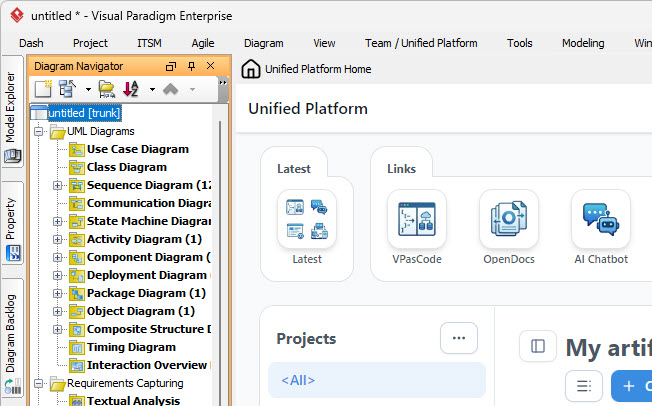
Welcome to this comprehensive guide on the Visual Paradigm Unified Platform. In modern enterprise architecture and software engineering, the ability to switch seamlessly between heavy-duty modeling and lightweight collaboration is critical. This tutorial explains the architectural philosophy behind the “Hub,” how local engineering meets cloud collaboration, and how the ecosystem functions as a single, unified environment.
1. The Concept: The Unified Platform as a “Front Door”
Traditionally, modeling tools were siloed desktop applications. You opened a program, worked on a model, saved a file, and then had to manually upload it to a server for others to see. The Unified Platform eliminates this friction. It acts as the central dashboard and “front door” to your entire digital ecosystem.
Instead of requiring users to open multiple applications independently, the Unified Platform provides a central place to:
- Navigate Projects: View the hierarchy of your work without launching a separate file manager.
- Launch Specialized Tools: Start a modeling session or a web-based editor directly from the dashboard.
- Unified Artifact View: See local desktop artifacts (like diagrams saved on your hard drive) and cloud-based files in one central list.
- Create Instantly: Initiate new projects or diagrams through a unified creation workflow.
2. The Core Components of the Ecosystem
The Visual Paradigm ecosystem is built on three distinct but integrated pillars that allow for flexible workstyles.
3.2 Unified Drive: The Centralized Asset Manager
Think of the Unified Drive as the brain of the operation. It is a centralized asset manager that organizes a project’s artifacts—diagrams, models, documents, and files—into a single coherent repository.
The most significant architectural feature here is the hybrid file system. It makes local desktop data and cloud application data behave as one file ecosystem. This means you can edit a model locally, and the system handles the synchronization logic so that the cloud version is always up to date, and vice versa.
3.3 VP Desktop: The Engineering Engine
VP Desktop is the full-featured desktop suite designed for detailed, standards-based engineering. This is where the heavy lifting happens. It supports complex modeling languages including:
- UML (Unified Modeling Language): For software architecture.
- BPMN (Business Process Model and Notation): For business process flow.
- SysML (Systems Modeling Language): For systems engineering.
- ArchiMate: For enterprise architecture.
- ER/Database Modeling: For data schema design.
- Code Generation: Turning models into executable code.
When you save a detailed model created in Desktop, it is saved to a local or connected repository. Crucially, these artifacts immediately become visible in the Unified Platform, making the desktop tool a “fully connected citizen of the digital ecosystem.”
3.4 VP Online: The Cloud Side
VP Online represents the browser-based half of the ecosystem. It is designed for web access, online diagramming, real-time collaboration, and lightweight work.
While the Desktop version is for deep engineering, VP Online is for the “broader home.” It allows teams to view diagrams, comment on models, and perform focused work without needing to install the heavy desktop client. The Unified Platform acts as the container that houses these cloud apps.
3.5 The VPasCode Ecosystem: AI-Driven Interaction
Modernizing the workflow, the VPasCode ecosystem introduces AI-driven intelligence. It serves as the “home” for finding applications, performing actions, and sending or creating artifacts to the workspace.
This component transforms the platform from a passive storage system into an active assistant. By integrating AI, users can:
- Find Apps: Instantly locate the specific modeling tool needed for a task.
- Perform Actions: Execute commands or workflows via natural language or shortcut triggers.
- Create Artifacts: Generate models or diagrams and send them directly to the workspace.
Summary: The Workflow
The power of the Visual Paradigm Unified Platform lies in the seamless transition between these states:
- Start: You access the Unified Platform (the Hub) to see your latest projects.
- Model: You launch VP Desktop for deep, offline modeling work using standards like UML or BPMN.
- Sync: Upon saving, the model appears in the Unified Drive, bridging the local and cloud worlds.
- Collaborate: Team members access VP Online via the browser to view, comment, or edit the model in real-time.
- Enhance: Throughout the process, VPasCode assists with finding resources and automating actions.