
Mastering the VP Unified Platform: Architecting a Connected Enterprise Workspace
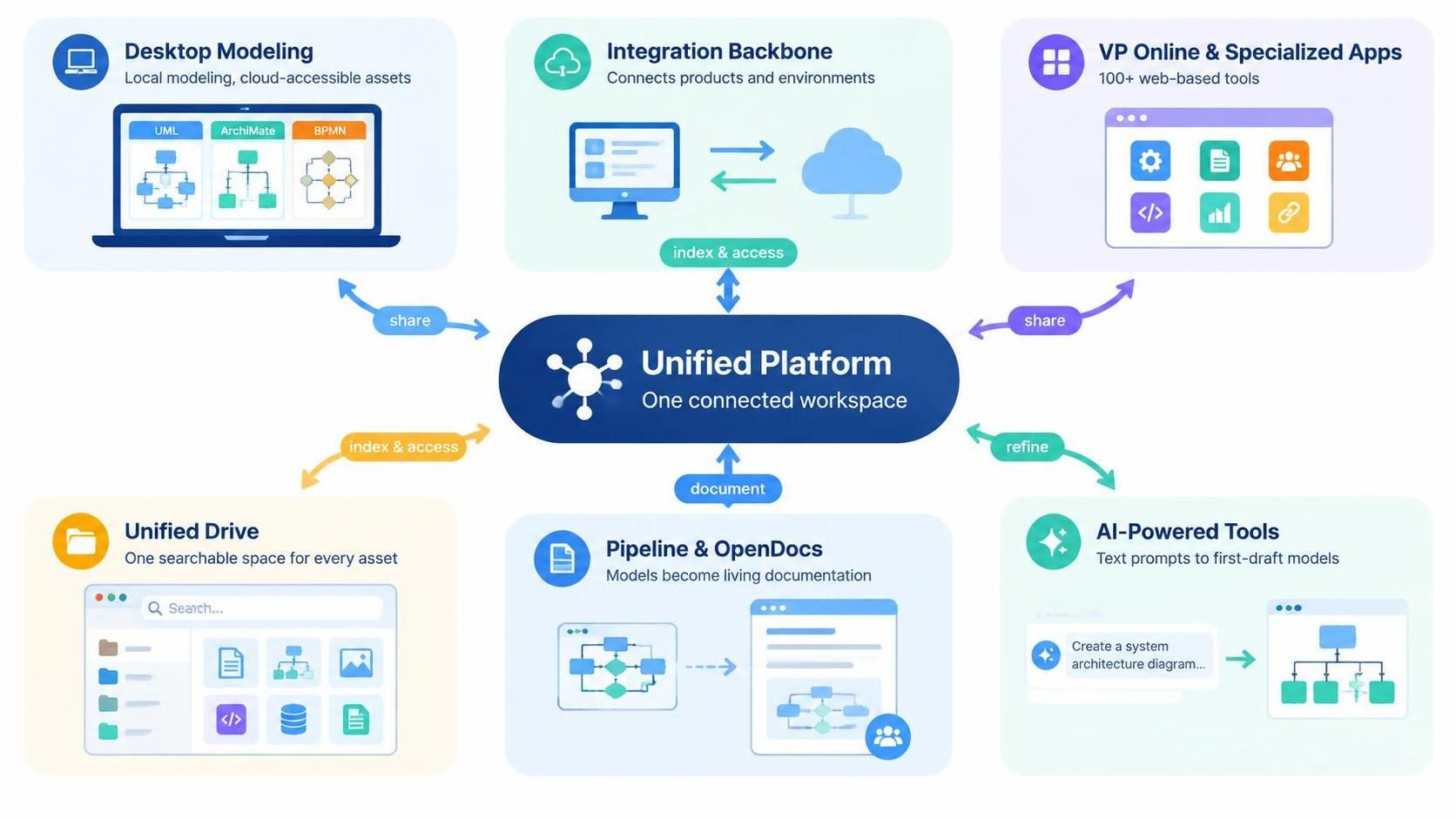
In the modern landscape of enterprise architecture and software development, the “tool sprawl” problem is pervasive. Teams often find themselves siloed, using desktop modeling tools for heavy lifting while simultaneously managing agile workflows in the cloud and documentation in wikis. This fragmentation leads to version control nightmares and significant context-switching costs. The solution lies in a paradigm shift from using isolated tools to utilizing a cohesive ecosystem. This tutorial explores the architecture of the Visual Paradigm Unified Platform, a central coordination layer introduced to dissolve these boundaries and create a single source of truth.
The Core Architecture: A Centralized Nervous System
At the heart of this ecosystem is the Unified Platform. Think of this not merely as a software launcher, but as the central nervous system connecting disparate environments. It serves as the “front door” and command center, bridging the gap between heavy local modeling capabilities and agile cloud collaboration. The architecture is designed to ensure that data flows freely between different environments, eliminating the need for manual exports and imports.
1. The Integration Backbone
The Integration Backbone acts as the connective tissue of the platform. It is responsible for indexing and accessing assets regardless of where they are created. This ensures that a model created on a local machine is immediately visible and accessible within the cloud environment, and vice versa. This bidirectional synchronization is crucial for maintaining data integrity across the organization.
2. Desktop Modeling & Cloud Accessibility
The ecosystem acknowledges the power of local processing. Visual Paradigm Desktop remains the powerhouse for creating complex diagrams such as UML, ArchiMate, and BPMN. The Unified Platform ensures that these local models are automatically indexed. This allows users to leverage the heavy processing power of desktop applications while still having their assets seamlessly accessible via cloud apps and AI features. This hybrid approach solves the traditional limitation of desktop tools being “offline” silos.
3. VP Online & Specialized Apps
For agile management and specialized design, the platform acts as a centralized app launcher. It hosts an expansive catalog of over 100 web-based tools spanning domains like database design, UX wireframing, and business analysis. This “One connected workspace” philosophy means that instead of switching between five different browser tabs, users can access all specialized tools from a single dashboard.
Unified Drive: The Searchable Asset Repository
One of the most significant friction points in enterprise software is file management. The Unified Drive addresses this by acting as a single, drive-like repository. It automatically indexes and organizes every asset—whether it is a web design, a cloud diagram, or a desktop project export—into a searchable, unified space. This ensures that no artifact is ever lost in a local folder or an obscure cloud directory. It transforms file management from a manual task into an automated, discovery-friendly process.
Pipeline & OpenDocs: Models as Living Documentation
A critical function of the Unified Platform is the ability to connect raw modeling data directly to living documentation tools. This is achieved through the Pipeline & OpenDocs feature. Rather than taking static screenshots of diagrams for a report, users can drag and drop local diagrams directly into web-based documents. This turns technical specifications into collaborative web knowledge bases that stay up-to-date with the underlying models. When a model changes, the documentation automatically reflects that change, ensuring the “single source of truth” remains valid.
AI-Powered Tools: Text to Model
The platform integrates Natural Language Processing (NLP) engines directly into the workspace. AI-Powered Tools, such as the AI Diagramming Chatbot, allow users to build rapid first-draft models from text prompts. This democratizes modeling, allowing non-technical stakeholders to visualize ideas quickly. These drafts can then be exported to Desktop for refinement or shared immediately via VP Online, bridging the gap between abstract concepts and concrete architectural models.
Conclusion
The Visual Paradigm Unified Platform represents a shift from managing software tools to managing a workflow ecosystem. By integrating Desktop modeling, cloud apps, a unified drive, and AI capabilities into a single command center, it eliminates the friction of fragmented workflows. For architects, analysts, and developers, this platform provides the necessary infrastructure to focus on value creation rather than file management and tool switching.