
From Chat to Code: Mastering the AI Chatbot Integration in VPasCode
In the modern era of software engineering, the gap between conceptual thinking and technical implementation is often bridged by a tedious manual process of memorizing syntax and writing boilerplate code. VPasCode revolutionizes this workflow by introducing a seamless integration with the Visual Paradigm AI Chatbot. This tutorial explores how to leverage this powerful tool to transform natural language descriptions into fully editable, professional-grade architectural diagrams.
The Paradigm Shift: Conversational Design
Traditionally, creating a Use Case Diagram or a Sequence Diagram requires the architect to know specific syntax rules for tools like PlantUML or Mermaid. If you want to model a food delivery app, you have to remember that a customer actor is defined by specific keywords and that an “include” relationship requires a distinct arrow type.
The AI Chatbot integration removes this barrier. It functions as a conversational interface where you simply describe what you want to visualize. The AI acts as the bridge, converting your natural language requirements into executable diagram code, which can then be transferred instantly into the full VPasCode editor for refinement.
Step-by-Step: The Workflow
Let’s walk through the lifecycle of creating a complex system diagram using the AI Chatbot and VPasCode.
Step 1: Initiating the Conversation
Begin by accessing the AI Chatbot interface. The system is specifically trained on diagram syntax and architectural patterns. You do not need to load a template; you start with a blank slate.
Step 2: Describing the Architecture
This is where your domain knowledge comes in. Instead of writing code, you describe the actors and the system boundaries. For example, if you are designing a food delivery platform, your prompt might look like this:
“Create a use case diagram for a food delivery app. Include customers, delivery drivers, and restaurant managers. Show how they interact with the main application.”
Step 3: Reviewing the AI Output
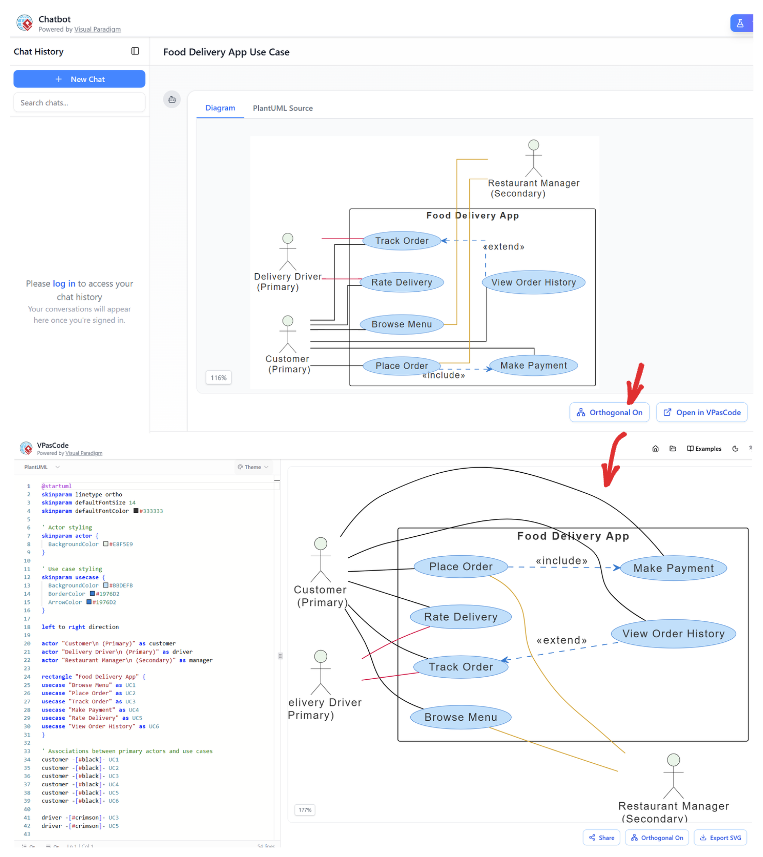
Once the prompt is sent, the AI generates a complete diagram. It identifies the primary actors (Customer, Driver) and secondary actors (Restaurant Manager). It also correctly infers relationships, such as “Browse Menu” or “Track Order.”
Step 4: The Critical Integration – “Open in VPasCode”
This is the most powerful feature of the workflow. You will see a button labeled Open in VPasCode.
- The Action: Clicking this button transfers the complete diagram code and visual state to the VPasCode editor.
- The Result: The diagram loads with all syntax preserved. You are no longer in the “view-only” chat interface; you are now in the full, robust editor.
Step 5: Refinement and Customization
Once in VPasCode, the diagram becomes fully editable. You can modify the text syntax directly if the AI missed a nuance, switch between rendering engines, or add complex styling parameters. The diagram is ready for version control, export, or team collaboration.
Advanced Capabilities: Beyond Generation
The AI integration is not just a generator; it is an intelligent assistant that can verify and refine your architecture.
Automated Verification
The AI can parse your generated diagrams to identify potential issues. It looks for:
- Missing relationships or dependencies.
- Alternative user routes and edge cases.
- Architectural anti-patterns.
Iterative Refinement
You can continue the conversation to modify the diagram without losing context. For instance, you can ask the AI to “Add a caching layer between the API and database” or “Show error handling paths in red,” and it will update the underlying code structure.
C4 Hierarchical Modeling
The tool supports the C4 model for multi-level architecture documentation. You can generate diagrams at different abstraction levels:
- Context Level: High-level system boundaries.
- Container Level: Application and data store relationships.
- Component Level: Internal service structures.
- Code Level: Class and interface diagrams.
Conclusion
By combining the speed of natural language processing with the precision of VPasCode’s syntax-driven editor, teams can drastically reduce the time spent on documentation. The workflow transforms from “write code, check syntax, render” to “describe, render, and refine.”