
Architecting the Enterprise Digital Home Base with the VP AI Ecosystem
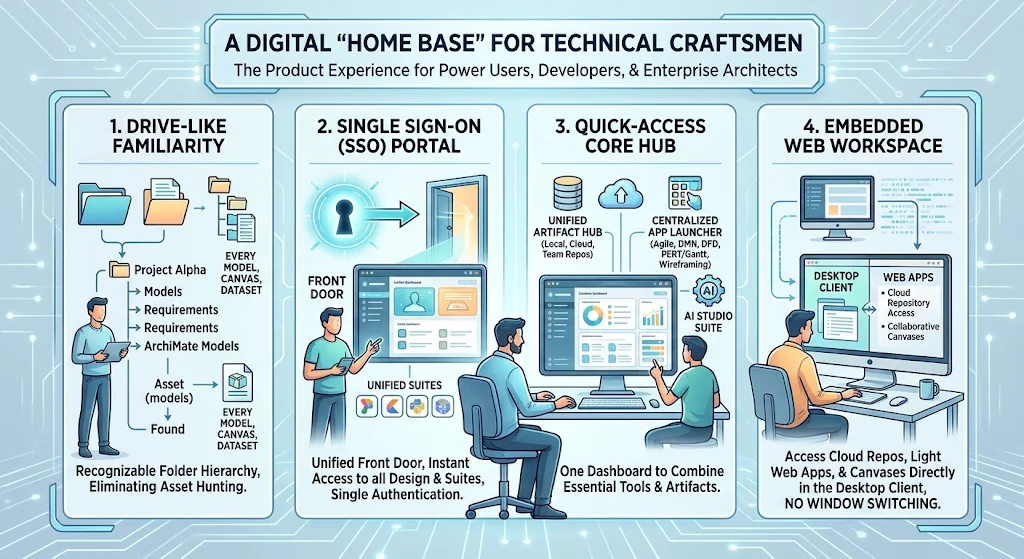
In the modern software engineering landscape, the “tool sprawl” phenomenon creates a fractured environment where data is siloed, access is fragmented, and the “single source of truth” becomes a myth. The Visual Paradigm Unified Platform addresses this by transforming the ecosystem into a cohesive digital home base. This tutorial explores the architectural philosophy and user experience design behind this platform, focusing on how it unifies modeling, requirements, and application development into a streamlined workflow.
Whether you are a Technical Craftsperson, an Enterprise Architect, or a Developer, understanding the flow from the “Front Door” to the “Web Workspace” is essential for maximizing the platform’s potential.
1. The Foundation: Drive-Like Familiarity
The first principle of the platform is usability through familiarity. Traditional modeling tools often bury assets in complex, proprietary directory structures that require extensive training to navigate. The Unified Platform solves this by adopting a file-system metaphor that is intuitive to all users.
Organizing the Chaos
At the core of this architecture is the Project Alpha concept. Instead of hiding models within database blobs or obscure paths, the platform organizes assets into a recognizable folder hierarchy.
- Models: Stored in a dedicated directory for easy access.
- Requirements: Separated logically to track business needs independently from design.
- ArchiMate Models: Included for high-level enterprise architecture views.
- Asset Discovery: The system utilizes an index that “Finds” assets, ensuring that whether you are working with Canvas, Dataset, or Model files, they are always discoverable.
This structure eliminates “asset hunting,” allowing engineers to focus on the engineering task rather than the file management system.
2. The Entry Point: Single Sign-On (SSO) Portal
Security and speed are often at odds in enterprise environments. The Unified Platform bridges this gap with a Single Sign-On (SSO) mechanism, acting as the “Front Door” to the ecosystem.
The Unified Dashboard
Upon authentication, the user is presented with a centralized dashboard. This is not merely a login screen but a command center. It aggregates access to all Design & Suites, providing:
- Instant Access: One click to launch the necessary tool.
- Unified Authentication: You log in once, and the platform manages the session across all connected tools.
- Role-Based Visibility: The dashboard adapts to show only the suites relevant to your specific role (e.g., Developer vs. Architect).
3. The Core Hub: Quick-Access Architecture
Once inside the platform, the architecture shifts to performance and integration. This is the “Quick-Access Core Hub,” where the heavy lifting of data management and application orchestration occurs.
Unifying the Artifact Lifecycle
The platform treats artifacts—whether they are Agile backlogs, UML diagrams, or DFD charts—as first-class citizens stored in a Unified Artifact Hub. This hub supports:
- Local & Cloud Storage: Seamlessly switch between local repositories and cloud-based team repos.
- Centralized App Launcher: A unified interface to launch specific applications like Agile, BPMN, DFD, PERT/Gantt, and Wireframing tools.
The AI Studio Suite
Modern engineering is powered by intelligence. The platform integrates an AI Studio Suite that sits at the center of the workflow. This allows users to generate models, analyze requirements, and optimize diagrams using AI, all without leaving the core hub.
4. The Workspace: Embedded Web & Desktop Integration
The final layer of the architecture addresses the friction of context switching. In traditional setups, an architect might work in a desktop client while a developer works in a browser, requiring constant window switching and leading to version conflicts.
The “No Window Switching” Philosophy
The Unified Platform offers an Embedded Web Workspace that integrates directly into the Desktop Client. This is a critical architectural decision that enhances productivity.
Key Features of the Workspace:
- Desktop Client Integration: Users access cloud repositories and web apps directly within the desktop interface.
- Collaborative Canvases: Real-time collaboration is supported without needing to open a separate browser tab.
- Unified View: The distinction between “Desktop App” and “Web App” blurs, creating a singular, fluid experience.
This setup ensures that whether you are a power user on a powerful workstation or a light user on a tablet, the experience remains consistent and the data remains synchronized.
Conclusion
The Visual Paradigm Unified Platform represents a shift from managing software tools to managing a software ecosystem. By addressing the operational costs of tool sprawl and delivering a unified digital home base, it transforms visual modeling from a fragmented task into a streamlined, enterprise-grade engineering discipline.
Whether you are leveraging the Drive-Like Familiarity for asset management or the Embedded Web Workspace for seamless collaboration, the platform provides the structural integrity needed for modern software development.