
Mastering Business Process Modeling with VPasCode: From Concept to Mermaid Execution
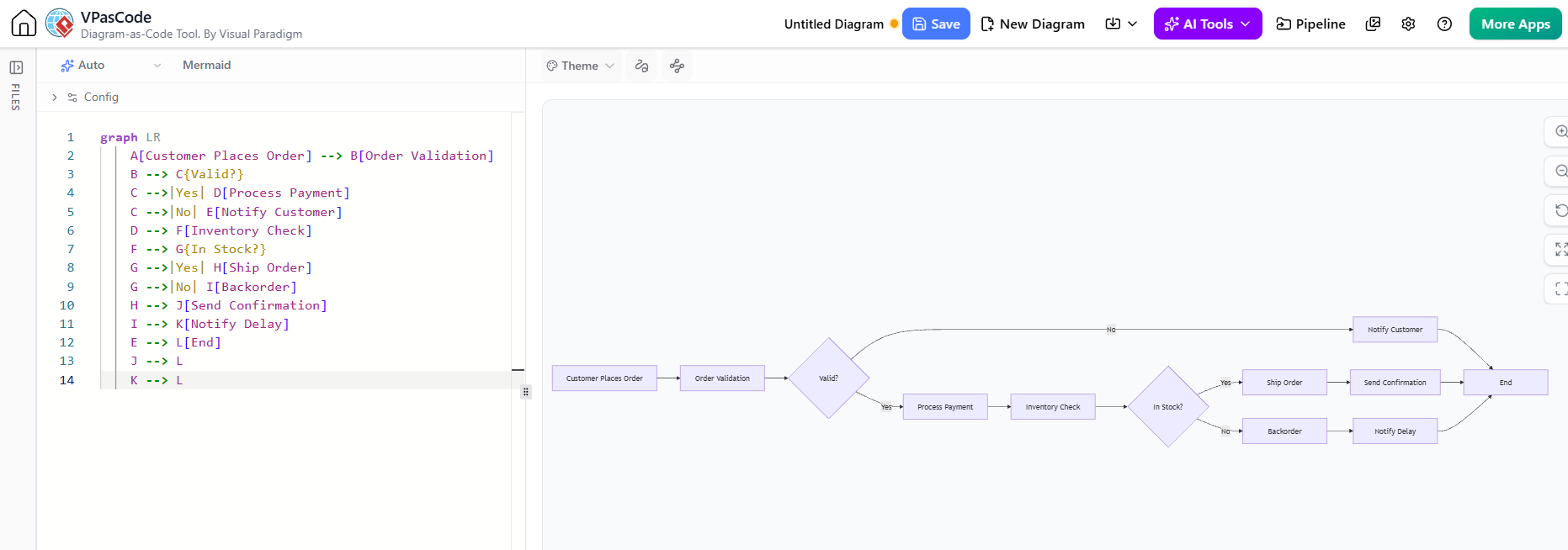
In the realm of enterprise architecture and business analysis, the ability to translate complex workflows into clear, executable diagrams is a critical skill. Visual Paradigm’s VPasCode tool bridges the gap between human-readable logic and machine-executable code, allowing analysts to define system behaviors using a clean syntax that automatically renders into professional diagrams.
This tutorial explores the architecture of an Online Order Processing System. We will dissect the workflow from the moment a customer places an order to the final notification of delivery or backorder status. By understanding the underlying Mermaid.js logic within VPasCode, you can efficiently design, document, and align stakeholder expectations regarding business processes.
The Anatomy of the Business Logic
The diagram presented is a classic Flowchart (specifically using the graph LR or Left-to-Right layout). This structure is ideal for visualizing decision points and sequential actions. The logic follows a deterministic path where specific conditions (Yes/No) dictate the flow of execution.
Let us break down the key components of the system architecture shown:
- Entry Point: The process begins at
A[Customer Places Order]. This represents the trigger event for the entire workflow. - Validation Gate: The first critical decision node is
C{Valid?}. Before any resources are committed, the system must verify the integrity of the incoming data.- Branching Logic: If the validation fails, the flow diverts immediately to
E[Notify Customer], preventing further processing costs.
- Branching Logic: If the validation fails, the flow diverts immediately to
- Transaction & Inventory Core: Upon successful validation, the system proceeds to
D[Process Payment]andF[Inventory Check]. This parallel or sequential check ensures that financial solvency and physical stock availability are met before fulfillment. - Fulfillment Decision: The node
G{In Stock?}is the pivot point for logistics.- Success Path: If items are available, the system executes
H[Ship Order]followed byJ[Send Confirmation]. - Failure Path: If items are unavailable, the system enters a backorder state
I[Backorder], triggering a delay notificationK[Notify Delay].
- Success Path: If items are available, the system executes
- Termination: The process concludes at node
L[End]. All logical paths (whether successful shipment, backorder, or immediate rejection) converge here, ensuring the diagram is a complete, closed loop.
Understanding the VPasCode Syntax
The power of VPasCode lies in its ability to parse text into visual representations. The syntax used in the screenshot relies on the Mermaid.js graphing library. Each line of code defines a relationship between two nodes.
Here is the raw logic that drives the visualization. Notice how the text on the left represents the “Source” and the text on the right represents the “Destination.”
graph LR
    A[Customer Places Order] --> B[Order Validation]
    B --> C{Valid?}
    C -->|Yes| D[Process Payment]
    C -->|No| E[Notify Customer]
    D --> F[Inventory Check]
    F --> G{In Stock?}
    G -->|Yes| H[Ship Order]
    G -->|No| I[Backorder]
    H --> J[Send Confirmation]
    I --> K[Notify Delay]
    E --> L[End]
    J --> L
    K --> L
Key syntax elements to observe include:
- Node Identification: Nodes are identified by a unique ID (e.g.,
A,B) followed by their label in brackets[Label]or braces{Decision}. - Directional Flow: The operator
-->signifies a directed edge. It tells the renderer that information flows from left to right. - Labeled Edges: The syntax
|Yes|or|No|acts as a label for the connection line itself. This is crucial for business diagrams where a single decision point often branches into multiple outcomes.
Implementation Strategy with AI Generation
In modern enterprise workflows, you do not need to manually type every line of Mermaid code. The Visual Paradigm environment integrates AI generation capabilities. This allows you to describe the process in natural language, and the tool generates the VPasCode syntax for you.
For instance, an AI prompt could be: “Create a flowchart for an e-commerce order process that checks inventory and handles backorders.” The AI would then output the exact code structure seen in the screenshot, which you can then tweak manually if specific business rules change.
Conclusion
By utilizing VPasCode, organizations can maintain their business process models as code. This ensures version control, easy editing, and seamless integration into documentation pipelines. The Online Order Process we analyzed serves as a foundational template for more complex workflows, demonstrating how simple text lines can orchestrate intricate business logic.