
Mastering Multilingual UML with VPasCode and AI Chatbots
In the era of distributed engineering teams, technical documentation often becomes a bottleneck. A process flow designed by an architect in the United States might be difficult for a developer in Shanghai to interpret if the terminology isn’t native to their workflow. Visual Paradigm addresses this challenge by integrating powerful AI capabilities directly into the modeling environment.
This tutorial explores how to leverage the VPasCode Tool and integrated AI Chatbot to manage complex UML Activity Diagrams across language barriers. We will walk through the architecture of a webhook processing system, demonstrating how to maintain a single source of truth while generating instant, accurate translations for global stakeholders.
Understanding the System Architecture
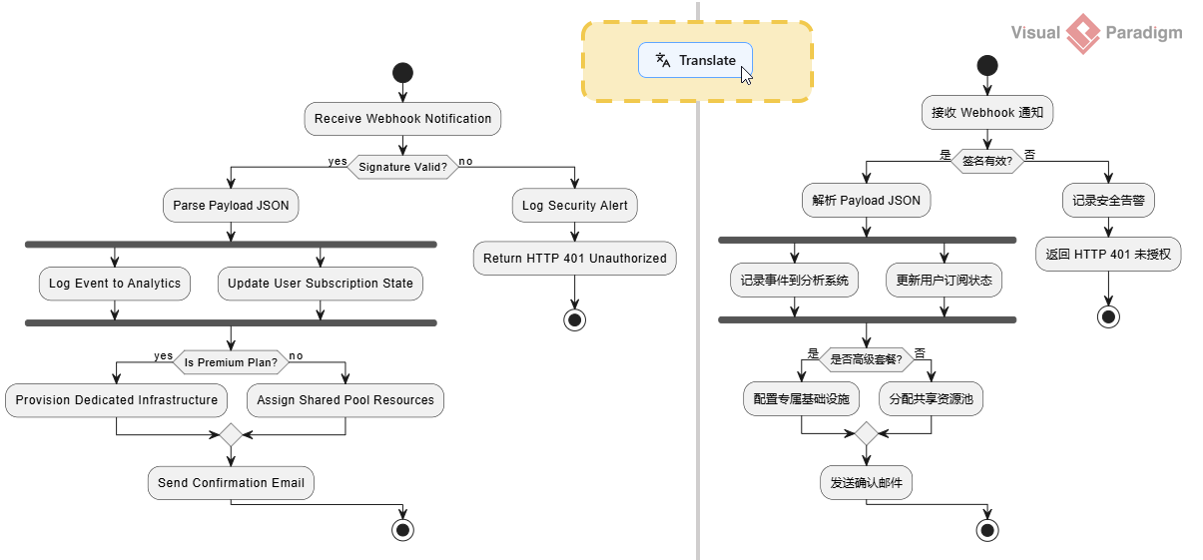
The diagram provided illustrates a robust Webhook Processing Workflow. This type of activity diagram is critical for backend systems where asynchronous events (like payment confirmations or status updates) trigger immediate actions. The flow is divided into three distinct phases: Authentication, Business Logic, and Resource Allocation.
1. Authentication and Security
The process begins at the top with a Start Node, immediately triggering a check for a Webhook Notification. Security is paramount in this phase. The diagram depicts a decision diamond labeled “Signature Valid?”. This represents a cryptographic verification step where the system checks the incoming data’s integrity.
- Valid Path (Yes): The system proceeds to parse the payload.
- Invalid Path (No): The system triggers a Log Security Alert and returns an
HTTP 401 Unauthorizedstatus, effectively blocking unauthorized access.
2. Data Processing and Analytics
Once the payload is parsed (JSON), the system enters a Parallel Fork (indicated by the thick horizontal bar). This is a key concept in UML Activity Diagrams, representing concurrent processing.
- Analytics Path: The event is logged to an analytics database for monitoring and historical data.
- State Path: The user’s subscription state is updated in the database.
These parallel paths converge at a Join Node, ensuring that the next step only occurs once both background tasks are complete.
3. Resource Allocation Logic
The core business logic determines how infrastructure is provisioned based on the user’s tier. The diagram checks: “Is Premium Plan?”.
- Premium User: Triggers the provisioning of Dedicated Infrastructure (e.g., a dedicated server or high-performance container).
- Standard User: Assigns Shared Pool Resources (e.g., a standard shared hosting environment).
Finally, a Confirmation Email is sent to the user, and the process terminates.
Implementing AI-Powered Translation
The image highlights a specific feature: the Translate tool (indicated by the magnifying glass and cursor icon). This feature is not merely a text overlay; it is a functional bridge between the diagram’s logic and the user’s local language.
When working with global teams, you might start with a diagram in English. However, for the diagram to be effective in a Chinese-speaking team, the labels must be localized without altering the underlying model logic. Visual Paradigm’s AI engine ensures that technical terms are translated contextually.
Comparing the Localized Model
Let’s analyze the translation logic applied in the diagram provided:
| Concept | English Term | Chinese Translation | Technical Context |
|---|---|---|---|
| Receive Webhook Notification | Receive Webhook Notification | 接收 Webhook 通知 | The initial trigger event. |
| Signature Valid? | Signature Valid? | 签名有效? | HMAC or JWT verification check. |
| Parse Payload JSON | Parse Payload JSON | 解析 Payload JSON | Deserialization of incoming data. |
| Log Event to Analytics | Log Event to Analytics | 记录事件到分析系统 | Writing to a data lake or SIEM. |
| Provision Dedicated Infrastructure | Provision Dedicated Infrastructure | 配置专属基础设施 | Resource scaling for high-tier users. |
Notice how the translation preserves the technical acronyms (JSON, HTTP, Webhook) while translating the descriptive verbs and nouns. This balance is crucial for maintaining technical accuracy.
Step-by-Step: How to Use the Translation Feature
To replicate this workflow in your own modeling sessions, follow these steps using the Visual Paradigm interface:
- Open Your Diagram: Load the activity diagram containing the process logic.
- Access the Tooling Menu: Locate the VPasCode Tool or the AI integration menu within the toolbar.
- Initiate Translation: Click the Translate button (often represented by an icon like a globe or a ‘A’ with an arrow).
- Select Target Language: Choose the target language (e.g., Chinese, Japanese, German) from the dropdown menu.
- Execute: The AI Chatbot will scan the diagram elements. It will automatically update the text labels on the activity nodes, decision diamonds, and text objects.
- Verify: Review the diagram to ensure the flow remains logical and the terminology fits your specific domain requirements.
Conclusion
By utilizing AI translation tools within your modeling software, you eliminate the friction of language barriers. The diagram above serves as a prime example of how a single, unified model can serve a diverse, international audience. Whether you are documenting a webhook handler or designing a complex cloud architecture, ensuring your diagrams are accessible to all stakeholders is the first step toward successful global collaboration.