
Mastering System Boundaries: Online Store Use Case View with UML and VPasCode
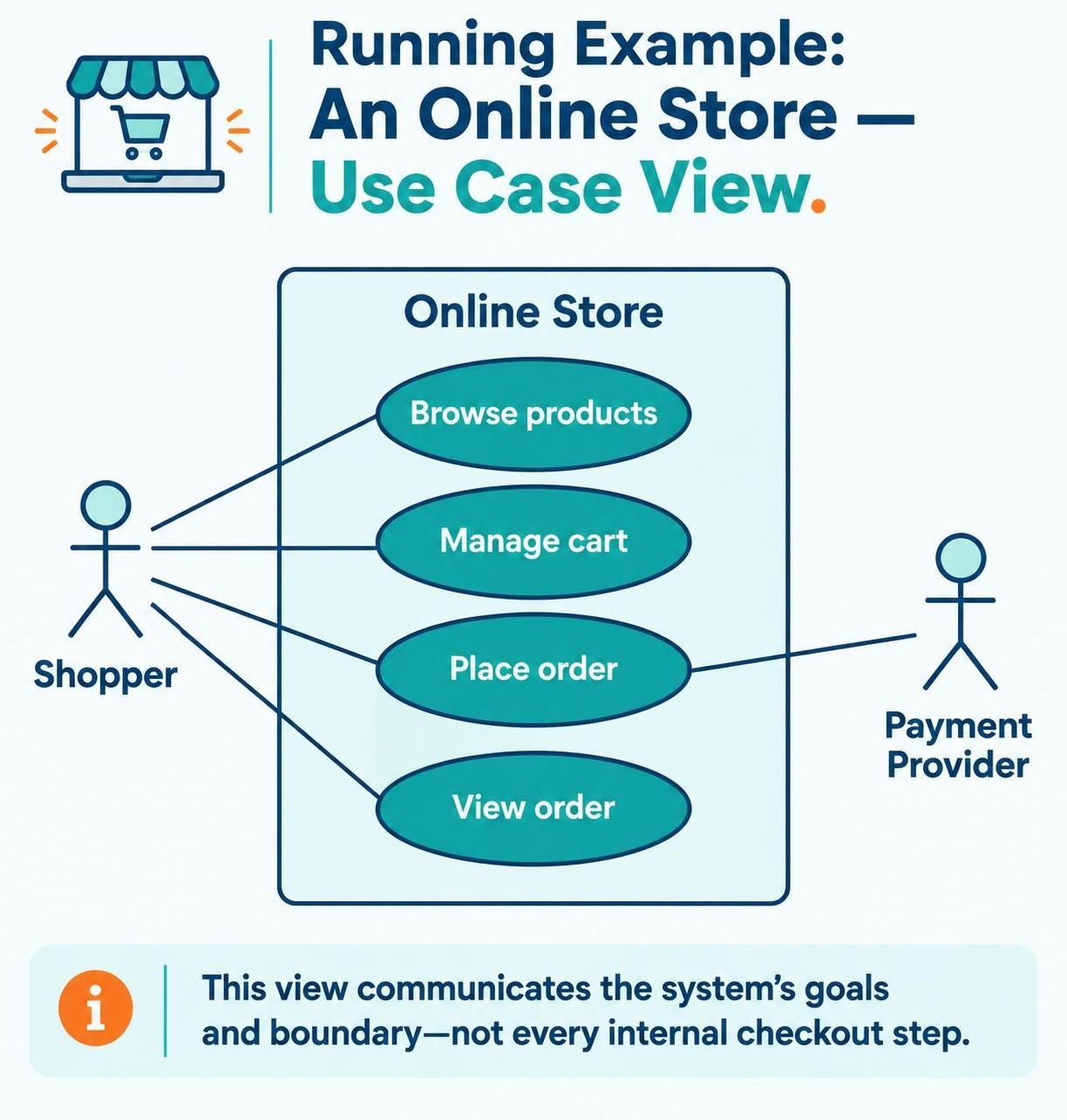
In the realm of software architecture, defining the boundary of what your system does—and more importantly, what it doesn’t do—is the first step toward a successful design. The Use Case View is the primary tool we use to capture these goals. It acts as a contract between the system and its environment, ignoring the internal implementation details to focus purely on functionality.
This tutorial uses a classic Online Store example to demonstrate how to model system interactions, actors, and boundaries using Visual Paradigm UML and VPasCode.
1. The Concept: Defining the System Boundary
Imagine a physical shop. The wall separating the customer from the back office is the “system boundary.” Inside, you have inventory management and staff training; outside, you have customers browsing and paying. A Use Case Diagram is the architectural equivalent of this.
As the context text states: “This view communicates the system’s goals and boundary. It does not need to show every internal step of checkout.”
By focusing on the Online Store system, we define the following scope:
- Goal: Facilitate the sale of products.
- Boundary: The software handles the logic, but the actual payment processing happens outside the store’s direct control.
- Abstraction: We do not model the internal database queries or the specific credit card validation logic here. Those belong in the sequence or class diagrams.
2. Identifying Actors and Use Cases
To create a valid Use Case View, we must identify the “Who” (Actors) and the “What” (Use Cases).
Actors
An Actor is a role played by a user or an external system that interacts with your software. In our example:
- Shopper: The primary human user who initiates the interaction. They have the goal of buying products.
- Payment Provider: An external system (a “System Actor”). This is crucial. The Online Store does not process the money itself; it delegates this responsibility to an external entity like Stripe or PayPal.
Use Cases
A Use Case represents a distinct piece of functionality provided by the system. Notice how the “Place order” use case acts as a bridge between the human and the external system.
- Browse products: Read-only interaction.
- Manage cart: Modifies the state of the current session.
- Place order: The core transactional event.
- View order: Post-transaction retrieval.
3. Modeling with PlantUML and VPasCode
Visual Paradigm UML allows you to model diagrams visually, but its VPasCode (PlantUML) feature allows you to generate diagrams using code. This is highly beneficial for version control and AI-assisted design.
Below is the code representation of the diagram shown in your context. This syntax strictly adheres to the PlantUML specification.
@startuml
skinparam packageStyle rectangle

actor "Shopper" as S
actor "Payment Provider" as PP
package "Online Store" {
  usecase "Browse products" as UC1
  usecase "Manage cart" as UC2
  usecase "Place order" as UC3
  usecase "View order" as UC4
}

S -- UC1
S -- UC2
S -- UC3
S -- UC4

' Note the external actor interaction
UC3 --> PP
@enduml
How to interpret this code:
skinparam packageStyle rectangle: Sets the visual style of the system boundary.actor "Label" as Alias: Defines the stick figures (Actors).package "Name" { ... }: Creates the system boundary box.usecase "Label" as Alias: Defines the ellipses (functions) inside the boundary.S— UC1: The double hyphen--creates an association line.UC3–> PP: The arrow-->indicates a flow or dependency from the internal use case to the external actor.
4. Why Visual Paradigm UML?
While you can write text descriptions, Visual Paradigm UML offers distinct advantages for modern software engineering:
- VPasCode Tool: You can toggle between the visual canvas and the code view instantly. This makes it easy to share models via Git repositories.
- AI Chatbot Integration: You can describe a scenario (like “An online store where a shopper buys items and a bank processes payment”) and let the AI generate the initial diagram structure, which you can then refine.
- Standout Benefits: Unlike simple drawing tools, Visual Paradigm understands the semantics of your model. It can validate that your actors are correctly placed and that your associations make logical sense.
Conclusion
The Use Case View is not about the “how”; it is about the “what.” By modeling the Online Store, we successfully defined the goals (Place Order) and the boundary (the box) without getting bogged down in the internal logic of the payment gateway. Whether you use the visual canvas or VPasCode, this view remains the cornerstone of requirement gathering.