
Mastering Visual Paradigm Flowcharts: A Step-by-Step Guide to VPasCode and AI-Assisted Modeling
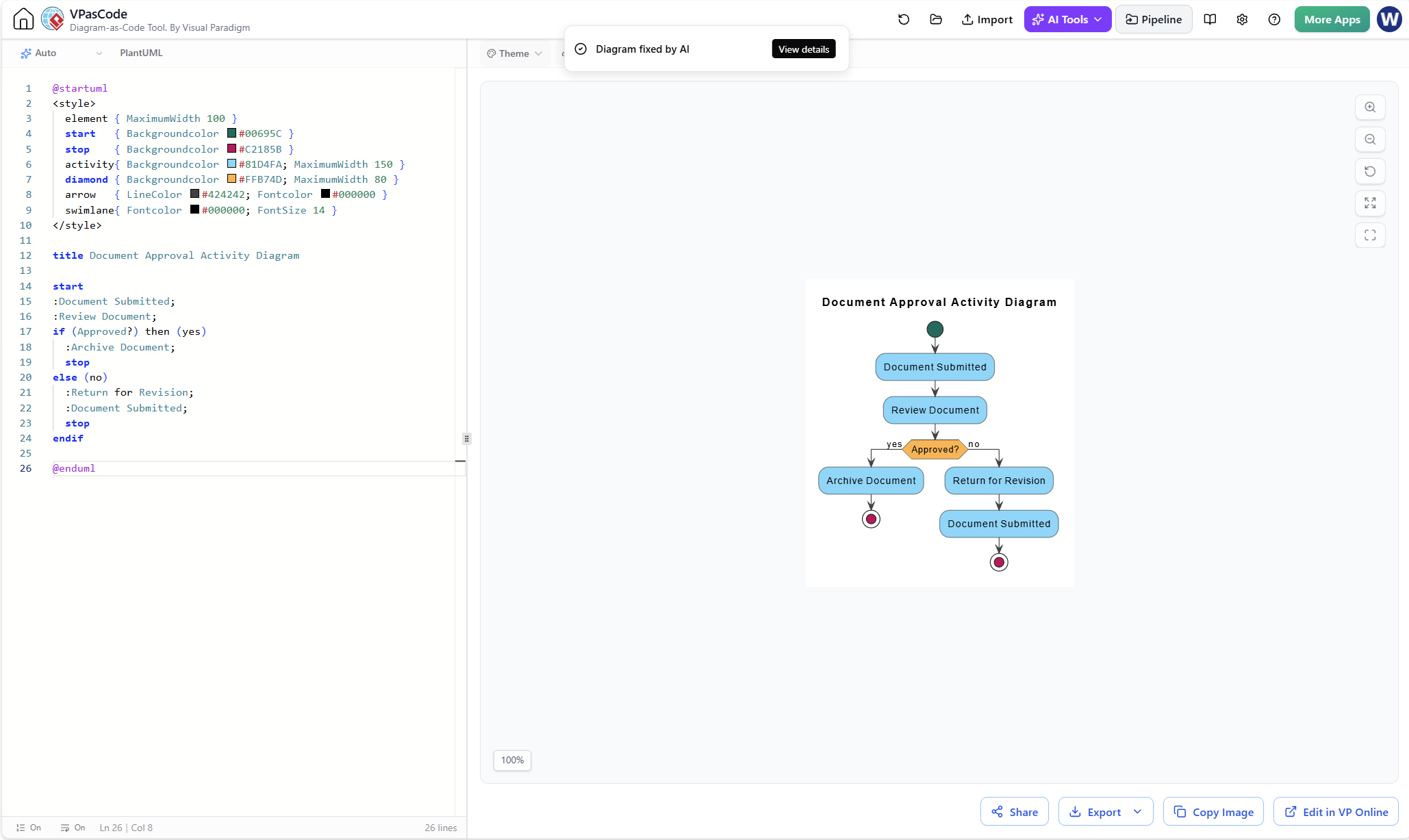
In the modern landscape of software engineering and business process management, the gap between abstract thought and concrete documentation is often bridged by diagramming tools. Visual Paradigm has revolutionized this workflow with VPasCode, a “Diagram-as-Code” tool that allows users to define complex flowcharts and activity diagrams through text rather than drag-and-drop actions. When combined with AI assistance, this approach creates a powerful synergy: rapid prototyping via natural language followed by precise code-based refinement.
This tutorial explores the architecture of VPasCode, analyzing how the code on the left transforms into the visual activity diagram on the right, and how you can leverage this system for efficient documentation.
The VPasCode Workflow Architecture
VPasCode operates on a split-screen architecture that separates the definition logic from the visual rendering. This is particularly useful for version control systems (like Git), where text files are far more manageable than binary image files.
1. The Code Editor (Left Pane)
The left pane serves as the source of truth. It accepts standard PlantUML syntax, extended with Visual Paradigm-specific directives. Every line of code here dictates a specific visual element or a logical relationship.
2. The Rendering Engine (Right Pane)
The right pane is the visualization layer. It parses the PlantUML script and renders it into a high-fidelity diagram. Crucially, this rendering is bidirectional; if you drag a shape in the diagram, the code updates automatically. However, for precision, direct code editing is often preferred.
Deconstructing the Diagram: From Text to Shape
Let’s analyze the code snippet provided in the screenshot to understand how a “Document Approval” process is modeled.
Styling and Aesthetics
Before drawing the logic, the code defines the look and feel. The <style> block allows for granular control over element appearance.
- Element Sizing:
MaximumWidth 100ensures that activity boxes are uniform in size, creating a clean, grid-aligned look. - Color Coding: Distinct colors are assigned to different node types. For instance, the
startnode is a dark teal (#00695C), while the decision diamond is amber (#FFB74D), making the diagram instantly readable.
Defining the Process Logic
The core logic follows a linear flow, interrupted by a decision point. The syntax is intuitive, using keywords like start, if, else, and stop.
title Document Approval Activity Diagram

start
:Document Submitted;
:Review Document;
if (Approved?) then (yes)
  :Archive Document;
  stop
else (no)
  :Return for Revision;
  :Document Submitted;
endif
The if block is the engine of the flowchart. It defines a diamond shape with the condition Approved?. The code then branches:
- The “yes” branch: The flow moves to
Archive Documentand terminates atstop. - The “no” branch: The flow moves to
Return for Revision. Crucially, it loops back to:Document Submitted;, creating a feedback loop that is essential for revision workflows.
AI-Assisted Modeling: The Accelerator
One of the most significant features shown in the interface is the “AI Tools” capability. Instead of memorizing syntax, users can describe the process in natural language.
For example, a user could type: “Create a flowchart for a document approval process where if it’s not approved, it goes back to submission.”
The AI engine then parses this intent and generates the VPasCode structure we analyzed above. This reduces the cognitive load of syntax memorization, allowing the user to focus on the business logic rather than the code formatting.
Best Practices for VPasCode
To maintain efficiency in your modeling, consider the following architectural patterns:
- Modularity: Keep your code clean by separating style definitions from logic. This allows you to change the theme of your diagram without rewriting the process logic.
- Iterative Refinement: Use the AI to generate the skeleton, then manually refine the code for specific edge cases. This “Hybrid Approach” is faster than coding from scratch and more accurate than pure AI generation.
- Standardization: Use the
elementandactivitystyles to enforce corporate branding standards across all diagrams in your project.
Conclusion
Visual Paradigm’s integration of VPasCode and AI represents a shift towards “Infrastructure as Code” for business processes. By defining workflows through code, organizations gain the ability to version, audit, and automate their process documentation just like they do with software code. Whether you are a developer or a business analyst, mastering this syntax provides a robust foundation for creating precise, maintainable diagrams.