
VP OpenDocs: Architecting Tabbed Navigation in the VP AI Ecosystem
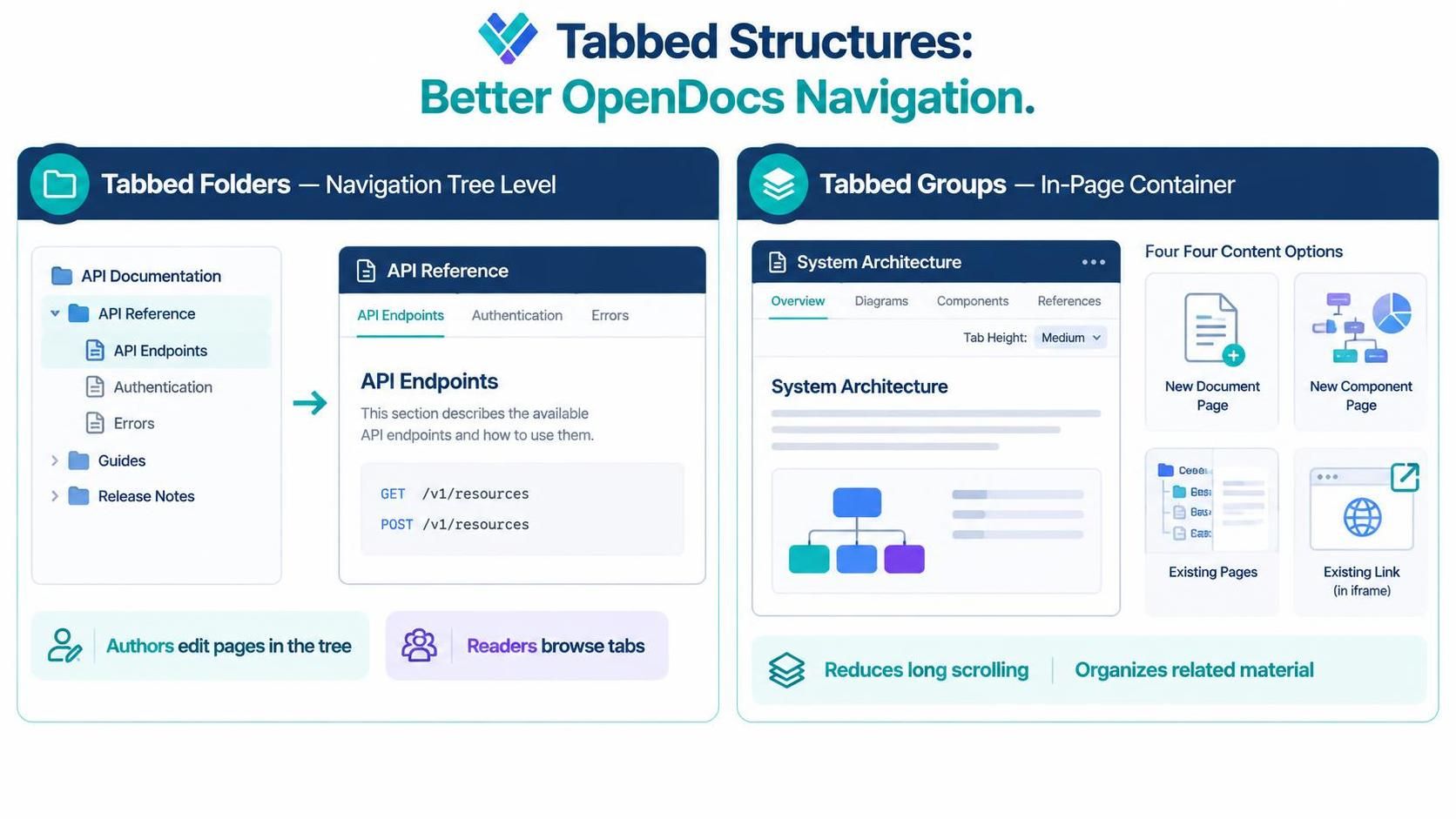
In the rapidly evolving landscape of technical writing, the traditional single-column document format often struggles to accommodate complex, modular information without overwhelming the reader. Enter Visual Paradigm OpenDocs and its late 2026 update: Tabbed Structures. This architectural shift represents a fundamental change in how documentation is organized, moving from linear scrolling to interactive, context-aware interfaces.
This tutorial explores the two core pillars of this new system: Tabbed Folders and Tabbed Groups. We will examine how these tools leverage the Visual Paradigm ecosystem to bridge the gap between authoring workflows and reader experience.
1. The Navigation Hierarchy: Tabbed Folders
The first layer of this new architecture is the Tabbed Folder, which operates at the Navigation Tree Level. Traditionally, a documentation tree in Visual Paradigm displays a flat list of child pages under a parent folder. While effective for hierarchy, it can lead to navigation fatigue when a folder contains dozens of related topics.
Concept: The Invisible Transformation
Tabbed Folders introduce a dual-layered workflow designed to decouple the authoring structure from the browsing interface.
- The Author’s View (The Tree): Authors continue to work within the standard sidebar tree structure. They create, name, and organize child pages (e.g., “API Endpoints,” “Authentication,” “Errors”) exactly as they would in a standard project. This ensures that the underlying logical structure remains flat and easy to manage.
- The Reader’s View (The Interface): When a reader clicks on the parent folder in the navigation tree, the system dynamically renders these child pages as tabs rather than a sequential list. This transforms a long-scrolling list into a compact, interactive dashboard.
Strategic Application: API Documentation
This capability is particularly powerful for API Reference Documentation. Instead of navigating through a long list of endpoint pages, a developer can select the “API Reference” folder and instantly switch between “Authentication,” “Endpoints,” and “Error Codes” via tabs. This reduces cognitive load and keeps related technical specifications within a single, cohesive view.
2. The Content Layer: Tabbed Groups
If Tabbed Folders organize the navigation tree, Tabbed Groups organize the content within a single document. This feature operates at the In-Page Container Level, allowing authors to embed complex, multi-faceted layouts directly into a specific page.
Concept: The Modular Container
A Tabbed Group acts as a flexible container that sits inside a standard Visual Paradigm page. It allows you to partition a single page into distinct sections, each serving a different purpose. This is ideal for “Overview” pages that need to house summary text, technical diagrams, and deep-dive references simultaneously.
The Four Content Options
Visual Paradigm OpenDocs offers four distinct content types that can be hosted within a single Tabbed Group, creating a truly integrated documentation environment:
- New Document Page: You can spawn a fresh, dedicated page directly inside the tab. This is useful for keeping a specific chapter or tutorial isolated while keeping it visually grouped with related content.
- New Component Page: This option is designed for visual-heavy documentation. It allows you to embed diagrams (such as System Architecture or Data Flow diagrams) directly into a tab. This keeps the diagram contextually relevant to the text in the tab without cluttering the main document flow.
- Existing Pages: You can reference pages that already exist elsewhere in the project. This creates a “Table of Contents” style view on the left (showing the TOC tree) with content displayed on the right, effectively merging multiple pages into a unified reading experience.
- Existing Link (iFrame): One of the most powerful features for modern documentation is the ability to load external resources. By using an iFrame, you can integrate live web tools, external documentation, or interactive web applications directly into the tab, enabling readers to reference tools without leaving the documentation environment.
Workflow Benefits
By utilizing Tabbed Groups, authors can reduce the “long-scrolling” effect that often plagues comprehensive system architecture guides. Instead of scrolling for minutes to find a specific diagram or reference, the reader can toggle through the tabs to access the exact information needed immediately.
Conclusion: A Unified Architecture
The introduction of Tabbed Structures in Visual Paradigm OpenDocs represents a mature evolution in technical documentation. By offering solutions at both the Navigation Tree Level (Tabbed Folders) and the In-Page Container Level (Tabbed Groups), Visual Paradigm provides a robust architecture for organizing information.
Whether you are grouping API endpoints for a developer audience or consolidating system diagrams for an engineering review, these tools allow you to deliver a clean, modular, and highly readable documentation experience. This structural flexibility ensures that your documentation scales effectively alongside the complexity of the systems you describe.