
Introduction
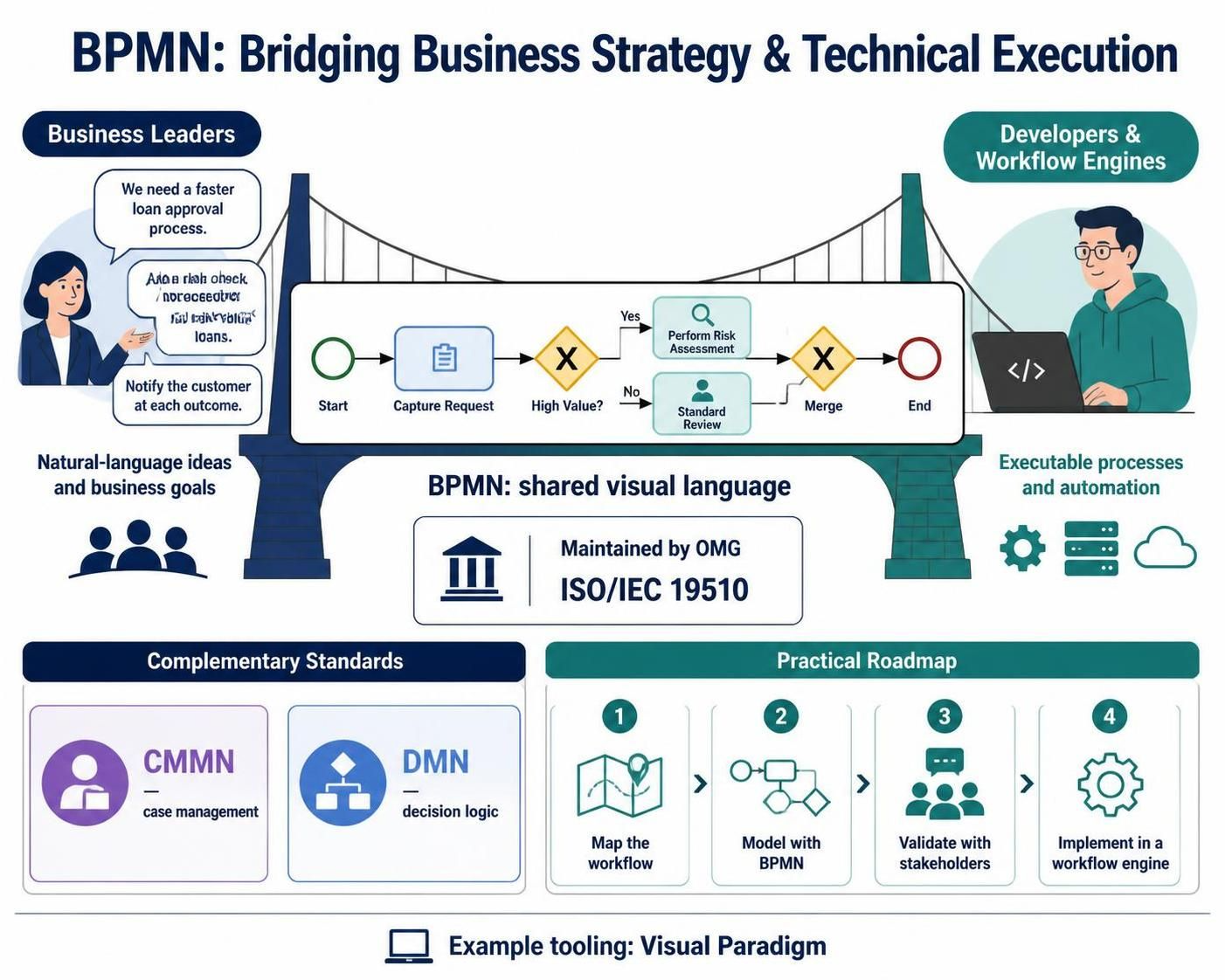
In the modern enterprise, the gap between business strategy and technical execution is often where projects fail. Business leaders describe workflows in natural language, while developers require precise, executable logic. Business Process Model and Notation (BPMN) serves as the universal translator between these two worlds.
Maintained by the Object Management Group (OMG) and standardized as ISO/IEC 19510, BPMN provides a graphical notation that is intuitive enough for business analysts yet rigorous enough for process engineers to implement on workflow engines. This guide explores the core tenets of BPMN, its relationship with complementary standards like CMMN and DMN, and provides a practical roadmap for modeling complex processes using industry-standard tooling like Visual Paradigm.
1. The Modern BPM Ecosystem: BPMN, CMMN, and DMN
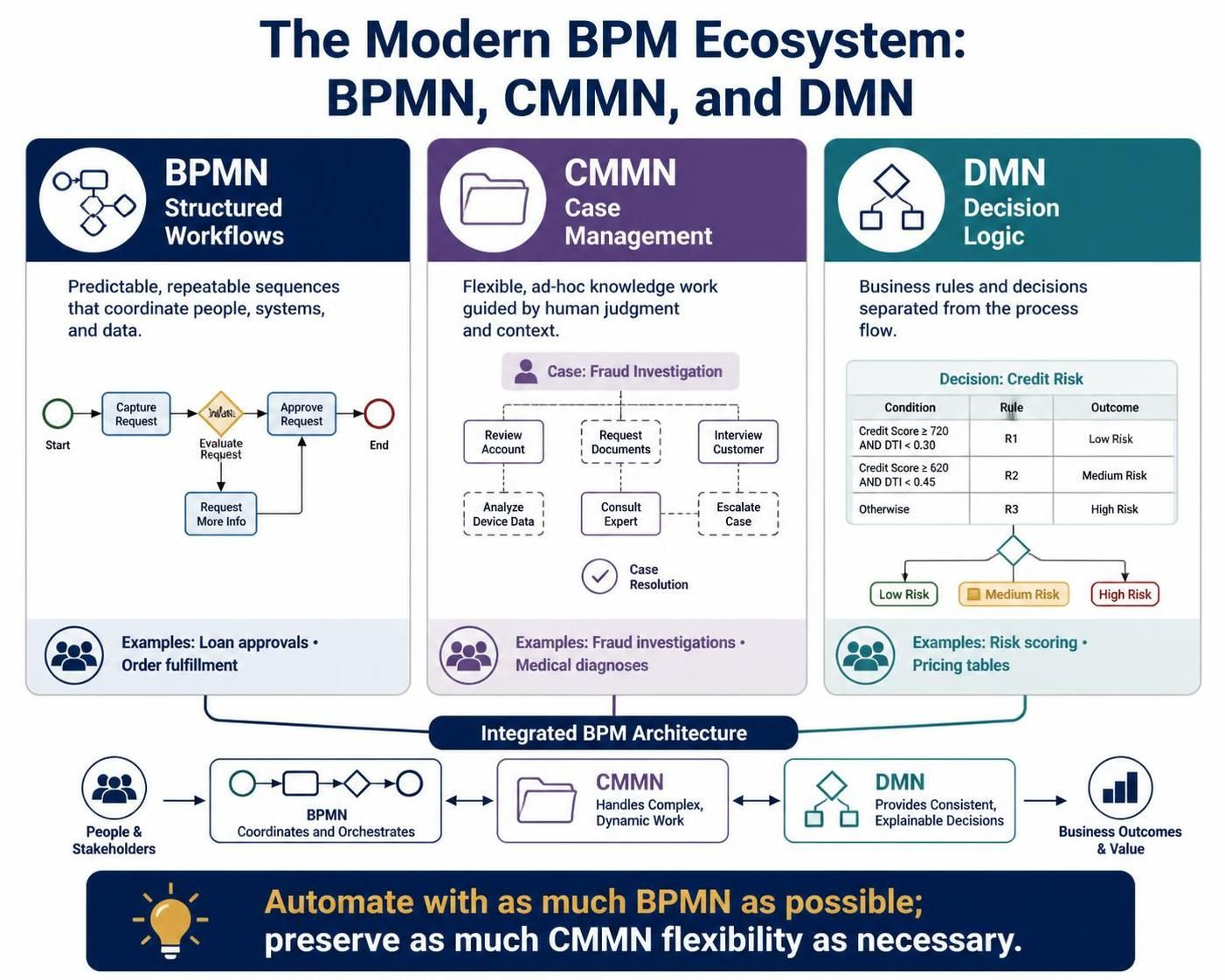
While BPMN is the cornerstone of process modeling, it is rarely used in isolation. Modern Business Process Management (BPM) relies on a “Standards Trio” to handle different types of work:
| Standard | Focus | Best Used For |
|---|---|---|
| BPMN | Structured Workflows | Predictable, repeatable sequences (e.g., loan approvals, order fulfillment). |
| CMMN | Case Management | Unstructured, ad-hoc knowledge work driven by human discretion (e.g., fraud investigations, medical diagnoses). |
| DMN | Decision Logic | Rule-based decisions separated from process flow (e.g., risk scoring, pricing tables). |
Strategic Insight: The most efficient architectures implement “as much BPMN as possible for automation, and as much CMMN as necessary for human flexibility.”
2. Core Concepts & Basic Elements of BPMN
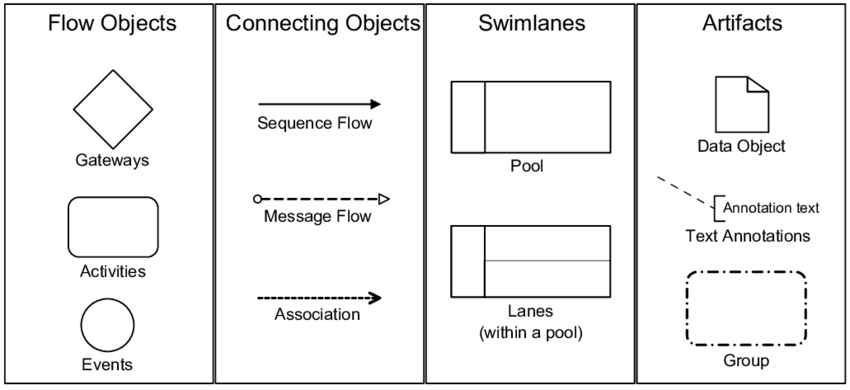
BPMN diagrams are constructed using four primary categories of elements. Understanding how these interact is essential for creating clear, executable models.
A. Flow Objects
These are the primary building blocks that define the behavior of a process.
1. Activities
Activities represent units of work.
-
Tasks: Atomic actions that cannot be broken down further.
-
User Task: Requires human interaction via a software interface.
-
Service Task: Automated execution by the workflow engine (e.g., API calls).
-
Business Rule Task: Integrates with a DMN engine to evaluate logic.
-
-
Subprocesses: Used to encapsulate complexity.
-
Embedded Subprocess: Scoped within the parent; shares data variables.
-
Call Activity: References a reusable, globally defined subprocess.
-
Event Subprocess: Triggered by specific events (like an error or timer) while the main process is active.
-
2. Events
Events represent things that happen rather than work that is done.
-
Start Event: Triggers the beginning of a process instance.
-
Intermediate Event: Occurs during the process. Can be boundary events attached to tasks (e.g., a timer that escalates a task if not completed in 24 hours).
-
End Event: Marks the conclusion of a path.
-
Catching vs. Throwing: Catching events wait for a trigger (e.g., waiting for an email); Throwing events initiate a result (e.g., sending an error signal).
3. Gateways
Gateways control the divergence and convergence of sequence flows.
-
Exclusive Gateway (XOR): Routes the token down exactly one path based on conditions.
-
Parallel Gateway (AND): Splits the flow into all outgoing paths simultaneously or waits for all incoming paths to complete.
-
Inclusive Gateway (OR): Activates one or more paths based on conditions.
-
Event-Based Gateway: Routes the flow based on which event occurs first (e.g., waiting for either a customer reply or a 48-hour timeout).
B. Connecting Objects
-
Sequence Flow (Solid Line): Defines the order of execution within a single pool.
-
Message Flow (Dashed Line): Represents communication between different pools (participants). Note: Sequence flows cannot cross pool boundaries.
-
Association (Dotted Line): Links data objects or annotations to flow elements.
C. Participants: Pools and Lanes
-
Pool: Represents a major participant (e.g., “Customer,” “Insurance Company,” “Bank”). Each pool typically has its own process definition.
-
Lanes: Sub-divisions within a pool used to categorize tasks by role, department, or system (e.g., “Underwriting Dept,” “Claims System”).
D. Data and Artifacts
-
Data Objects/Documents: Represent information created, read, or updated during the process.
-
Annotations/Groups: Provide supplementary context without affecting the execution logic.
3. Methodological Levels: Strategic vs. Operational
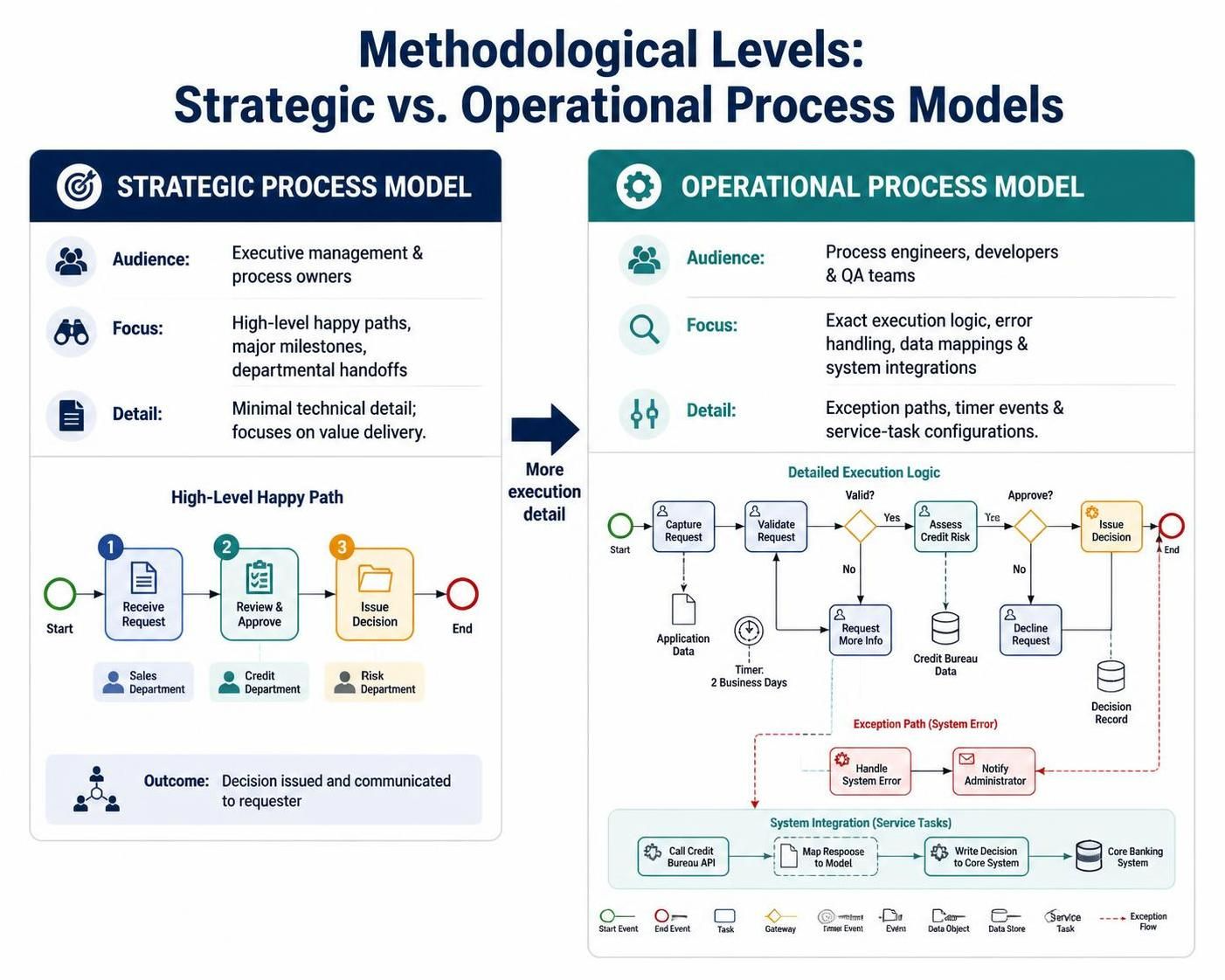
When modeling in Visual Paradigm, it is crucial to determine the target audience and depth of the model:
-
Strategic Process Model:
-
Audience: Executive management and process owners.
-
Focus: High-level “happy paths,” major milestones, and handoffs between departments.
-
Detail: Minimal technical detail; focuses on value delivery.
-
-
Operational Process Model:
-
Audience: Process engineers, developers, and QA teams.
-
Focus: Exact execution logic, error handling, data mappings, and system integrations.
-
Detail: Includes all exception paths, timer events, and specific service task configurations.
-
4. Real-World Examples
Example: Integrated Insurance Application (The “Camundanzia” Model)
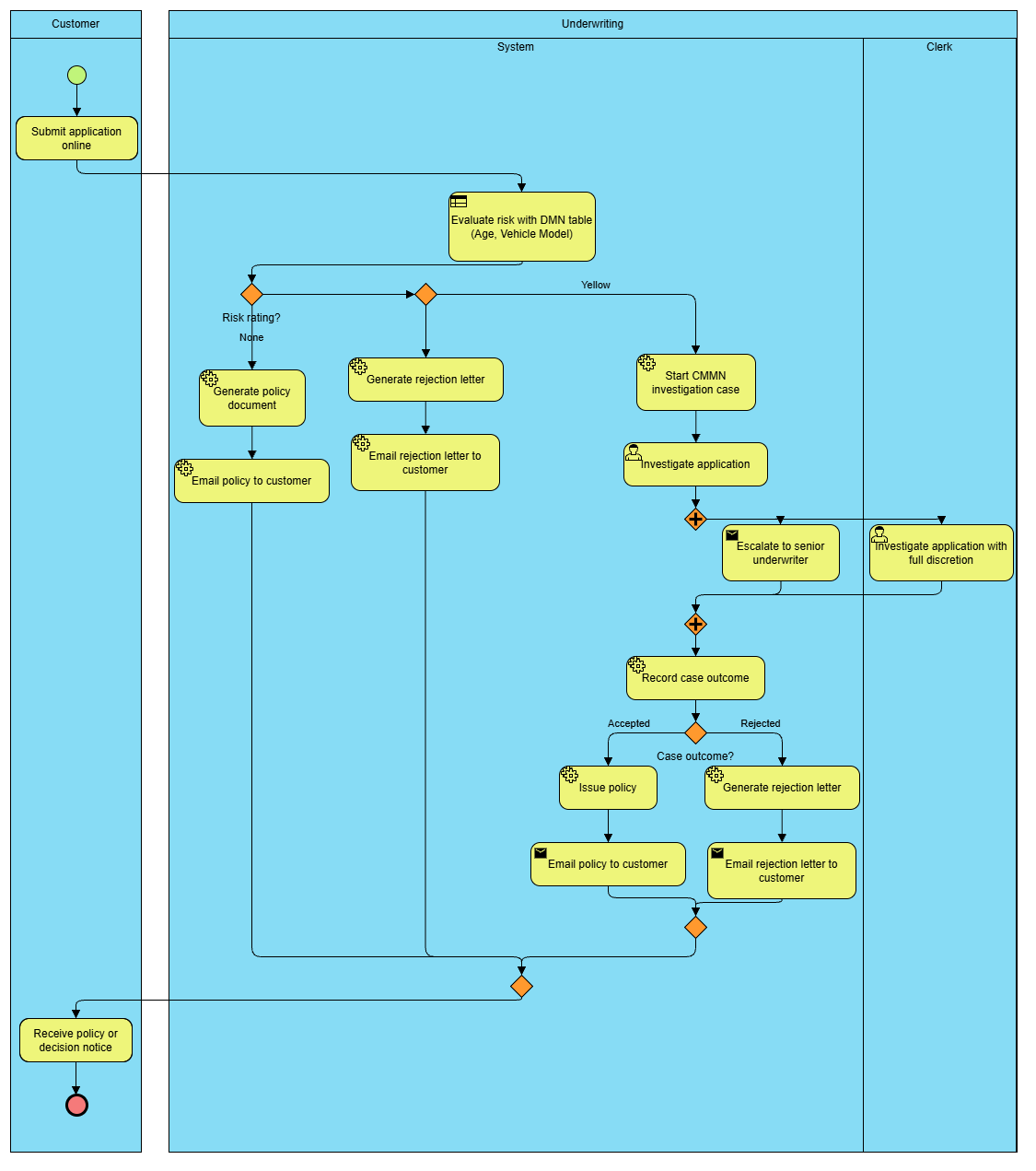
This example demonstrates the synergy of BPMN, DMN, and CMMN in a car insurance workflow.
-
Start: Customer submits an application online.
-
DMN Integration: A Business Rule Task sends applicant data (Age, Vehicle Model) to a DMN decision table. The table returns a risk rating (None, Yellow, or Red).
-
BPMN Routing (XOR Gateway):
-
None Risk: The process automatically executes Service Tasks to generate and email the policy.
-
Red Risk: The process automatically triggers a rejection letter.
-
Yellow Risk: The process calls a CMMN Case. Here, a human clerk investigates the application with full discretion. If the case isn’t resolved in 2 days, a Timer Boundary Event triggers an escalation task.
-
-
Completion: Once the CMMN case concludes with an “Accepted” status, the BPMN process resumes to issue the policy.
5. Tooling Spotlight: Visual Paradigm
Visual Paradigm is a robust enterprise-grade tool for BPMN modeling that supports the full lifecycle of process management.
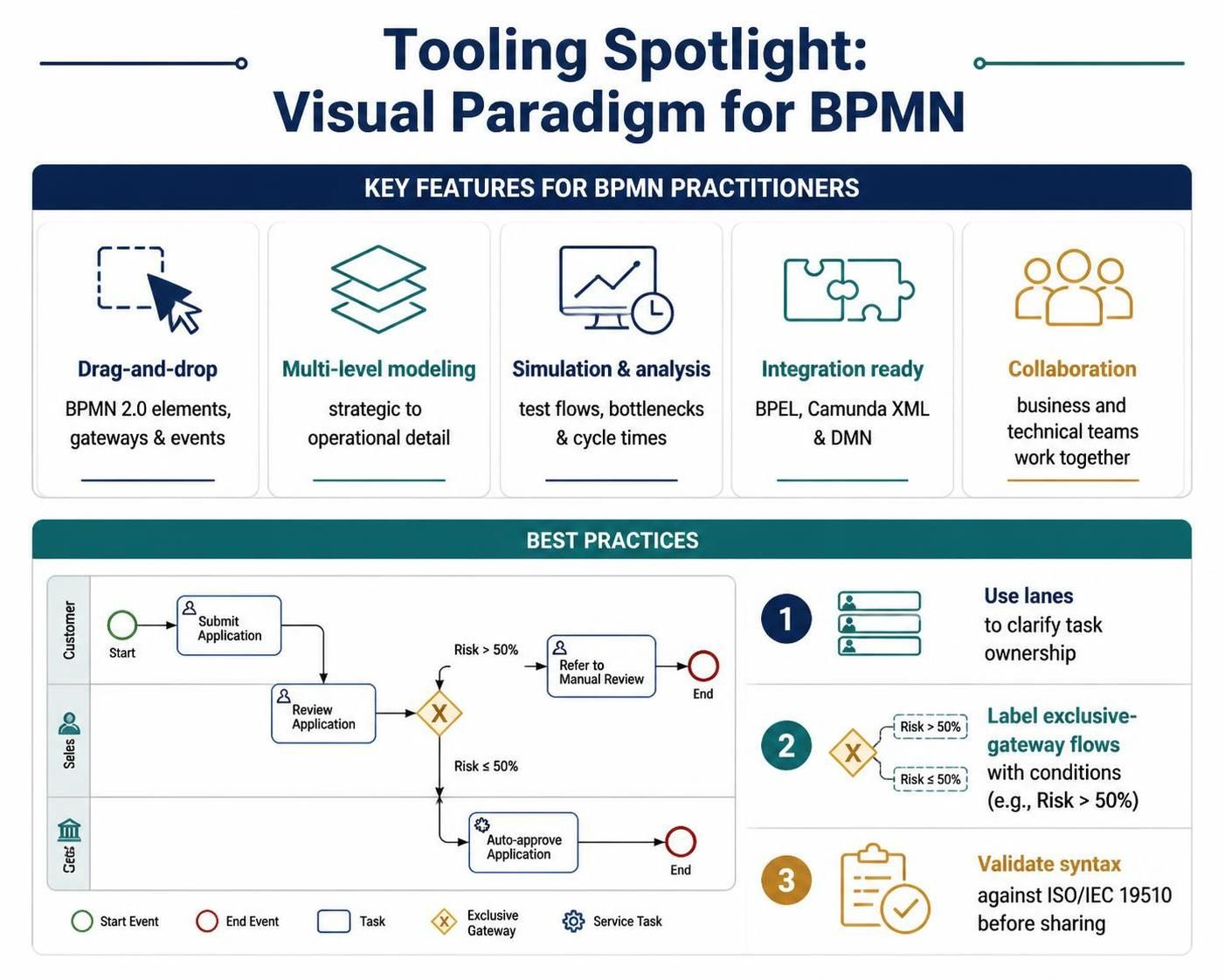
Key Features for BPMN Practitioners:
-
Drag-and-Drop Interface: Intuitive palette for all BPMN 2.0 elements, including complex gateways and event types.
-
Multi-Level Modeling: Easily switch between strategic diagrams (high-level) and operational diagrams (detailed) using the same underlying model structure.
-
Simulation & Analysis: Built-in simulation capabilities allow you to test process flows, identify bottlenecks, and calculate cycle times before implementation.
-
Integration Ready: Supports export to executable formats (like BPEL or Camunda XML) and integrates with DMN editors for decision logic.
-
Collaboration: Cloud-based features enable real-time collaboration between business analysts and technical teams, ensuring the “bridge” between business and IT remains intact.
Best Practices in Visual Paradigm:
-
Use Lanes Effectively: Always assign tasks to specific lanes to clarify responsibility.
-
Name Your Flows: Label sequence flows leaving Exclusive Gateways with the condition being evaluated (e.g., “Risk > 50%”).
-
Validate Syntax: Use Visual Paradigm’s built-in validator to ensure your diagram adheres to ISO/IEC 19510 standards before sharing with stakeholders.
Conclusion
BPMN is more than just a drawing standard; it is a critical communication tool that aligns business intent with technical reality. By mastering the core elements—Flow Objects, Connecting Objects, and Participants—and understanding how to integrate BPMN with CMMN and DMN, organizations can achieve greater agility and transparency in their operations.
Whether you are mapping a simple approval workflow or a complex, multi-party insurance claim process, tools like Visual Paradigm provide the structural rigor needed to turn abstract ideas into executable, efficient business processes. As businesses continue to digitize, the ability to model, analyze, and optimize these processes will remain a key competitive advantage.