


Introduction
For years, enterprise architects and product managers have lived in a fragmented world. We draw high-level strategy in one tool, model complex database schemas in another, write technical documentation in a third, and then struggle to keep them all in sync. The result? “Documentation debt”—outdated diagrams, broken image links, and a team that spends more time managing files than building products.
Enter the Visual Paradigm Unified Platform. This isn’t just an update to a diagramming tool; it’s a fundamental re-architecture of how visual engineering works. By integrating desktop power, cloud accessibility, AI generation, and live documentation into a single ecosystem, Visual Paradigm aims to eliminate the friction of switching contexts.
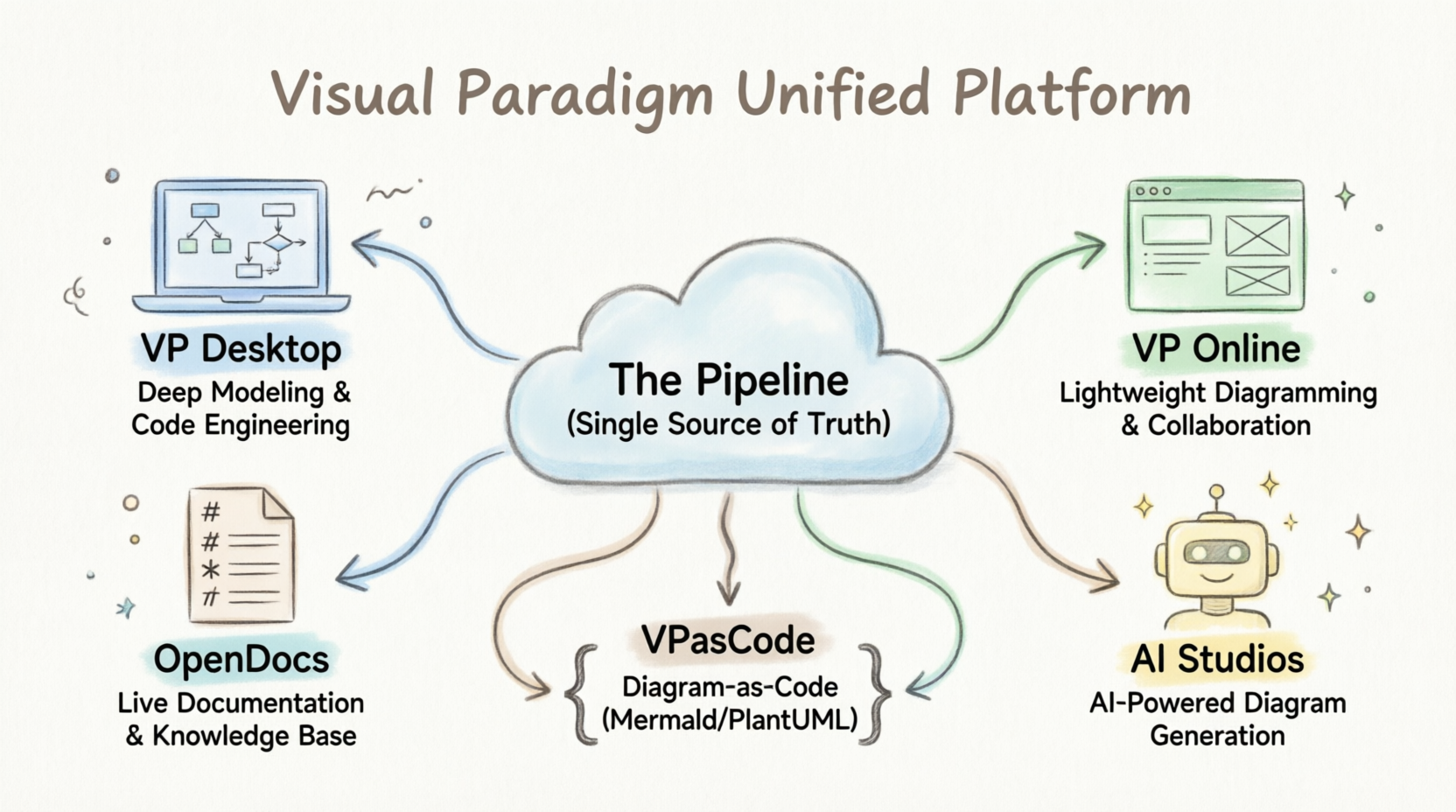
As someone who has tested various modeling suites, I found the shift from “static exports” to “dynamic artifacts” to be the game-changer. This guide breaks down how the platform’s four pillars work together, powered by the central Pipeline and the code-driven VPasCode engine, to create a true single source of truth for your team.
The Four Pillars of the Ecosystem
The platform consolidates its features across four core processing environments, each designed for a specific stage of the product lifecycle but built to talk to each other seamlessly.
- Visual Paradigm Desktop: This is the heavy-duty engineering engine. It’s where you go for advanced enterprise architecture, deep data modeling, and system analysis using standards like UML, SysML, and ArchiMate. It also handles round-trip code engineering, making it essential for developers who need strict syntax validation.
- Visual Paradigm Online (VP Online): A web-based suite hosting over 100 specialized apps. This is your go-to for lightweight diagramming, graphic design, interactive slide makers, and agile planning tools. It’s accessible, fast, and perfect for collaborative brainstorming.
- OpenDocs: A cloud-based knowledge management platform with a rich editing interface. Think of it as the home for your manuals, system specifications, and product requirements. Unlike traditional wikis, OpenDocs treats diagrams as live, editable components rather than static screenshots.
- AI Generative Studios & Chatbots: These are natural language processing tools designed to instantly generate full architectural blueprints, diagrams, and use-case scenarios from text descriptions. They serve as the ideation spark, turning vague concepts into structured visuals in seconds.
How They Integrate Together
Visual Paradigm achieves its “all-in-one” status through three foundational integration mechanisms that bridge the gap between these pillars.
1. Centralized Data Management & The Pipeline
Siloed data is eliminated via The Pipeline, a secure cloud repository that acts as a bridge for visual artifacts. Rather than operating as static picture exports, an artifact created in any branch of the platform is saved dynamically.
- An AI-generated chart or cloud architecture draft can instantly be transferred into a project.
- While writing a report in OpenDocs, you can pull live, editable diagrams directly from the Pipeline via a simple context menu.
2. Desktop-to-Cloud Synergy
The platform integrates the high-compute power of a desktop app with the flexible accessibility of the cloud.
- Embedded Platform Access: Desktop users can open the Unified Platform inside an embedded browser without minimizing their app workspace.
- Unified Workspace View: Diagrams built locally on your machine coexist seamlessly inside a centralized web-like drive view, mapping local engineering to cloud collaboration networks.
3. Closed-Loop AI Workflows
The integration enables a fluid “text-to-design-to-code” pipeline:
- Ideation: You converse with the AI VPP Chatbot to brainstorm and auto-generate an initial structural diagram (e.g., a C4 model or class diagram).
- Refinement: You import that asset into VP Desktop to apply strict, enterprise-grade constraints and execute syntax validations.
- Execution: The desktop tool converts those finalized components directly into software code templates or database schemas.
- Knowledge Sharing: The live, linked diagrams are embedded into OpenDocs manuals, where clicking “Edit” from the documentation page instantly re-opens the original source model for quick updates.
The Role of The Pipeline: The Connective Tissue
The Pipeline is not a file transfer feature; it is a secure cloud-based centralized repository that standardizes diagram assets as dynamic “artifacts” rather than static pictures.
| Pillar | How the Pipeline Serves It |
|---|---|
| 1. VP Desktop | Receives upstream text sketches; exports heavy-duty enterprise models into the cloud as live elements without manual exporting. |
| 2. VP Online | Saves lightweight agile plans or wireframes into a shared project layer accessible by both desktop engineers and executives. |
| 3. OpenDocs | Serves as the distribution hub. It embeds active Pipeline assets into technical manuals so that users can view and swap revisions instantly. |
| 4. AI Studios | Stores instant AI layouts (e.g., C4 architecture, WBS) directly in the cloud so they can serve as structural blueprints across platforms. |
Core Impact: It maintains a Single Source of Truth. When an architect changes a design inside VP Desktop and “re-sends” it, the Pipeline updates the asset across all team spaces. A writer in OpenDocs can swap the graphic to the latest version in two clicks without worrying about broken image links.
The Role of VPasCode: The Text-to-Diagram Sandbox
VPasCode is a browser-based, zero-setup developer sandbox designed to shift diagram creation from manual canvas drawing to Diagram-as-Code (DaC). It supports industry-standard layout engines like PlantUML, Mermaid.js, and Graphviz.

graph LR
    A[AI Chatbot] -->|Natural Language Text| B(VPasCode Syntax Engine)
    B -->|Pipeline| C[OpenDocs / VP Desktop]
    style B fill:#bbf,stroke:#333,stroke-width:2px
- The Bridge from AI to Code: In the AI Studio pillar, natural language queries are converted into code text rather than a fixed drawing. VPasCode takes that raw text and structures it into an editable script.
- Automation and Auto-Fixing: If code contains syntax issues, VPasCode leverages its AI Auto-Fix engine to scan, locate the exact broken line, and repair the code with a single click.
- Native Software Engineering (Git Friendly): Because diagrams are kept as plain code scripts, engineering teams can track adjustments, review text differences, and manage diagram versioning inside standard Git version control systems.
How They Unify the Ecosystem: A Working Example
The cross-pillar integration relies on VPasCode generating the logic and the Pipeline distributing it.
- Generation (AI & VPasCode): You prompt the AI Chatbot to design a cloud deployment layout. The chatbot outputs a Mermaid script inside VPasCode, which automatically generates a clean, readable diagram layout.
- Transportation (The Pipeline): Using the integrated VPasCode-to-OpenDocs Pipeline, you click “Send” to push the diagram directly into the cloud repository.
- Execution (OpenDocs & VP Desktop): Technical writers display that diagram natively inside an OpenDocs system guide. Concurrently, enterprise developers pull that exact same model code into VP Desktop to validate constraints and export physical database structures.
Conclusion
The Visual Paradigm Unified Platform represents a significant leap forward for teams tired of managing disjointed tools. By centering everything around the Pipeline and embracing Diagram-as-Code through VPasCode, it solves the perennial problem of documentation drift.
For product managers and architects, the value lies in the continuity: an idea born in an AI chat can become a validated enterprise model in Desktop, a collaborative wireframe in Online, and a live component in OpenDocs—all without ever losing fidelity or context. If your team prioritizes keeping technical documentation alive and synchronized with actual system architecture, this ecosystem offers a compelling, cohesive solution.
References
- Visual Paradigm’s Pipeline: Hands-on Review of Desktop to OpenDocs Integration: A detailed look at how the Pipeline connects desktop modeling with cloud documentation.
- Visual Paradigm Official Site: The main hub for Visual Paradigm’s suite of modeling and design tools.
- Announcing the All-New Visual Paradigm Unified Platform: Official release notes detailing the new unified architecture.
- From Concept to Knowledge Base: How the Visual Paradigm Pipeline Eliminates Documentation Debt: An exploration of how dynamic artifacts reduce maintenance overhead.
- Visual Paradigm Unified Platform Quick Intro: A beginner’s guide to understanding the core components of the platform.
- From Concept to Knowledge Base: A Third-Party Review of Visual Paradigm’s OpenDocs Workflow: Insights into using OpenDocs for live, editable documentation.
- AI Deployment Diagram Generation in Visual Paradigm: Examples of AI-generated infrastructure diagrams.
- Comprehensive Guide to Visual Paradigm’s AI Ecosystem: An external review of how AI transforms modeling workflows.
- Visual Paradigm Pipeline Demo Video: A video demonstration of the Pipeline in action.
- Mastering Software Architecture with the C4 Model and Visual Paradigm: Guide to using C4 models within the platform.
- Introducing Visual Paradigm 18.1: A New Era of Unified Ecosystems and AI-Driven Innovation: Release highlights for version 18.1.
- VPasCode and AI Chatbot Integration Demo: Video showing the interaction between AI and code-based diagramming.
- A Comprehensive Case Study of Visual Paradigm’s Free UML Modeling Tiers: Overview of free tier capabilities.
- Overview and Integration with IDEs: Documentation on integrating with development environments.
- Digital Asset Management Overview: Context on digital asset management principles relevant to the Pipeline.
- Mastering VPasCode: The Ultimate Guide to AI-Powered Diagram-as-Code: Deep dive into VPasCode features.
- Mastering Visual Paradigm OpenDocs: Guide to leveraging OpenDocs for knowledge management.
- From Code to Clarity: A Beginner’s Guide to Seamless Diagramming with VPasCode and OpenDocs: Tutorial on connecting code and docs.
- Seamlessly Connect Diagramming to Documentation: VPasCode Integrates with OpenDocs: Announcement of the VPasCode-OpenDocs integration.
- Comprehensive Guide to VPasCode by Visual Paradigm: Official guide to VPasCode.
- VPasCode Features Page: Overview of VPasCode capabilities.
- How the Visual Paradigm AI Chatbot and VPasCode Function as an Integrated Ecosystem: Explanation of the AI-to-code workflow.
- Introducing VPasCode: The Ultimate Unified Text-to-Diagram Platform: Launch announcement for VPasCode.
- Revolutionizing Diagram Maintenance: How VPasCode’s AI Auto-Fix Eliminates Syntax Frustrations: Guide to using the AI Auto-Fix feature.
Related posts:
 Visual Paradigm 18.0: The AI-Powered Revolution in Visual Modeling and Enterprise Architecture
 E-Commerce Checkout Process: A Complete UML Sequence Diagram Case Study with Visual Paradigm AI
 How AI is Transforming SysML Internal Block Diagram Design
 Comprehensive Guide to Visual Paradigm’s AI-Powered UML and Agile Development