


Introduction
In the fast-paced world of software architecture, documentation is often the first casualty of tight deadlines. For years, engineering teams have relied on “Diagram-as-Code” (DaC) tools to keep their architectural visuals in sync with their codebases. However, while writing code feels natural to developers, maintaining strict syntax rules for diagramming languages like PlantUML, Mermaid, or Graphviz can become a significant bottleneck. A single missing bracket or misplaced semicolon doesn’t just cause a minor warning; it breaks the entire preview, forcing architects and developers to halt their creative flow to hunt down trivial syntax errors.
This friction has long been the Achilles’ heel of DaC platforms. While the concept of generating diagrams from text is powerful, the debugging experience has historically been opaque and frustrating. Visual Paradigm addresses this critical pain point with VPasCode, a browser-based, AI-powered platform designed not just to render diagrams, but to actively assist in their creation and maintenance. By introducing intelligent, transparent AI error fixing, VPasCode transforms debugging from a tedious chore into a seamless, educational experience, allowing teams to focus on architecture rather than syntax.
The Challenge: Syntax Errors as Productivity Killers
For developers and solution architects, the value of Diagram-as-Code lies in its ability to be version-controlled, reviewed, and integrated directly into CI/CD pipelines. However, the learning curve for specific syntax rules across different engines can be steep.
Common issues include:
-
Structural Breaks: Missing opening or closing brackets
{}that prevent the parser from understanding the scope of elements. -
Typographical Errors: Misspelled keywords or incorrect relationship operators.
-
Engine Confusion: Accidentally mixing syntax rules between PlantUML, Mermaid, and Graphviz.
Traditionally, resolving these errors required manual line-by-line inspection, consulting external documentation, or trial-and-error adjustments. This process interrupts the “flow state,” leading to wasted time and decreased morale.
The Solution: AI Code Error Fixing in VPasCode
VPasCode unifies major industry-standard diagramming compilers into a single cloud-native workspace. Its core innovation lies in its AI Code Error Fixing capability, which monitors syntax in real-time and offers immediate, automated repairs.
How It Works: One-Click Syntax Healing
When a script fails to render due to a syntax error, VPasCode shifts from a standard editor to an assistive troubleshooting mode. The workflow is designed for speed and minimal interruption:
-
The Rendering Error: If the script contains an error, such as a missing opening bracket, the diagram viewer displays a “Failed to Generate Diagram” warning block. This alert details the suspected error type and pinpoints the line number.
-
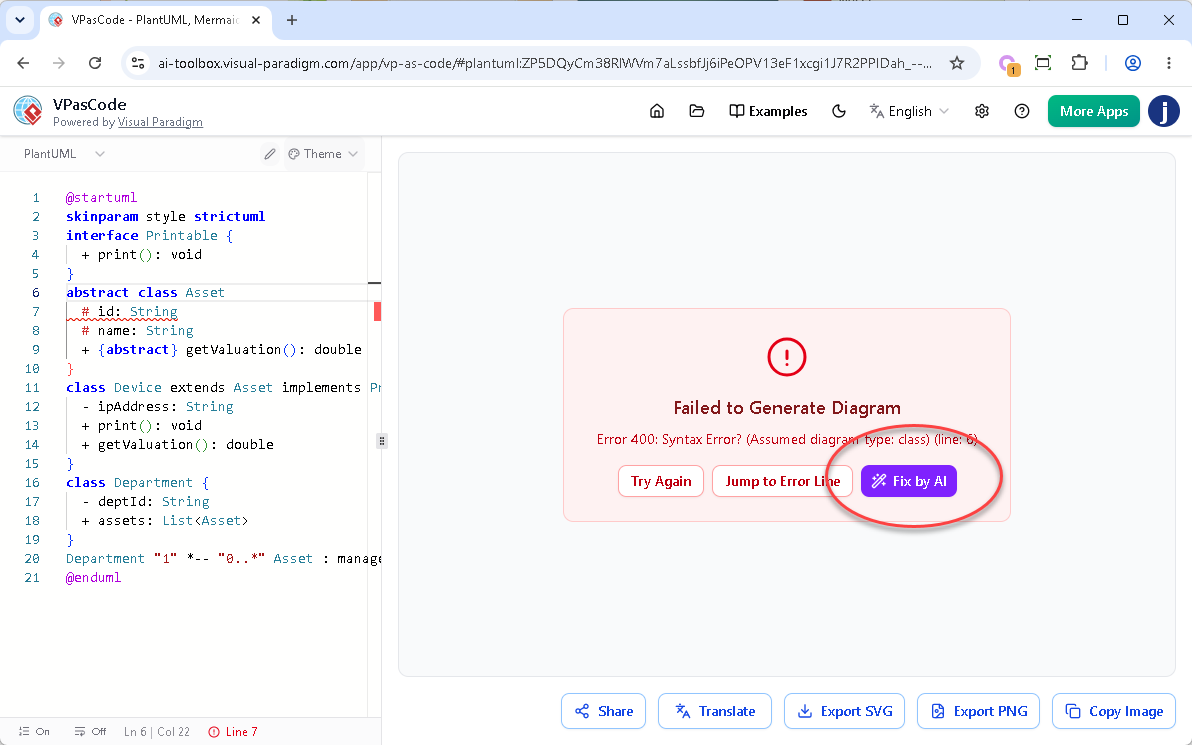
Triggering the AI: Instead of manually searching through hundreds of lines of code, the user simply clicks the purple “Fix by AI” button located within the error overlay.
-
The Auto-Fix: The AI engine instantly cross-references the active code against the specific syntax rules of the selected diagram type (PlantUML, Mermaid, or Graphviz). It isolates the issue, generates the correct solution, and automatically injects the corrected code back into the editor.
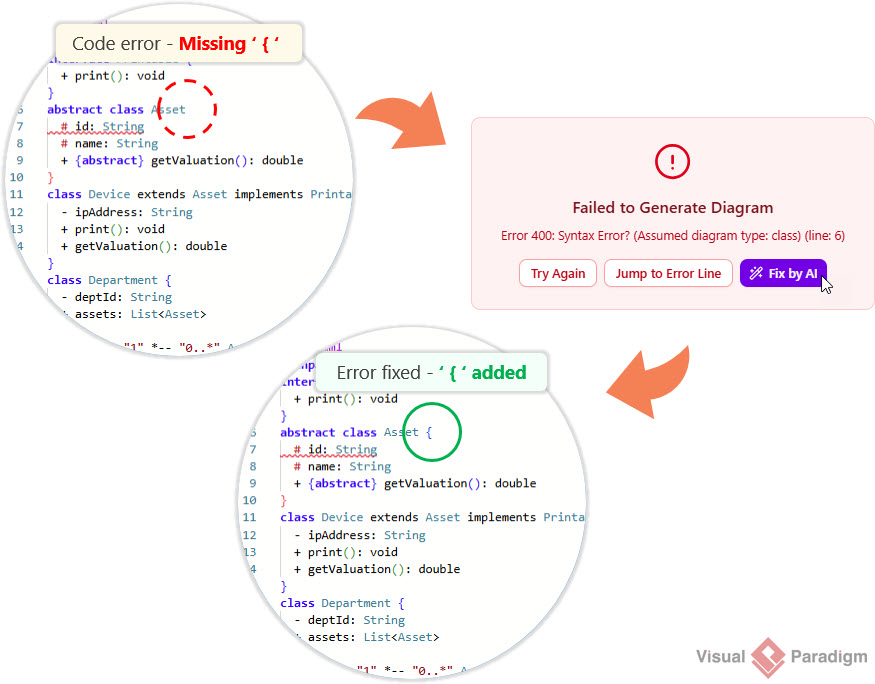
As soon as the AI applies the fix, the diagram re-renders immediately. This eliminates guesswork and ensures that creative momentum is never lost to tedious debugging.
Enhancing Trust: Transparency Meets Learning
While automated fixes are powerful, engineers are naturally skeptical of “black box” solutions that modify their code without explanation. Recognizing that trust and control are paramount for professional developers, VPasCode introduced a major enhancement: the AI Fix Details panel.
The Upgraded Workflow: Complete Visibility
The core functionality remains fast, but users now have full visibility into every change made by the AI:
-
The Fix: Upon clicking “Fix by AI,” the engine repairs the syntax and renders the diagram.
-
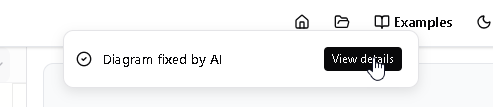
The Notification: A sleek notification banner appears at the top of the screen with the message: “Diagram fixed by AI”.
-
The Reveal: Next to the banner, a “View details” button allows users to open a comprehensive popup dialog that breaks down the exact modifications.
Inside the AI Fix Details Dialog
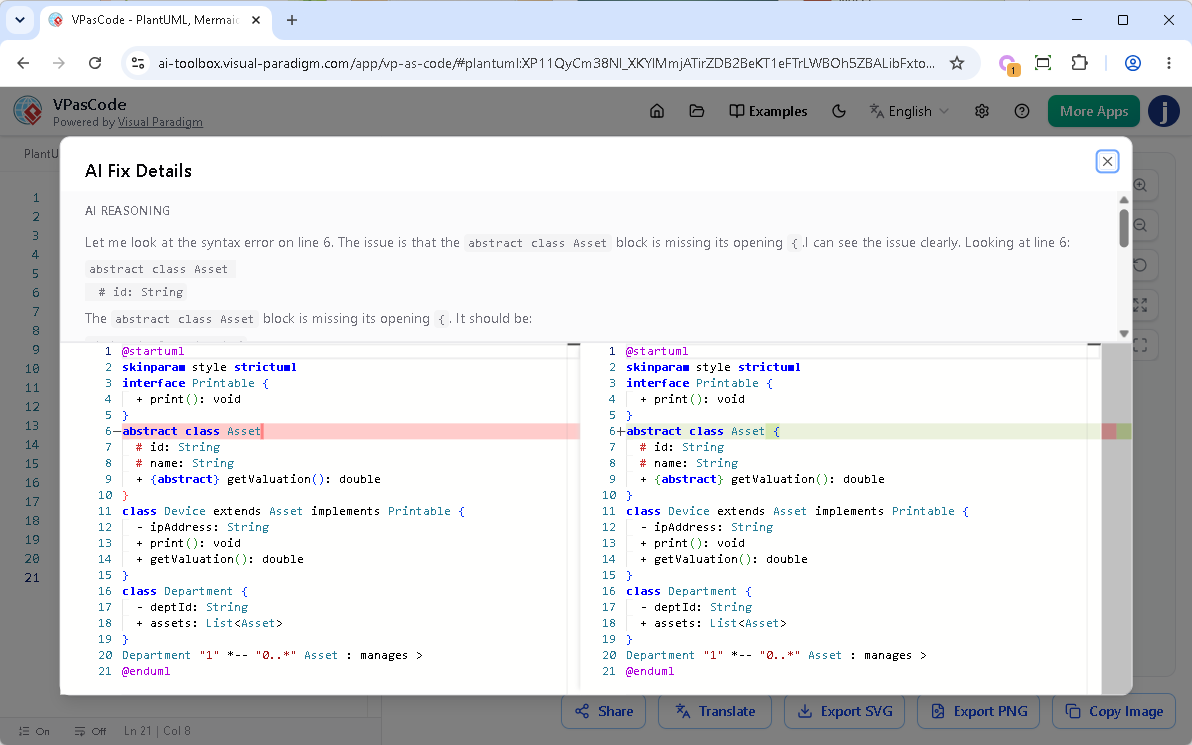
The new dialog box is divided into two informative sections designed to provide clarity and context:
-
Upper Part (AI Reasoning): This section provides a plain-English explanation generated by the AI. It details exactly what syntax issue was discovered (e.g., “Missing opening bracket ‘{‘ on line 12”) and explains the logic behind the proposed solution.
-
Lower Part (Code Diff Component): This features a precise, side-by-side comparison of the code before and after the modification. Red highlights indicate broken or missing sections on the left, while green highlights show the repaired syntax on the right.
Strategic Advantages for Engineering Teams
The introduction of transparent AI fixing offers three key benefits that go beyond simple error correction:
1. Absolute Trust and Control
Developers need to know that automated tools are not making arbitrary changes to their business logic. The code diff component provides peace of mind by proving that the AI is targeting only the specific syntax error. This ensures that the underlying architectural intent remains intact.
2. Interactive Learning on the Go
Syntax rules for PlantUML, Mermaid, and Graphviz can be nuanced and confusing. By reading the AI’s plain-text reasoning and viewing the visual diff, VPasCode transforms from a simple editor into a learning tool. Users can master subtle syntax nuances by seeing exactly how errors are resolved, helping them avoid similar mistakes in the future.
3. Effortless Auditing and Quick Reversals
In large, complex diagrams, tracking small code modifications can be difficult. The detailed view allows teams to audit changes easily. If the AI’s fix differs from the user’s original intent, the clear visualization makes it simple to manually revert specific choices or adjust the code further.
Feature Availability and Accessibility
The AI Code Error Fixing tool, including the enhanced AI Fix Details panel, is a premium capability designed to maximize engineering productivity. It is available in the following packages:
-
Visual Paradigm Online Combo Edition (or higher).
-
Visual Paradigm Desktop Professional Edition (or higher) with an active maintenance plan.
Note for Desktop Users: If you are running Visual Paradigm Professional Edition (or higher) with active maintenance, you already have full access to the web apps included in the VP Online Combo Edition. This means you can log into VPasCode and start using the “Fix by AI” tool immediately.
Conclusion
The evolution of Diagram-as-Code is not just about better rendering engines; it is about creating a smoother, more intuitive experience for the humans behind the code. VPasCode’s AI Code Error Fixing feature, bolstered by its transparent “Fix Details” panel, represents a significant leap forward in developer experience. By combining instant syntactic healing with educational transparency, Visual Paradigm has created a tool that not only saves time but also empowers architects and developers to write cleaner, more accurate diagram code.
For teams looking to eliminate tool sprawl, reduce debugging friction, and maintain high-quality architectural documentation, VPasCode offers a compelling, cloud-native solution. It turns the often-frustrating task of diagram maintenance into a seamless part of the development workflow, ensuring that documentation keeps pace with innovation.
Try the new transparent AI Fix Details interface today at https://www.vpascode.com/editor/.
References
-
Mastering VPasCode: The Ultimate Guide to AI-Powered Diagram-as-Code with Multi-Engine Support: A comprehensive guide detailing how VPasCode unifies PlantUML, Mermaid.js, and Graphviz into a single workspace with zero local setup requirements, featuring AI-native diagram generation.
-
Beyond the Code: How Strategic UML Modeling Bridges the Gap Between Developers and Stakeholders: An article exploring how conversational AI chatbots in VPasCode read standard text descriptions to generate standard-compliant visuals, facilitating better communication between technical and non-technical teams.
-
Comprehensive Guide to VPasCode by Visual Paradigm: A detailed overview of VPasCode’s dual-pane user interface, supported diagram types including behavioral and structural tools, and strategic advantages such as automated quality checks and cloud collaboration.
Related posts:
 Visual Paradigm 18.0: The AI-Powered Revolution in Visual Modeling and Enterprise Architecture
From Static PDFs to Interactive Libraries: My Experience Embedding Visual Paradigm Flipbooks in OpenDocs
From Concept to Documentation: The Visual Paradigm Pipeline as Your AI Modeling Ecosystem Bridge
📘 Comprehensive Tutorial: The C4 Model for Software Architecture Visualization
Visual Paradigm 18.0: The AI-Powered Revolution in Visual Modeling and Enterprise Architecture
From Static PDFs to Interactive Libraries: My Experience Embedding Visual Paradigm Flipbooks in OpenDocs
From Concept to Documentation: The Visual Paradigm Pipeline as Your AI Modeling Ecosystem Bridge
📘 Comprehensive Tutorial: The C4 Model for Software Architecture Visualization